
Add and Explore Office Add-ins easily with our new entry point
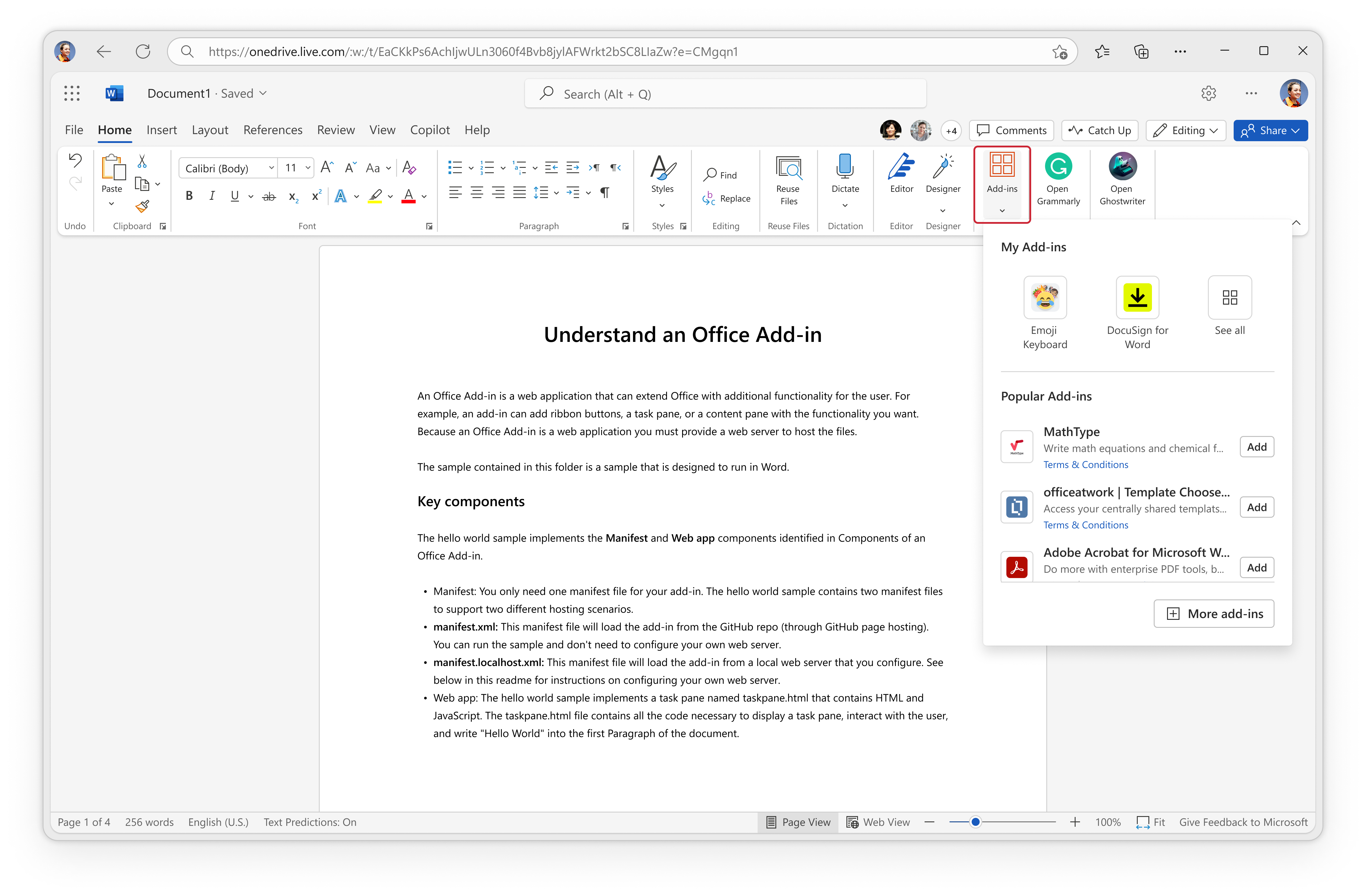
We’re excited to announce that a more easy-to-access entry point for Office Add-ins is now available online. By accessing the new entry point in Word, Excel, and PowerPoint, you’ll have an upgraded experience without worrying about managing all your add-ins or choosing the fit right add-in among the thousands available in AppSource and the Office marketplace.
Quickly find Office Add-ins
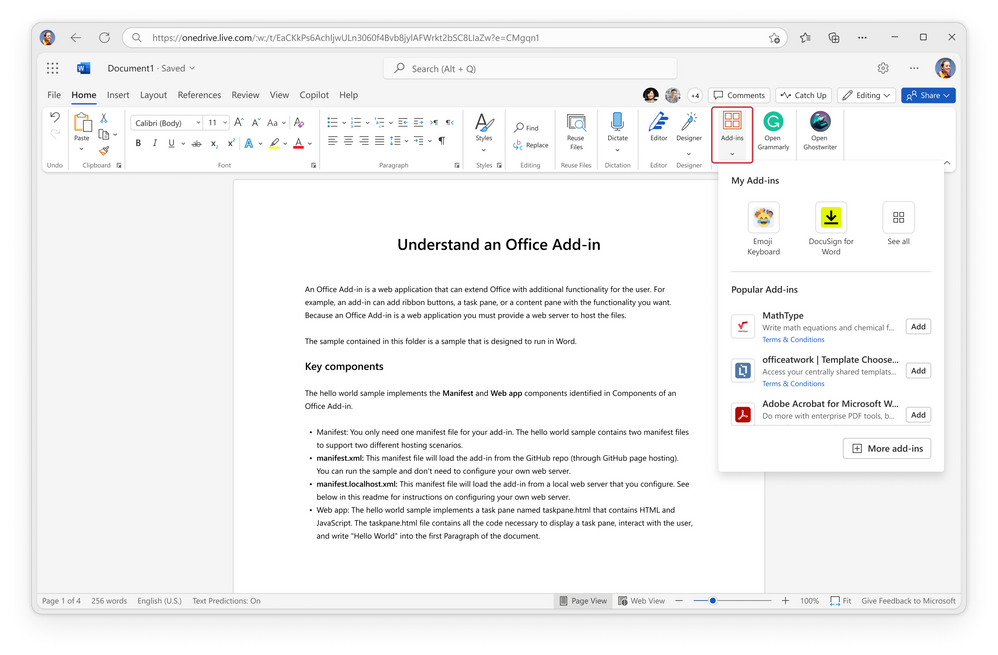
If you already use Word, Excel, and PowerPoint add-ins, the entry point has moved! Now you can find and activate your installed add-ins in two locations, on the Home tab and File tab. On the Find tab, your installed add-ins are shown in the top section under My Add-ins for quick access. You can still find and use the add-ins you’ve previously pinned to the ribbon, as shown in the following image.
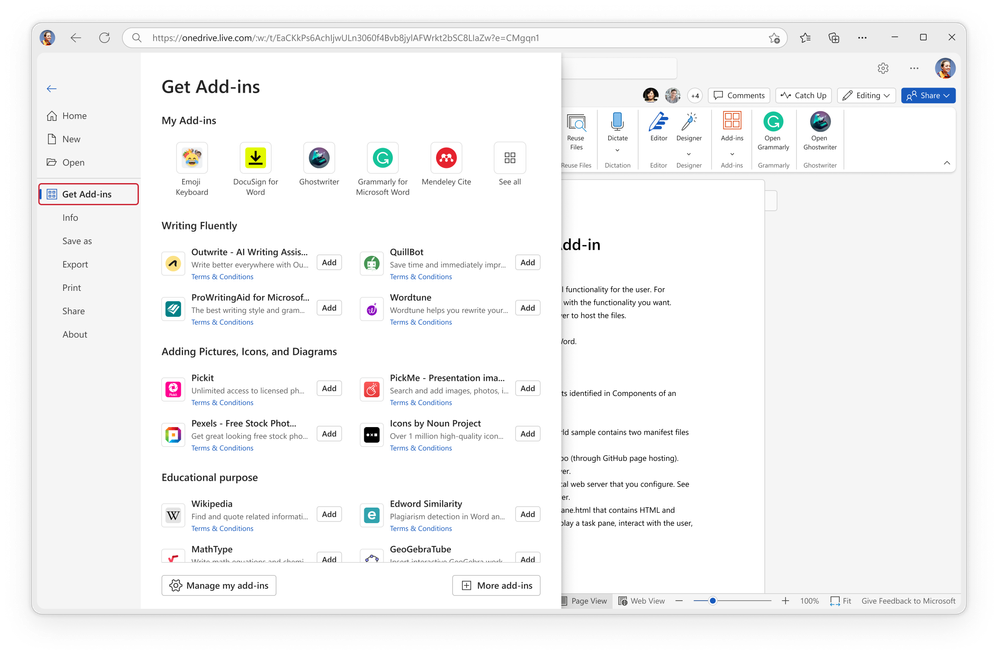
You can also find the Word, Excel, PowerPoint Get Add-ins entry point on the File tab as shown in the following image.
Explore popular add-ins easily
If you've never used any Word, Excel, and PowerPoint add-ins before, no problem! The new recommendation mechanism provides targeted, expert help no matter which application you use.
For each application, you’ll see several hot topics that people usually face under different scenarios. By clicking the Add button next to each add-in, you can quickly install and activate popular add-ins in less than a minute.
You may wonder how add-ins chosen, right?
We aim to provide users with the best possible experience by making fair adjustments to the order of add-ins in the listings. This is achieved by considering the following criteria.
- Add-in quality: We prioritize add-ins with high-quality user experience and content, as measured by add-in rating, add-in user reviews, first-run experience (FRE), free trial feature, and so on.
- User engagement: We give prominence to popular and well-received add-ins to facilitate easy discovery and access, based on your recent and historical data. We evaluate monthly usage, number of downloads, admin deployment numbers, retention rate, and so on.
- Security and performance: We encourage developers to prioritize regular updates for their add-ins to ensure app security, optimize performance, and enhance the overall user experience.
- Compliance: Add-ins must adhere to Microsoft Add-in Store policies and guidelines and ensure that safety, privacy, and content standards are met.
Search and explore more
If at first you don’t find the add-in to suit your needs, we encourage you to explore and search apps in the marketplace. Simply select More Add-ins to browse thousands of add-ins in over 20+ categories.
Availability
This feature is available to all Word, Excel, and PowerPoint for web and Win32 users.
Don’t have it yet? It’s probably us, not you.
Features are released over some time to ensure things are working smoothly. We highlight features that you may not have because they’re slowly releasing to larger numbers of Insiders. Sometimes we remove elements to further improve them based on your feedback.
Want to build Word, Excel, or PowerPoint add-ins?
If you’re interested in building a Word, Excel, or PowerPoint add-in and allow users from all over the world to use it, simply out the Microsoft Office Add-ins registration form to consult with our team.
Find more developer resources
Microsoft 365 App Compliance Program
Microsoft 365 Developer Program
Published on:
Learn moreRelated posts
Announcing the General Availability of the Microsoft 365 Document Collaboration Partner Program
Empowering Seamless Collaboration for Modern Workforces We are thrilled to announce the general availability of the Microsoft 365 Docume...
Favorite Copilot Prompts
(Amber Plumb interviewing Michael Morales and Allison Sweet) The power of M365 Copilot is transforming the way our support team operates...
Favorite Microsoft 365 Copilot Prompts
(Amber Plumb interviewing Michael Morales and Allison Sweet) The power of M365 Copilot is transforming the way our support team operates...
Boost digital event engagement with Voting and Archiving in Teams Q&A
Managing and delivering effective town halls is key to enabling two-way dialogue with leaders in today’s hybrid world. Microsoft Teams Q&A...
Prepare now for key end of support moments in 2025
One year from today, on October 14, 2025, support will end for all Office 2016 and 2019 suites, standalone apps, and servers. This includes:&n...
Everything you should know about Visio 2016 and Visio 2019 end of support
On October 14, 2025, Visio 2016 and Visio 2019 will reach end of support. After this date, Visio 2016 and Visio 2019 will no longer receive se...
Limit frontline worker access to Teams when off shift
We’re excited to announce that the frontline working time feature is now generally available! This feature allows admins to block or warn acce...
We are removing Feed on Microsoft 365 (Office)
As part of our ongoing efforts to streamline and enhance user experiences, we will be retiring the Feed feature (shown in figure 1 below) on t...
Leveraging Partner Apps to Deliver on the Promise of AI-Led Productivity
The advent of generative AI is driving a rethink of what outcomes we deserve from our productivity software – from gains in efficiency to more...
What’s new in FLW shared devices
Discover the Latest Enhancements in Shared Device Mode (SDM) We are excited to announce a series of new features in Shared Device Mode ...