
[Eventhub] How to receive diagnostic log from Storage Accounts on different Subscriptions to EH
![[Eventhub] How to receive diagnostic log from Storage Accounts on different Subscriptions to EH](https://techcommunity.microsoft.com/t5/image/serverpage/image-id/507970i269A7F8ACB932FCF/image-size/original?v=v2&px=-1 "[Eventhub] How to receive diagnostic log from Storage Accounts on different Subscriptions to EH")
In Storage Account, you can set diagnostic log to EventHub. However, did you ever wonder if you could have a centralized EventHub to take care of these logs? Instead of having multiple EventHubs across each Subscription within the same Management Group? In this article, it will explain to you how to centralize your EventHub.
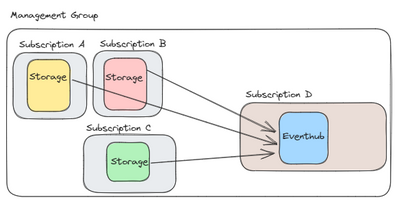
I. What is the required Permission configuration?
Before reading through this article, be sure to have multiple subscriptions. As this will not explain the steps to add subscriptions to your Management Group. This article is based on the fact that you already have more than one subscription under your Management Group. However, if you still some help with adding a subscription, please visit this link.
Now, let’s get this started. Before setting up anything from the Storage Account side, you must provide the roles from the Subscription side.
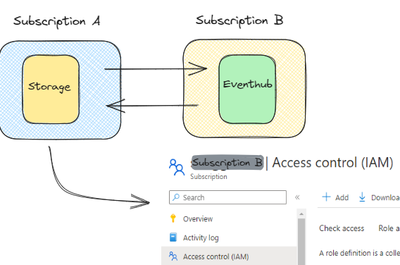
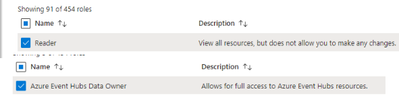
The roles that are needed are Reader and Event Hub Data Owner. These roles must be configured from Subscription B for Subscription A to have access to the EventHub located in Subscription B.
For those, who needs to know how to add the role, please check this link.
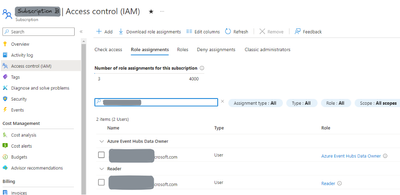
For testing purposes, I have assigned it to a user. At the end, it will look like below. It could take a maximum of 10 minutes for the Access Control (IAM) to settle in.
II. Let’s validate our configuration
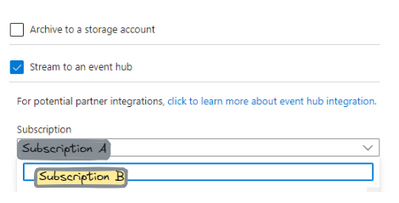
Go back to your Subscription A’s Storage Account and go to Monitoring > Diagnostic Settings and add a new diagnostic setting. From there you need to enable Stream to an EventHub, and you can find Subscription B from the drop box.
From there, choose the EventHub from Subscription B. Once that is done name your diagnostic settings and save it!
III. What are the limitations?
Unfortunately, there are a few limitations to this. The event hub namespace needs to be in the same region as the resource being monitored if the resource is regional.
Diagnostic settings can't access Event Hubs resources when virtual networks are enabled. You must enable ‘Allow trusted Microsoft services’ to bypass this firewall setting in Event Hubs so that the Azure Monitor diagnostic settings service is granted access to your Event Hubs resources.
Lastly, if your tenant ID is different, then this will not work. It must be under the same tenant ID.
For more information on the limitation, please visit this link.
IV. Conclusion
Hope I was able to provide the answer you were looking for. There will be pros and cons to having a centralized EventHub. However, this article will not decide which is better, since that is not the objective of this article. The objective is to show you how to configure it and let you test if this is the best solution for you.
Published on:
Learn moreRelated posts
Azure Storage - TLS 1.0 and 1.1 retirement
Overview TLS 1.0 and 1.1 retirement on Azure Storage was previously announced for Nov 1st, 2024, and it was postponed recently to 1 year later...
Efficient Management of Append and Page Blobs Using Azure Storage Actions
Overview In Azure Storage, Blob Lifecycle Management (BLM) allows you to automate the management of your data based on rules defined by...
[Azure AI Search] Internal Server Error when creating CMK encrypted objects
Scenario Customers follow the Microsoft doc to create CMK encrypted objects (data source, index etc.), but get the 500 Internal Serv...
Optimizing Azure Table Storage: Automated Data Cleanup using a PowerShell script with Azure Automate
Scenario This blog’s aim is to manage Table Storage data efficiently. Imagine you have a large Azure Table Storage that accumulates logs from ...
Optimizing Azure Table Storage: Automated Data Clean-up using a PowerShell script with Azure Automat
Scenario This blog’s aim is to manage Table Storage data efficiently. Imagine you have a large Azure Table Storage that accumulates logs from ...
Restoring Soft-Deleted Blobs with multithreading in Azure Storage Using C#
Blob soft delete is an essential feature that safeguards your data against accidental deletions or overwrites. By retaining deleted data for a...
Performing simple Azure Table Storage REST API operations using curl command.
The blog provides guidance to perform simple Table Storage REST API operations such as Create table, Delete Table, Insert entity, Delete entit...
Bulk delete all the old jobs from the batch account
Deleting a Job also deletes all Tasks that are part of that Job, and all Job statistics. This also overrides the retention period for Task dat...
Utilizing Azure Storage and Runbooks for scheduled automated backups of Azure SQL Databases
In this article, we are going to provide detailed steps to create a scheduled Azure SQL Database backup to storage account using automation. T...
[Azure Service Bus] JMS messages getting dead-lettered
The article discusses a problem where numerous messages end up in the dead letter queue (DLQ) when the JMS service bus consumer connects to th...