
Trigger Condition and Evaluation Workflow of Azure Policy

There are many scenarios in which users encountered some policy unexpected behaviors because they do not understand policy workflow and designed the incorrect custom policy definition.
This blog will introduce the following three parts in detail.
- When the policy will be triggered and evaluate the target resources
- The essence of checking request payload
- Resource types and segments in policy definition
When the policy will be triggered and evaluate the target resources
There are multiple scenarios that the policy can be triggered and the documentation concludes all the scenarios. The following content illustrates part of scenarios and mainly introduces that the policy will evaluate the resources in two distinct but interrelated parts.
- Policy enforcement
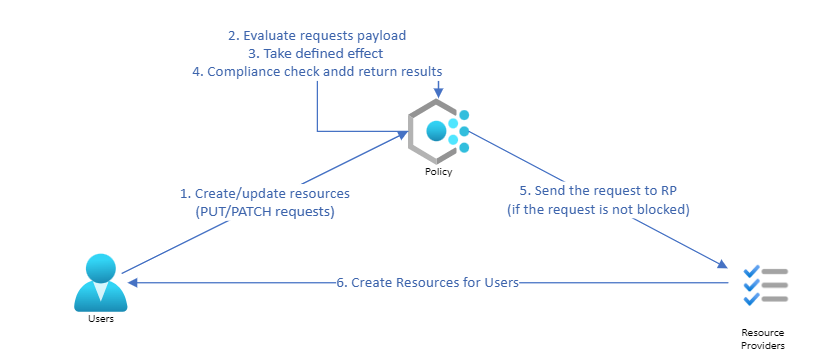
When users create a new resource or update an existing resource, PUT/PATCH requests will be sent to the backend and related policies will be triggered. The policy engine will check the request payload that is sent to it. The policy engine will compare this received payload with the policy rules and take actions according to the policy effect.
- Compliance Scan
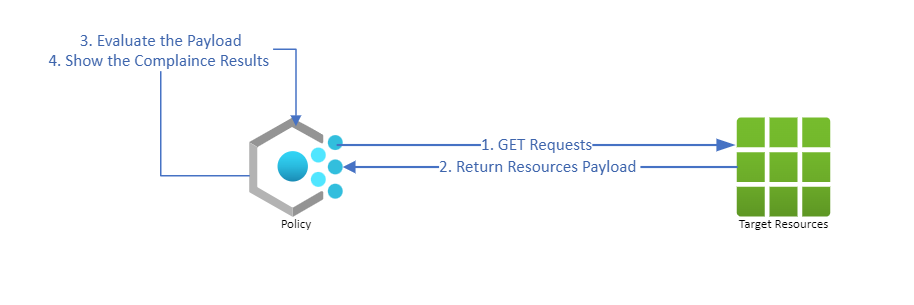
The Azure policy will use GET REST API to get existing resources and compare the payload with policy rules. The policy will evaluate resources and show the compliance status when- Every 24 hours
The Azure policy will automatically check existing target resources every 24 hours. After completing the compliance scan, the resources compliance status will be updated. - Manually trigger to do the policy evaluation by users
Users can manually trigger the compliance check by commands.
Get policy compliance data - Azure Policy | Microsoft Docs - The compliance results are returned after the compliance check so it is always triggered after the policy enforcement part mentioned above.
For the DeployIfNotExist(DINE) policy effect, the compliance check will be triggered when the policy completes deploying the ARM template specified in the policy definition.
- Every 24 hours
The essence of checking request payload
The Azure policy will check the request payload and compare it with the policy definition and then decide the next action. The following part will explain how the policy with different effects evaluates resources by the simplified workflow sample.
- For creating or updating resources
- For the Deny and Audit effect, the policy engine will only check the payload but not change the payload content. After checking this payload, the policy will take the policy definition specified effect and give back the evaluated compliance results.
- For the Append and Modify effect, the policy will update the request payload according to the policy if the payload does not satisfy the policy requirements and then give back the evaluated compliance results.
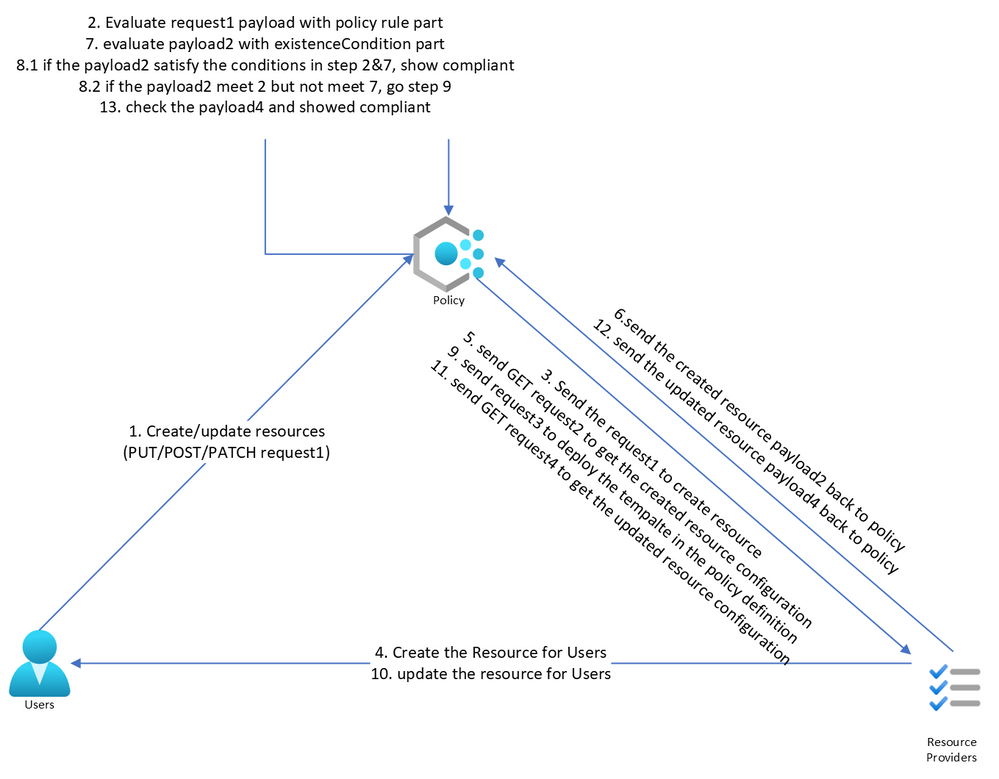
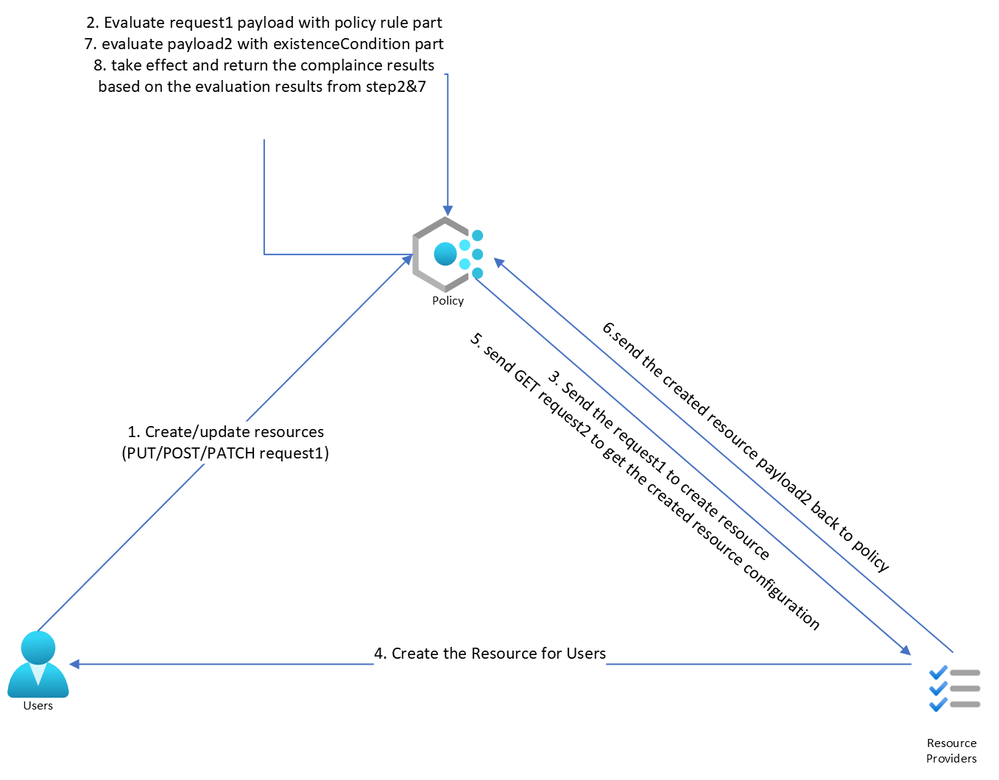
- For the DeployIfNotExist and AuditIfNotExist effect, the policy will allow the request to be sent to Resource Provider (RP) if the request satisfies all the requirements specified in the "if” condition part. RP will create this resource and then the policy will send another GET request to find the resource mentioned in the “existenceCondition” type and compare it with “existenceCondition” rules. If the GET request payload does not comply with the “existenceCondition”,
- For the DINE policy, the policy engine will trigger the template deployment. Hence, there will always be some delay when the required template is deployed after the resource is created. After the deployment is completed, the policy will check the resources again and return the compliance results.
- For AINE policy, it adds a Microsoft.Authorization/policies/audit/action operation to the activity log and marks the resource as non-compliant.
- For the DINE policy, the policy engine will trigger the template deployment. Hence, there will always be some delay when the required template is deployed after the resource is created. After the deployment is completed, the policy will check the resources again and return the compliance results.
- For the Deny and Audit effect, the policy engine will only check the payload but not change the payload content. After checking this payload, the policy will take the policy definition specified effect and give back the evaluated compliance results.

- For existing resources
For any effects, the policy will not change the existing resource unless users create remediation tasks or update the resource. The policy engine will send a GET REST API request to existing resources to collect all the target resources payload (API response), evaluate the payload and return the compliance status.
Resource Types and Segments in policy definition
For the Azure Policy with most effects (except the AINE and DINE), the policyRule part only can check the properties that returned from the same request payload. But for the AINE /DINE policies, since the policy can send another separate request when it checks the existenceCondition part, these kinds of policies can check the resource with different resource types or hierarchies.
If users put the properties belonging to different requests’ payload inside the “if” part together, the policy may not be able to scan any target resources and may also show other unexpected behaviors. The following example will help to explain in detail.
If users want to check whether a function app is configured the TLS with version 1.2, according to the function application exported template, we understand that the following 3 conditions need to be checked.
- {"field": "type", "equals": "Microsoft.Web/sites"},
- {"field": "kind", "like": "functionapp*"}
- {"field": "Microsoft.Web/sites/config/web.minTlsVersion", "equals": "1.2"}
But these three conditions cannot be checked inside the policy rule part together, since the “functionapp” kind is included in the following request payload.
Web Apps - Get - REST API (Azure App Service) | Microsoft Docs
But the “Microsoft.Web/sites/config/web.minTlsVersion” is included in the following request payload.
Web Apps - Get Configuration - REST API (Azure App Service) | Microsoft Docs
Since the existenceCondition used for the DeployIfNotExist/AuditIfNotExist effect can send another GET request and get the payload to further check, then the above 3 conditions can be checked in the same policy definition. Users can set the minTlsVersion condition in the existenceCondition part in the DeployIfNotExist/AuditIfNotExist effect policy as following policy definition.
azure-policy/AppService_FunctionApp_Audit_Tls_Ver.json at f2706e05bccaac0a7410f8613107a6ee3bd88afd · Azure/azure-policy · GitHub
Published on:
Learn moreRelated posts
Azure Storage - TLS 1.0 and 1.1 retirement
Overview TLS 1.0 and 1.1 retirement on Azure Storage was previously announced for Nov 1st, 2024, and it was postponed recently to 1 year later...
Efficient Management of Append and Page Blobs Using Azure Storage Actions
Overview In Azure Storage, Blob Lifecycle Management (BLM) allows you to automate the management of your data based on rules defined by...
[Azure AI Search] Internal Server Error when creating CMK encrypted objects
Scenario Customers follow the Microsoft doc to create CMK encrypted objects (data source, index etc.), but get the 500 Internal Serv...
Optimizing Azure Table Storage: Automated Data Cleanup using a PowerShell script with Azure Automate
Scenario This blog’s aim is to manage Table Storage data efficiently. Imagine you have a large Azure Table Storage that accumulates logs from ...
Optimizing Azure Table Storage: Automated Data Clean-up using a PowerShell script with Azure Automat
Scenario This blog’s aim is to manage Table Storage data efficiently. Imagine you have a large Azure Table Storage that accumulates logs from ...
Restoring Soft-Deleted Blobs with multithreading in Azure Storage Using C#
Blob soft delete is an essential feature that safeguards your data against accidental deletions or overwrites. By retaining deleted data for a...
Performing simple Azure Table Storage REST API operations using curl command.
The blog provides guidance to perform simple Table Storage REST API operations such as Create table, Delete Table, Insert entity, Delete entit...
Bulk delete all the old jobs from the batch account
Deleting a Job also deletes all Tasks that are part of that Job, and all Job statistics. This also overrides the retention period for Task dat...
Utilizing Azure Storage and Runbooks for scheduled automated backups of Azure SQL Databases
In this article, we are going to provide detailed steps to create a scheduled Azure SQL Database backup to storage account using automation. T...
[Azure Service Bus] JMS messages getting dead-lettered
The article discusses a problem where numerous messages end up in the dead letter queue (DLQ) when the JMS service bus consumer connects to th...