
New Managed Rule Set on Azure WAF for Front Door Premium

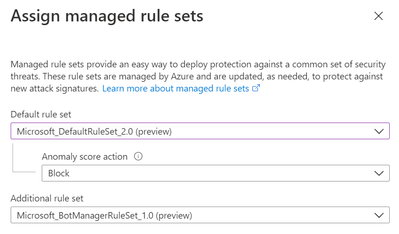
A new managed rule set called Microsoft_DefaultRuleSet_2.0 has been launched in public preview on Azure Web Application Firewall (WAF) for Front Door Premium. To simplify, we often refer to this rule set as DRS 2.0.
The new managed rule set offers enhanced rule definitions to help reduce false positives, additional managed rules to detect and protect against more web application attacks, anomaly scoring mode and support for additional content-types.
What are the requirements to use DRS 2.0?
You must be using Azure Front Door Premium SKU*.
*Note: Azure Front Door Premium (which includes DRS 2.0) is currently in Public Preview status. We do not recommend using this version on production workloads until it becomes Generally Available (GA). This is a great time to invest in a proof of concept or testing, though.
What changes when using DRS 2.0?
DRS 2.0 introduces updated rule definitions, Microsoft Threat Intelligence rules, anomaly scoring mode, and additional content-type support.
Let's talk a little more about each one of these items:
Updated Rule Definitions
Our managed rules that protect against the most common web application attacks, such as the OWASP Top 10, are based on OWASP ModSecurity Core Rule Set (CRS). In DRS 2.0, the definitions were updated based on version CRS 3.2.
CRS 3.2 has several improvements in comparison to the previous CRS versions. Multiple security rules have received fixes that help lower the occurrence of false positives, and new security rules have been added to detect and protect against more threats, such as new types of Cross-Site Scripting (XSS) and SQL Injection (SQLi) attacks.
For more detailed information on what changed from CRS 3.1 to CRS 3.2, you can refer to the OWASP ModSecurity Core Rule Set Version 3.2.0 change log.

Microsoft Threat Intelligence Rules
We have added our own Microsoft-authored security rules. These rules were created by the Microsoft Threat Intelligence Center (MSTIC) team based on signatures developed internally and are not open-sourced.

Anomaly Scoring Mode
Previous versions of the managed rule sets in Azure WAF for Front Door follow the “Traditional Mode” for threat response. This means that as soon as an HTTP request matches a rule, the WAF takes the configured action (allow, block, log, or redirect) and no further rules are processed. It has a binary "match-or-not-match" approach. This mode is easy to understand, but it lacks information about how many rules a specific HTTP request would match.
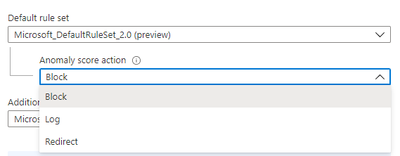
In DRS 2.0, the Azure WAF runs in “Anomaly Scoring Mode”. This means that an HTTP request gets inspected by all rules in the rule set, each rule has a specific severity level, and points are assigned based on the criticality of each rule. The WAF adds up these points, and if they reach the anomaly scoring threshold, then the WAF takes the configured action (block, log, or redirect.
Anomaly Scoring Mode allows analysts and administrators to get a holistic view of the attack, as the WAF will log all matches for a single HTTP request. It also helps improve the rates of false positives because it blocks requests based on severity levels and anomaly thresholds, instead of a simpler binary approach.
Additional Content-Type Support
DRS 2.0 supports additional Content-Types for HTTP request body inspection. Azure WAF for Front Door can inspect HTTP request body sizes up to 128KB. If requests are larger than 128KB, the WAF will stop inspection at that limit mark.
The supported Content-Types when using the DRS 2.0 managed rule set are:
- application/json
- application/xml
- application/x-www-form-urlencoded
- multipart/form-data
Published on:
Learn moreRelated posts
IPv6 Adoption: Enhancing Azure WAF on Front Door
The transition to IPv6 is a significant step for enterprise corporations, reflecting the evolution of internet technology and the need for a l...
Azure WAF’s Bot Manager 1.1 and JavaScript Challenge (Preview): Navigating the Bot Threat Terrain
Introduction Bots are a common presence on the internet, serving a range of functions from automating customer service to indexing page...
Private IP DNAT Support (Preview) and Scenarios with Azure Firewall
Introduction Azure Firewall is a cloud native security service to protect your workloads running in Azure. It is a stateful firewall as a serv...
Getting Started with Azure DDoS Protection REST API: A Step-by-Step Guide
REST API is a cornerstone in the management of resources on Azure, providing a streamlined and efficient approach for executing create, read, ...
Monitoring Azure DDoS Protection Mitigation Triggers
Monitoring Azure DDoS Protection Mitigation Triggers In today’s digital landscape, Distributed Denial of Service (DDoS) attacks pose a signifi...
Azure WAF’s Bot Manager 1.1 and JavaScript Challenge: Navigating the Bot Threat Terrain
Introduction Bots are a common presence on the internet, serving a range of functions from automating customer service to indexing page...
Utilizing Azure DDoS Protection Workbook for DDoS attack traffic Analysis
In today's digital age, the security of applications, servers, and networks is paramount. One of the most significant threats to this security...
Independent Configuration of Size Enforcement and Inspection Limits in Application Gateway WAF
Introduction In the constantly changing world of cybersecurity, both flexibility and effective security are essential for safeguarding ...
Private IP DNAT Support and Scenarios with Azure Firewall
Introduction Azure Firewall is a cloud native security service to protect your workloads running in Azure. It is a stateful firewall as a serv...
Monitoring traffic flows in Azure Firewall using Virtual Network Flow Logs
Azure Firewall is a managed service designed to protect your Azure Virtual Network resources, providing advanced threat protection and advance...