
UI Library updates for simpler meetings, accessibility, pinch-to-zoom and more

We are very excited to release new capabilities for developers using the Azure Communication Services UI Library.
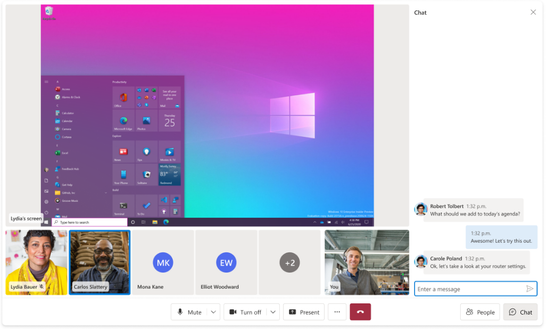
For the Web UI Library, the GA (General Availability) release of a new composite, Call with Chat , that enables developers to easily integrate a joint communication experience for calling and chat.
For the Mobile UI Library, the release includes a cumulative update to our public preview; in this new version, we introduce localization, screen shared content with zooming, and several enhancements to the calling experience.
These releases contain several improvements and new features that will help you as a team to achieve more in less time and add extra value to your communication application. Please take a moment to review those features and provide any feedback; you can visit the GitHub repositories to get more details:
- Azure/communication-ui-library: UI Library for Azure Communication Services helps developers build communication applications with ease. From turn-key composites to UI components that can be composited together. (github.com)
- Azure/communication-ui-library-android (github.com)
- Azure/communication-ui-library-ios (github.com)
Web UI Library
Call with Chat Composite
This new composite, bring together call and chat capabilities inside a unified component. It has been designed from the ground up to ensure a great experience when using these two capabilities together. It features support for Teams interoperability, making it easier to provide a full experience to users who are joining a Teams meeting where the rest of the participants will have voice, video, and chat capabilities. Learn more about it on our documentation.
Mobile UI Library
View screen shared content & perform pinch to zoom.
Now, any calling participant will be capable of viewing the shared content when other participant shares their screen during the call. Participants can zoom into the shared content, using a pinch gesture over the screen to get a better look at the shared content.
Localization.
Localization is a key to making products that can be used across the world. The Mobile UI Library now provides support for 13 languages out of the box (English, Spanish, French, German, Italian, Japanese, Korean, Dutch, Portuguese, Russian, Turkish and Chinese) and RTL (Right to Left) capabilities. Please share feedback for additional required languages. You can learn more about it on “How to add localization in your app”.
Accessibility.
Accessibility by design is a principle across Microsoft products. UI Library follows this principle in making sure that all UI Components are fully accessible. This release includes improvements to move towards compliance with Microsoft accessibility standards. Further improvements are planned for upcoming releases.
Enhance the full experience & bug fixing
Incorporated enhancements into the calling experience, adding UI/UX polish experience and new capabilities, like audio device selection, so at the beginning of the call, users can join the calling experience using the audio hardware they prefer, whether it's a Bluetooth speaker or a wired headphone will be listed, and you can set the device configuration.
How to provide quick feedback, comments, or report bugs?
Please use the UI SDK channel to file bugs, provide feedback or ask questions. We as a Mobile UI team will be keeping a close eye on this. Or drop a comment on our public GitHub repositories:
- Azure/communication-ui-library: UI Library for Azure Communication Services helps developers build communication applications with ease. From turn-key composites to UI components that can be composited together. (github.com)
- Azure/communication-ui-library-android (github.com)
- Azure/communication-ui-library-ios (github.com)
Thank you!
Published on:
Learn moreWe can help you with UI Library updates for simpler meetings, accessibility, pinch-to-zoom and more
If you want help implementing, troubleshooting, or improving this product, contact us and we’ll point you in the right direction.
Related posts
Azure Communication Services Ideas Board: Share your feedback with the product team
Innovation is not a solitary pursuit, and we recognize that some of the best ideas come from you, our Azure Communication Services community. ...
Engage with the Azure Community Services Ideas Board: Your Voice Matters
Innovation is not a solitary pursuit, and we recognize that some of the best ideas come from you, our Azure Communication Services community. ...
Part 2 - Multichannel notification system using Azure Communication Services and Azure Functions
In the first part of this topic, we setup all the Azure resources like the Azure Communication Services for Email, SMS, WhatsApp for...
Part 1 - Multichannel Notification System with Azure Communication Services and Azure Functions
In the interconnected digital era, it's crucial for businesses and services to communicate effectively with their audience. A robust notificat...
Building a WhatsApp AI bot for customer support
Building a WhatsApp AI Bot for customer support In this blog post, we’ll explore how to build a customer support application that integ...
Azure Communication Services September 2024 Feature Updates
The Azure Communication Services team is excited to share several new product and feature updates released in August 2024. (You can view previ...
Azure Communication Services at the DEVIntersection Conference
Join us for the DEVintersection Conference from September 10 to 12, 2024, in Las Vegas, Nevada. This event gathers technology enthusiasts from...
Azure Communication Services June 2024 Feature Updates
Data Retention with Chat threads Developers can now create chat threads with a retention policy between 30 and 90 days. This feat...
Azure Communication Services August 2024 Feature Updates
The Azure Communication Services team is excited to share several new product and feature updates released in July 2024. (You can view previou...
Anywhere365 integrates Azure Communication Services into their Dialogue Cloud Platform
Every day, companies aim to help their customers realize the most value from their products and services. They do this by providing ef...