
Announcing Collaboration Security for Microsoft Teams
Since 2020, remote work has fundamentally changed the way organizations operate. 66% of businesses worldwide now rely on a hybrid work model, and as a result adoption of collaboration platforms like Microsoft Teams have surged. Today, 270 million users use Teams to communicate and be productive, making it indispensable to effective collaboration.
However, the growing number of users has also made a new target for adversaries trying to gain access to an organizations’ sensitive data and operations. Attacks like phishing and ransomware that for decades have primarily used email as an entry point, are now also targeting users on collaboration tools with growing frequency.
To help organizations defend against these emerging cyber-attacks, we are excited to announce the public preview of Collaboration Security for Microsoft Teams. If you are a customer of Microsoft E5, Microsoft E5 Security, or Microsoft Defender for Office 365 you can take advantage of this new capability immediately and improve the security of your Microsoft Teams.
End-to-end protection for Microsoft Teams
With 71% of companies admitting that sensitive and business-critical data is regularly shared via collaboration tools like Microsoft Teams, organizations are increasingly realizing the need to make collaboration security an integral part of their overall SOC strategy. That’s why we are bringing the full feature set that customers use to protect their email environments across prevention, detection, and response to Microsoft Teams. In addition, we are introducing capabilities to help build cybersecurity awareness and resilience for end users.
All collaboration security capabilities will be integrated in the unified security operations (SecOps) experience of Microsoft 365 Defender - an industry leading Extended Detection and Response (XDR) solution, where all signals and alerts will be correlated across other domains including endpoints, identities, email, DLP, and SaaS apps.
For further information, check out the Collaboration Security for Teams launch video here.
Let’s break down the new capabilities.
Enhanced visibility into the attack landscape through end-user reporting
To prevent end users in Microsoft Teams from phishing attacks, we introduced “Safe Links” for Teams back in 2021, which scans URLs that are shared in Teams conversations, group chats, or Teams channels for potentially malicious content at time-of-click to prevent users from accessing malicious websites.
Now we are taking message protection to the next level by giving users the ability to report suspicious messages directly in Teams - similar to what they do today in Microsoft Outlook to report suspicious emails. The security team will be alerted whenever users report suspicious messages and can view them in the Microsoft 365 Defender portal.
Going forward, all user submissions will also be compiled into an auto-generated investigation suspicious URL clicks, giving SOC teams an even more efficient experience to review these suspicious messages and respond faster.

Figure 1: Recipient view where message can be reported
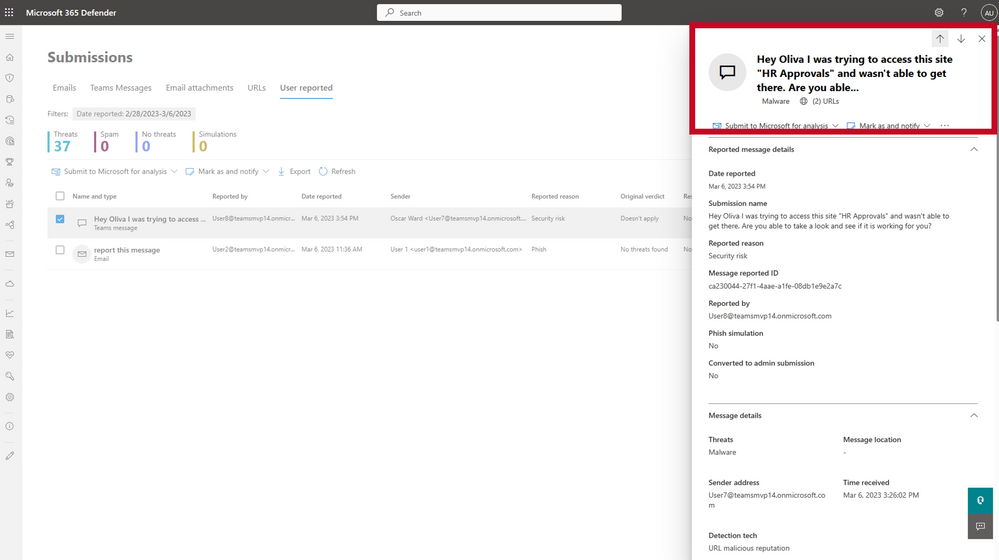
Figure 2: Admin view of the reported message
Speed up your response with post-delivery auto-purge of malicious messages and attachments
For advanced attacks that can spread quickly through an organization, the speed at which SecOps teams can respond is mission critical. For a faster response and automatic action, we are bringing zero auto purge (ZAP) to Microsoft Teams, which protects end-users by analyzing messages post-delivery and automatically quarantines messages that contain malicious content to stop the actor from compromising the account. The power of this capability lies in the holistic approach – once a malicious message is identified, the entire Teams environment will be scanned for that same indicator of compromise and quarantine relevant messages at scale for more effective protection.
While the default configuration for ZAP is to move all malicious messages into quarantine, where SOC teams can analyze them further and decide on next steps, the policy can be easily tailored to suit an organization’s preferred action and workflows.
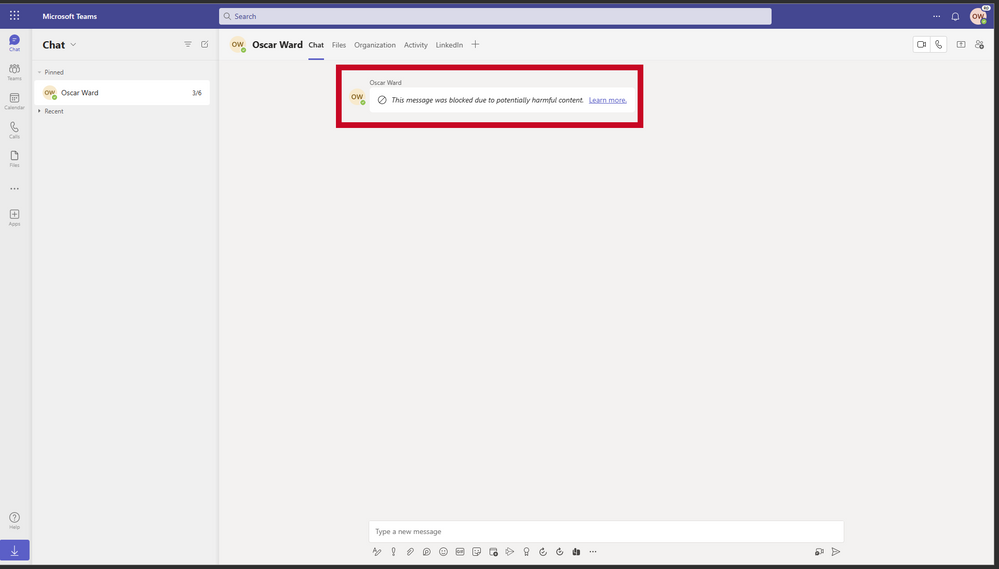
Figure 3: Zero auto purge (ZAP) instantly quarantining a message.
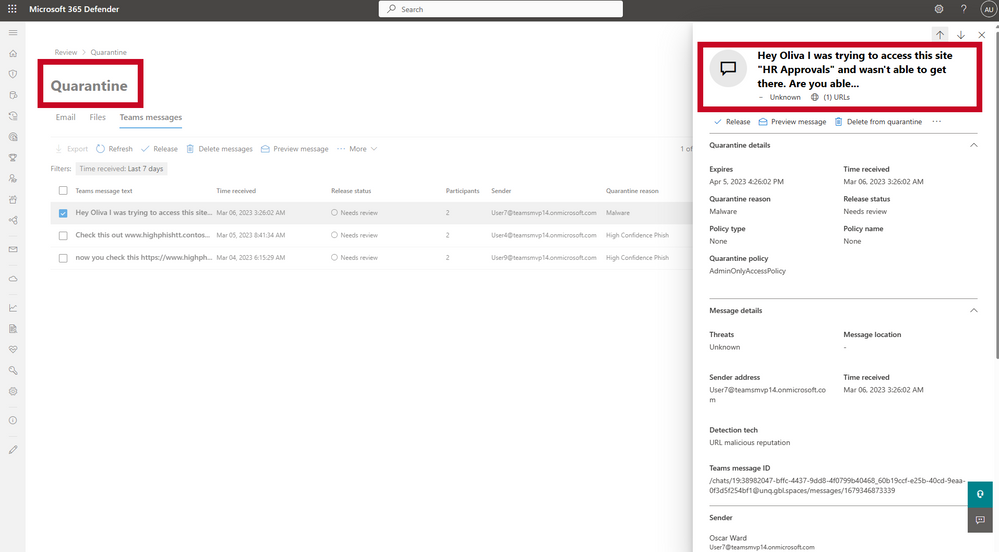
Figure 4: Admin View of Purge to Quarantine
Proactively hunt for threats in Microsoft Teams with advanced hunting
To enable SecOps with proactive tools to hunt for threats Microsoft is also adding to the existing advanced hunting features in Microsoft 365 Defender to support security for Teams. Advanced hunting is a query-based threat hunting tool that lets you explore up to 30 days of raw data. You can proactively inspect events within Teams to locate threat indicators and entities with custom queries using KQL, or by using the query builder for a guided hunting experience. Flexible access to data enables SecOps teams to hunt across and correlate data from email, endpoints, identities, SaaS apps, and DLP, enabling unconstrained hunting for both known and potential threats in a single, unified query.

Build end user resilience against phishing attacks in Microsoft Teams
At Microsoft, we know firsthand that an effective security strategy requires active engagement from end-users from day one. That’s why we are including attack simulation and training tools to promote education, awareness, and risk assessment for users of Microsoft Teams. To further enhance the effectiveness of these tools, security teams are provided with advanced analytics and insights on the most common types of attacks seen in your organization’s Microsoft Teams environment and can customize simulations and training to address specific knowledge gaps.
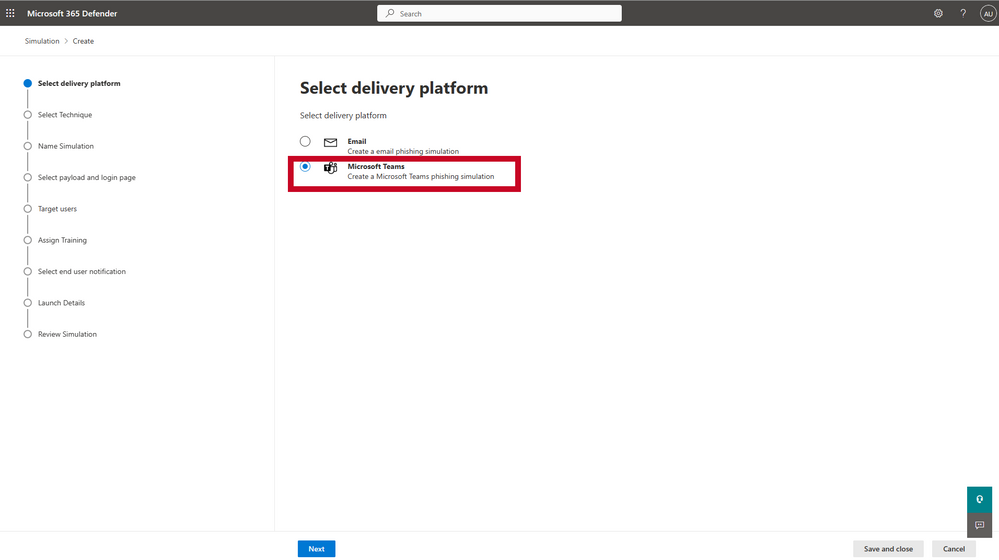
Figure 5: Attack Simulation Training
Protect against sophisticated attacks XDR
Collaboration security is part of Microsoft 365 Defender – a leading Extended Detection and Response (XDR) solution, which helps protect your organization more effectively from ransomware and other advanced threats in a unified experience. Microsoft 365 Defender correlates native signals across multi-platform endpoints, hybrid identities, email, as well as SaaS apps and DLP insights to provide a unified view of the kill chain. This deep context allows SOC teams to investigate and respond at the incident level, making prioritization easy and remediation faster. Soon, all new collaboration security events and alerts will be integrated into the same incident experience.
We are excited to bring collaboration security into the XDR SOC experience in Microsoft 365 Defender and help defenders protect their Microsoft Teams environment from emerging threats with end-to-end prevention, detection, and protection capabilities - so that organizations can continue to collaborate with confidence.
Learn more:
- Visit our website to learn more about Microsoft Defender for Office 365
- Ready to get started with Collaboration security? Check out our documentation.
- Not using Defender for Office 365, yet? Start a free trial.
- Want to know more about Microsoft’s XDR solution? Start here.
Published on:
Learn moreRelated posts
Monthly news - November 2024
Microsoft Defender XDRMonthly newsNovember 2024 Edition This is our monthly "What's new" blog post, summarizing product updates and v...
Monthly news - August 2024
Microsoft Defender XDRMonthly newsAugust 2024 Edition This is our monthly "What's new" blog post, summarizing product updates and var...
Defender for Identity: the critical role of identities in automatic attack disruption
In today's digital landscape, cyber-threats are becoming increasingly sophisticated and frequent. Advanced attacks are often multi-workload an...
New Security Copilot skill: Identity Summary
“Can you summarize Defender insights about this user over the last two days?” Microsoft’s latest innovation for Copilot for Security, sim...
Demystify potential data leaks with Insider Risk Management insights in Defender XDR
In today's complex security landscape, understanding and mitigating data exfiltration risks is more critical than ever. Earlier this year, we ...
Monthly news - October 2024
Microsoft Defender XDRMonthly newsOctober 2024 Edition This is our monthly "What's new" blog post, summarizing product updates and va...
AI-Driven Guided Response for SOCs with Microsoft Copilot for Security
In today's evolving cybersecurity landscape, security operation centers (SOCs) are constantly bombarded with incidents ranging from minor aler...
Identity Summary: New Security Copilot skill within Defender XDR
“Can you summarize Defender insights about this user over the last two days?” Microsoft’s latest innovation for Copilot for Security, sim...
Detecting browser anomalies to disrupt attacks early
Detecting browser anomalies is crucial for early identification and prevention of cyber threats, preventing data breaches and attacks by monit...
Microsoft Defender for Identity: the critical role of identities in automatic attack disruption
In today's digital landscape, cyber-threats are becoming increasingly sophisticated and frequent. Advanced attacks are often multi-workload an...