
Security Baseline recommendations now available in Office Cloud Policy Service

We are pleased to announce a new feature in the Office Cloud Policy Service that will allow you to easily find and configure policies that are recommended by Microsoft as security baseline policies. If you are not familiar with Microsoft Office Security Baselines take a look at this article.
To easily identify Security Baseline policies, we have added a new column to the policy table called ‘Recommendation’. If the policy is recommended as a Security Baseline you will see the policy tagged as such in this column. You can also use the column filter to limit the view to only policies that are tagged as Security Baseline.
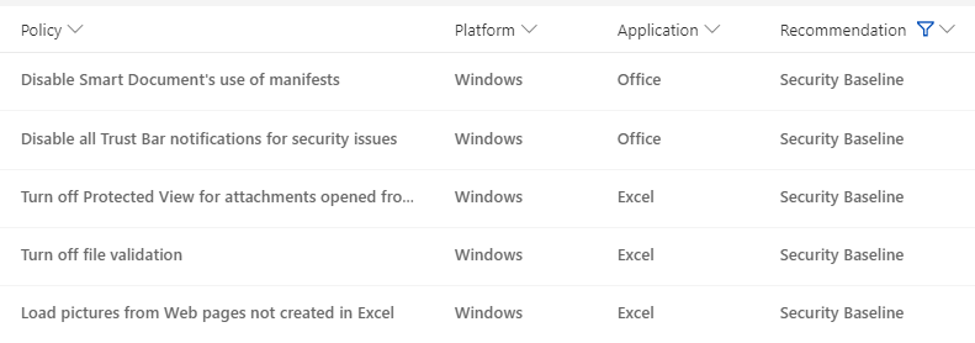
The experience to configure these policies has also been optimized as the policy is preconfigured with the recommended settings. You can simply review the policy behavior and click OK to accept the recommended configuration.

If the recommended configuration does not meet your needs, you can select to manually configure the policy and configure the settings.
For additional information about the Office Cloud Policy Service please refer to this article.
Published on:
Learn moreWe can help you with Security Baseline recommendations now available in Office Cloud Policy Service
If you want help implementing, troubleshooting, or improving this product, contact us and we’ll point you in the right direction.
Related posts
Excluding and re-including applications within the Office 365 ProPlus Suite
When installing Office 365 ProPlus using the Office Deployment Tool (ODT), the standard configuration includes the entire suite of application...
Deploy Microsoft 365 Apps to remote workers
This blog post will address the enterprise IT admin’s challenge on how to deploy Microsoft 365 Apps to remote workers without saturating the c...
Application Guard for Microsoft 365 Apps now in public preview
Application Guard for Office is now available in public preview! Files from the internet and other potentially unsafe locations can contain vi...
Update to the background image of the Office 365 sign-in screens
I’d like to give you an early heads up on a visual design update that is coming to the Office 365 sign-in experience. These are the screens us...
Updates to Office.com and the Office 365 app launcher
Office.com is the URL for an experience that we’ve been building for a couple of years. We designed it to be your work hub experience and help...
Troubleshooting Office Cloud Policy Service (OCPS)
The Office cloud policy service (OCPS) is a cloud-based service that enables you to apply policy settings for Office 365 ProPlus on a user’s d...
Office Cloud Policy Service integrated with the Microsoft Endpoint Manager portal
The latest update to Microsoft Endpoint Manager includes integration with the Office Cloud Policy Service, giving admins the ability to create...
Calendaring is Tricky and That Might be Why You Were An Hour Late to that Meeting
Writing code for calendaring features is hard. Some of you might say writing any kind of code is hard, and you might have a point, but cale...
Multi-Geo reduced seat minimum and expanded geo coverage
We are excited to announce the availability of Microsoft 365 Multi-Geo in Switzerland, and the reduction of the seat minimum requirement to 25...
How to Optimize Stream & Live Events traffic in a VPN scenario
***Updated August 4, 2021: This article was initially intended to provide customers with an option to optimize connectivity to the servic...