
Multi-Geo reduced seat minimum and expanded geo coverage
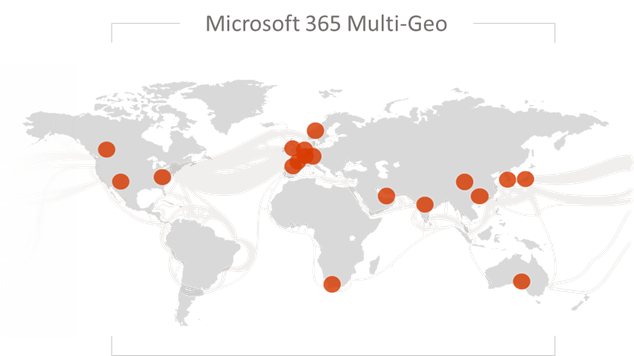
We are excited to announce the availability of Microsoft 365 Multi-Geo in Switzerland, and the reduction of the seat minimum requirement to 250 for Enterprise Agreement customers. These updates will allow more organizations to utilize Microsoft 365 Multi-Geo to address their legal, compliance, industry, or other related data residency requirements.
Please note that this product was previously referred to as ‘Multi-Geo Capabilities for Office 365,’ and will now be named ‘Multi-Geo Capabilities for Microsoft 365,’ consistent with the overall Microsoft 365 announcement on March 30. We previously announced the general availability of Multi-Geo Capabilities, in addition to the workload expansion from Exchange Online and OneDrive to include SharePoint Online.
Microsoft 365 Multi-Geo provides a solution for multi-national businesses seeking a balance between working as a single organization in the Microsoft 365 cloud and addressing global data residency needs. With the reduced seat minimum requirement and coverage across Exchange Online, OneDrive, and SharePoint Online this feature helps bring the full power of Microsoft 365 – the world’s productivity cloud – to organizations at any stage in their digital transformation journey.
Microsoft 365 Multi-Geo enables customers to reduce their on-premises footprint by allocating user data at rest to our available geo locations in the Microsoft 365 cloud, facilitating their ability to meet data residency obligations, all within a single tenant. For in-depth information on how Multi-Geo capabilities work and how to get started, please review the links above.
Available Geos
Microsoft is continuously making new infrastructure investments in response to growing customer demand as more industry leaders choose Microsoft’s cloud services. As a result, Microsoft 365 Multi-Geo is increasing our geo coverage as we expand our datacenter footprint for Microsoft 365. With the latest addition of Switzerland, you can now extend your Microsoft 365 tenant to store your users’ data in one or more of the following geos:
|
Australia |
Asia Pacific |
|
Canada |
European Union |
|
France |
India |
|
Japan |
Korea |
|
United Kingdom |
United States |
|
United Arab Emirates |
South Africa |
|
Switzerland |
|
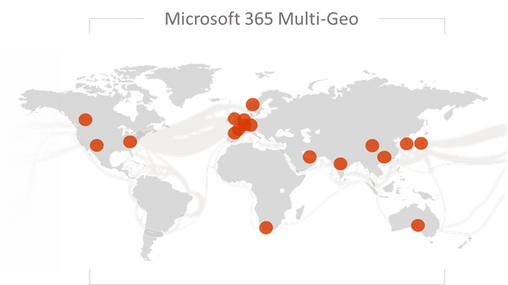
Learn about where your Microsoft 365 data is stored at aka.ms/DataMaps
Industry Focus
We see worldwide organizations of all sizes and across all industries currently investing in new ways of empowering their employees with modern tools to enable secure, flexible, and mobile working that fosters collaboration. The ability to configure data residency on a by-user basis helps organizations meet regulatory requirements, which is particularly important and relevant in industries such as healthcare, manufacturing, public sector, and financial services. This latest step enables companies adopting Microsoft 365 to accelerate their digital transformation journey. As a result, we see Microsoft 365 Multi-Geo assisting organizations across the world to enable the scalability required to address critical challenges affecting the global community.

|
“We now have as many people outside the US as in it, and although the GDPR doesn’t mandate a particular Geo for data residency, our clients are hypersensitive about data privacy issues, so we prefer to get in front of it,” Ackermann says. “Our lifeblood includes data which is personal information about people and with Multi-Geo, we’re able to proactively address client concerns about data residency.” - Bryan Ackermann, Chief Information Officer, Korn Ferry |
Pricing and Licensing:
Multi-Geo is available as an add-on to the following Microsoft 365 subscription plans for EA customers with a minimum of 250 Microsoft 365 seats in their Microsoft 365 tenant, and a minimum of 5% of the Microsoft 365 seats within a tenant have corresponding Multi-Geo Capabilities for Microsoft 365. Please contact your Microsoft account team for details.
|
Microsoft 365 F1, F3, E3, or E5 |
|
Office 365 F3, E1, E3, or E5 |
|
Exchange Online Plan 1 or Plan 2 |
|
OneDrive for Business Plan 1 or Plan 2 |
|
SharePoint Online Plan 1 or Plan 2 |
Licensing
- USD $2/user/month for users in Satellite Geos
- Resource mailboxes (Rooms/Equipment) and Shared mailboxes need to be licensed
- Microsoft 365 Group Mailboxes moved to Satellite Geos will not need to be licensed for Multi-Geo
How to buy Multi-Geo?
Please talk to your Microsoft representative to buy Multi-Geo Capabilities for Microsoft 365.
Questions?
Please comment on this thread with your questions
Published on:
Learn moreWe can help you with Multi-Geo reduced seat minimum and expanded geo coverage
If you want help implementing, troubleshooting, or improving this product, contact us and we’ll point you in the right direction.
Related posts
Security Baseline recommendations now available in Office Cloud Policy Service
We are pleased to announce a new feature in the Office Cloud Policy Service that will allow you to easily find and configure policies that are...
Excluding and re-including applications within the Office 365 ProPlus Suite
When installing Office 365 ProPlus using the Office Deployment Tool (ODT), the standard configuration includes the entire suite of application...
Deploy Microsoft 365 Apps to remote workers
This blog post will address the enterprise IT admin’s challenge on how to deploy Microsoft 365 Apps to remote workers without saturating the c...
Application Guard for Microsoft 365 Apps now in public preview
Application Guard for Office is now available in public preview! Files from the internet and other potentially unsafe locations can contain vi...
Update to the background image of the Office 365 sign-in screens
I’d like to give you an early heads up on a visual design update that is coming to the Office 365 sign-in experience. These are the screens us...
Updates to Office.com and the Office 365 app launcher
Office.com is the URL for an experience that we’ve been building for a couple of years. We designed it to be your work hub experience and help...
Troubleshooting Office Cloud Policy Service (OCPS)
The Office cloud policy service (OCPS) is a cloud-based service that enables you to apply policy settings for Office 365 ProPlus on a user’s d...
Office Cloud Policy Service integrated with the Microsoft Endpoint Manager portal
The latest update to Microsoft Endpoint Manager includes integration with the Office Cloud Policy Service, giving admins the ability to create...
Calendaring is Tricky and That Might be Why You Were An Hour Late to that Meeting
Writing code for calendaring features is hard. Some of you might say writing any kind of code is hard, and you might have a point, but cale...
How to Optimize Stream & Live Events traffic in a VPN scenario
***Updated August 4, 2021: This article was initially intended to provide customers with an option to optimize connectivity to the servic...