
Introducing a new way to verify your workplace on LinkedIn with Microsoft Entra Verified ID

Today we’re excited to announce that millions of LinkedIn members will soon be able to verify their place of work with a Microsoft Entra Verified ID credential. Workplace verifications will be visible on a LinkedIn member’s profile, confirming that the work affiliations listed are accurate while serving as a signal of trust and authenticity to other members and organizations on LinkedIn.
How to issue employee IDs that verify the workplace
Organizations can use Verified ID to create digital employee IDs that reflect their brand and business needs in a matter of minutes. LinkedIn members can click a “verify your workplace” button on their profile and with a few taps on their phone, receive their organization-issued digital employee ID. Once the employee ID credential is shared with LinkedIn, a Workplace Verification will be displayed on their profile.

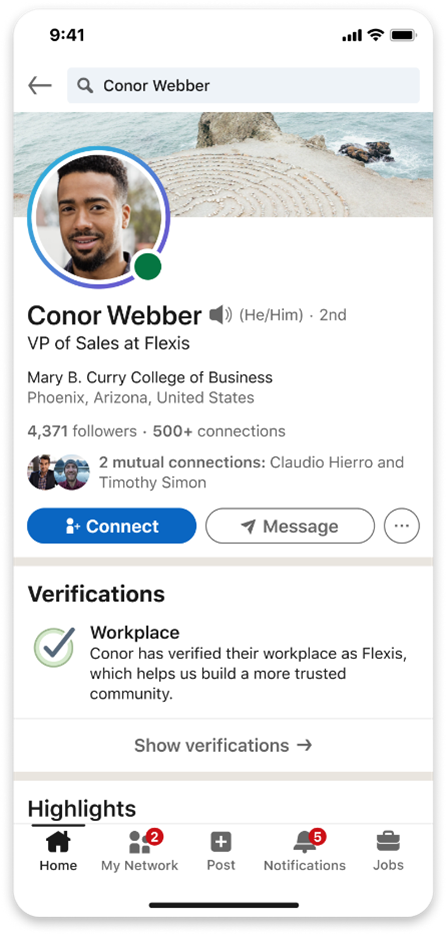
Figure Description: On a LinkedIn profile, members can verify their workplace in settings under About this profile, when enabled by their workplace, and can agree to display a workplace verification.
To get the full details and better understand how to implement workplace verification, be sure to read this blog post by Joy Chik, president of Identity and Network Access at Microsoft.
Get your company ready to issue employee IDs and verify their workplace on LinkedIn
If you are an Identity Global Administrator for your organization and you want to get your company ready for workplace verification on LinkedIn, please use this form to enroll in the pilot program.
Start issuing verified IDs today
Verified ID credentials can increase trust, authenticity, and verifiability while reducing cost, time, and friction in many scenarios. You can issue employee IDs using Verified ID today. It only takes a few minutes. To get started, check out these tutorials.
Learn more about Microsoft identity:
- Get to know Microsoft Entra – a comprehensive identity and access product family
- Return to the Microsoft Entra (Azure AD) blog home
- Join the conversation on Twitter and LinkedIn
- Share product suggestions on the Entra (Azure AD) forum
Published on:
Learn moreWe can help you with Introducing a new way to verify your workplace on LinkedIn with Microsoft Entra Verified ID
If you want help implementing, troubleshooting, or improving this product, contact us and we’ll point you in the right direction.
Related posts
Sync identities from Rippling to Microsoft Entra ID
Today, we’re thrilled to announce that customers using Rippling HCM can now automatically provision users to on-premises Active Directory and ...
Microsoft Entra ID Governance for government
I’m pleased to announce that as of November 1, 2024, Microsoft Entra ID Governance is available for federal agencies, state and local governme...
Update to security defaults
As part of the Secure Future Initiative, we’ve evolved our security approach to align with three security principles: secure by design, secure...
Meet Microsoft Entra at Ignite 2024: November 18-22
Microsoft Ignite is just around the corner, taking place from Monday, November 18, 2024 through Friday, November 22, 2024, in Chicago, Illinoi...
Manage Microsoft Entra ID role assignments with Microsoft Entra ID Governance
I’m excited to announce that we now support Microsoft Entra role assignments in Microsoft Entra ID Governance's Entitlement Management feature...
The latest enhancements in Microsoft Authenticator
Hi folks, I'm thrilled to announce three major Microsoft Entra ID advancements that will help you protect your users with phishing-resi...
Microsoft Security announcements and demos at Authenticate 2024
The Microsoft Security team is excited to connect with you next week at Authenticate 2024 Conference, taking place October 14 to 16 in Carlsba...
What's new in Microsoft Entra - September 2024
We’re excited to announce the general availability of Microsoft Entra Suite—one of the industry’s most comprehensive secure access solutions f...
Explore the key benefits of Microsoft Entra Private Access
The traditional network security models are becoming increasingly ineffective in a world where remote work and cloud services are the norm. Co...
Join us at the Microsoft Entra Suite Showcase!
This fall, we are bringing the Microsoft Entra Suite Showcase to cities worldwide. Join us to explore how our latest advancements in secure id...