
Azure portal November 2022 updates
Databases>SQL Databases
Mobile > Virtual Machines and Network Security Groups
Intune
Let's look at each of these updates in greater detail.
Databases>SQL Databases
Now generally available: Azure Synapse Link for SQL
You can use the Azure Synapse Link for SQL functionality to replicate your operational data into an Azure Synapse Analytics dedicated SQL pool from Azure SQL Database.
If you want a way to move transactional data to a data warehouse without building complex ETL packages, look no further than Synapse Link. This feature allows you specify a source Azure SQL Database and a destination Synapse dedicated SQL pool and have the data automatically replicated from the database to the pool. You can start, pause, resume, and stop this link. You also can choose continuous or batch mode for replication.
Now, you can set up the link from the SQL Database that holds the data, before opening Synapse Studio.
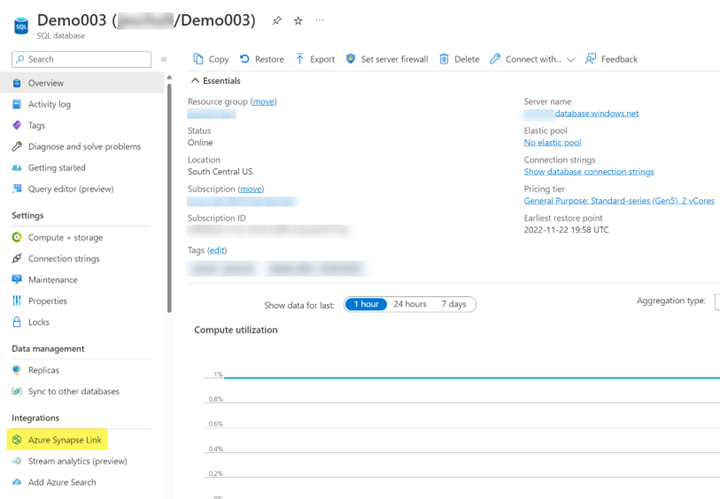
To get started, open a SQL database. From the menu on the left, under Integrations, select "Azure Synapse Link".

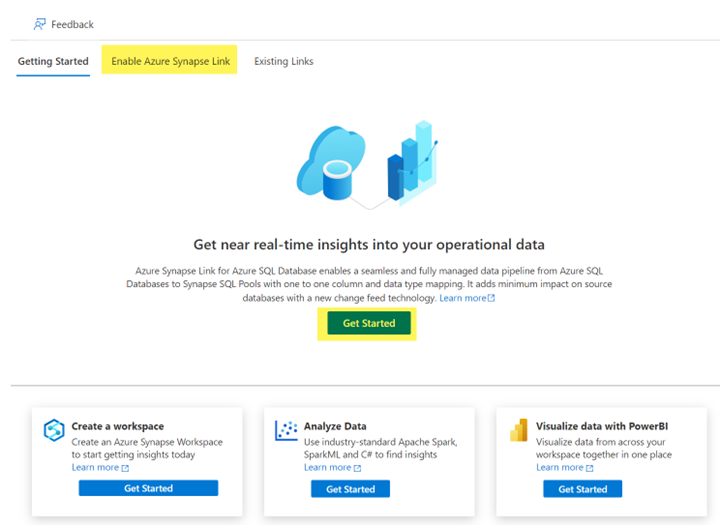
Select the "Enable Azure Synapse Link" tab at the top, or the "Get Started" button.
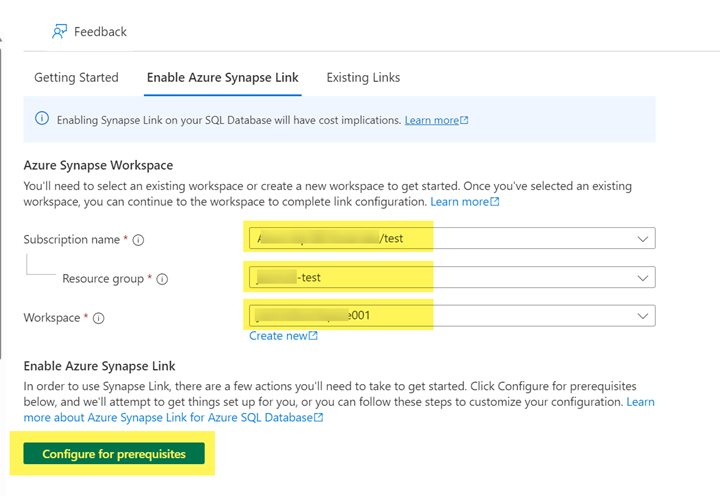
Select your subscription, resource group, and Synapse workspace. (You can also use the link to create a new workspace.) Then, select the "Configure for prerequisites" button.
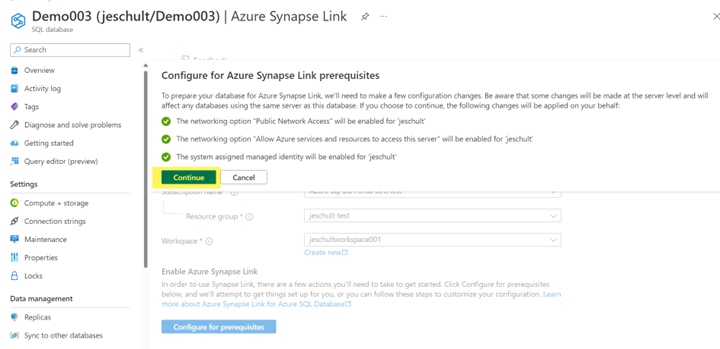
This step will ensure that the following options are enabled for the logical SQL server:
- Public Network Access
- Allow Azure services and resources to access this server
- A system assigned managed identity
If you need more granular network permissions, please refer to Configure Azure Synapse Link for Azure SQL Database with network security - Azure Synapse Analytics | Microsoft Learn. )
Choose Continue.
Choose Enable Link.
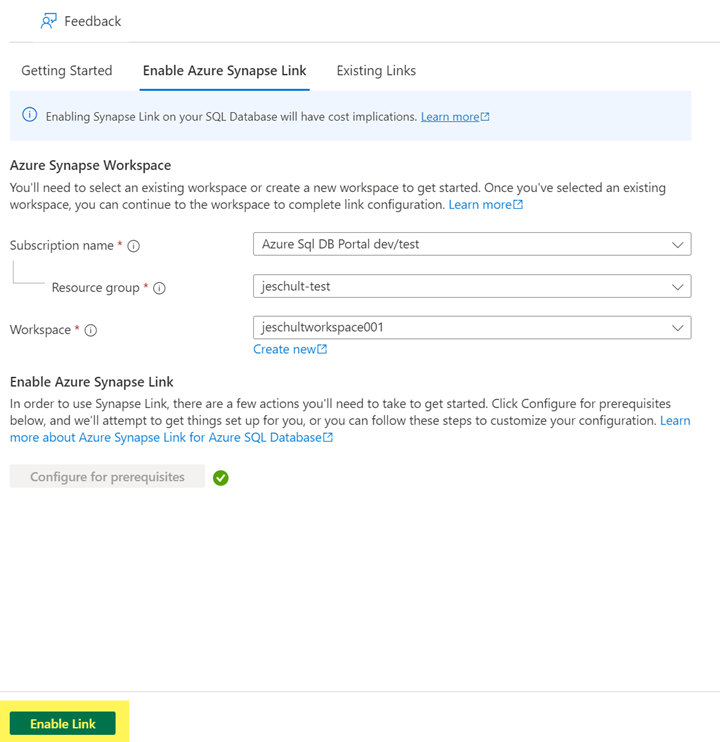
You are now redirected to Synapse Studio, where you can finish creating your link connection.
Mobile > Virtual Machines and Network Security Groups
Manage NSG security rules on mobile
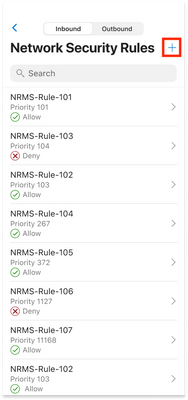
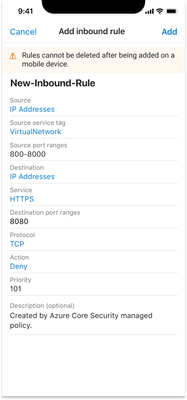
The new Network Security Group (NSG) experience on the Azure Mobile App allows users to interact with expanded functionality including a new rules section allowing users to see what the network security rules are and their priority, and the ability to add/edit rules on the go for that NSG. This joins the expanded features for Virtual Machine network management.
- Select a network security group
- Click "See all" under Network Security Rules
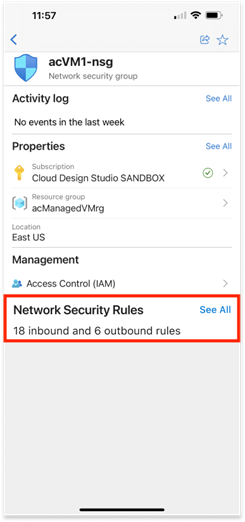
3. Select a rule to view details or edit or select plus to add a new rule
Intune
The Microsoft Intune team has been hard at work on updates as well. You can find the full list of updates to Intune on the What's new in Microsoft Intune page, including changes that affect your experience using Intune.
Azure portal “how to” video series
Have you checked out our Azure portal “how to” video series yet? The videos highlight specific aspects of the portal so you can be more efficient and productive while deploying your cloud workloads from the portal. Check out our most recently published videos.
Next steps
The Azure portal has a large team of engineers that wants to hear from you, so please keep providing us your feedback in the comments section below or on Twitter @AzurePortal.
Sign in to the Azure portal now and see for yourself everything that’s new. Download the Azure mobile app to stay connected to your Azure resources anytime, anywhere. See you next month!
Published on:
Learn moreRelated posts
Azure Landing Zones - Policy Refresh Q1 FY25
ALZ - Policy Refresh Q1 FY25 is here! As you may be aware, the ALZ team release cadence is now on quarterly basis to help customers and partne...
Custom Policy- Reusable Logs Templates
Reusable Templates for Sending Logs to Log Analytics Workspace Challenge: When it comes to developing custom policies for sendin...
Enhancements to Azure Monitor Baseline Alerts for Azure Landing Zones
Introduction Welcome to our latest blog post where we dive into a number of exciting new key updates, highlight the new portal accelera...
Introducing the Azure Policy Community Repo
Introducing the Azure Policy Community Repo What is the Azure Policy Community Repo? The Azure Policy Community Repo is a collaborativ...
General Availability: Vaulted backups for Azure Blob Storage
We are excited to announce the general availability of vaulted backups for Azure Blob Storage. Vaulted backups can help you achieve complete p...
Azure Update Manager to support CIS hardened images among other images
What’s coming in by end of July 2024: Azure Update Manager will add support for 35 CIS hardened images. This is the first time that Update Man...
Mastering your cloud journey: Essentials to Innovating, Migrating and Modernizing, on Azure
We are living during a time of rapid growth in AI technologies and seeing cloud complexity increase as a result of those advanced workloads, w...
Public Preview Announcement: Azure Policy Built-in Versioning
Welcome to a new era of policy management, where policy definitions are more agile, adaptable, and accessible than ever before! We are thrille...
Announcing Azure Monitoring Agent support in Azure Landing Zones
Introduction Hello and welcome to another blog post about Azure Landing Zones, the best practice framework for accelerating your cloud...
Announcing the General Availability of Change Actor
Change Analysis Identifying who made a change to your Azure resources and how the change was made just became easier! With Change Analys...