
How to Install GitHub Copilot in VS Code
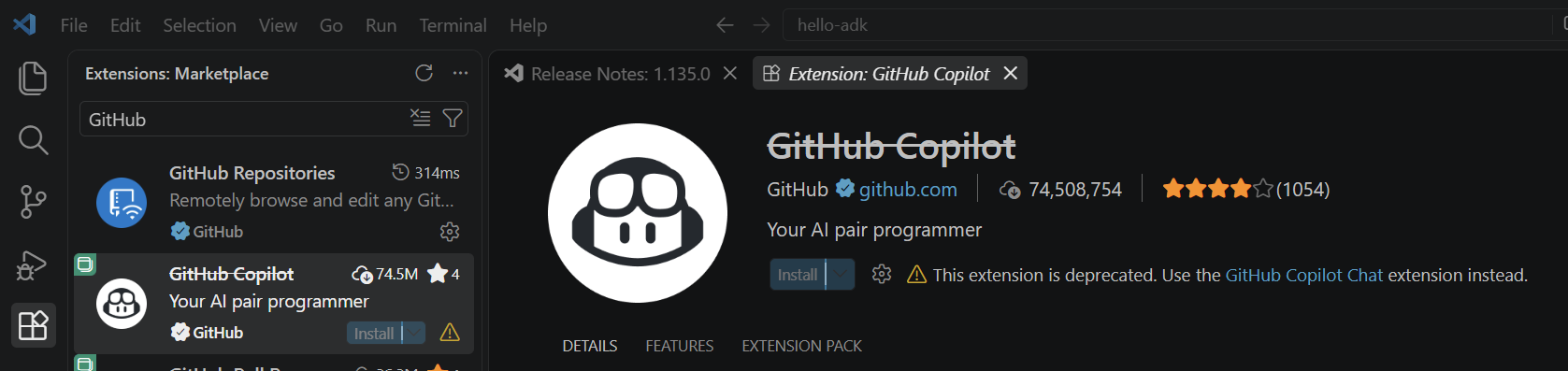
To install GitHub Copilot in VS Code, open VS Code and go to Extensions on the left, then search for GitHub Copilot. Note the “GitHub Copilot” extension has been deprecated: What we’re looking for is the GitHub Copilot Chat extension. Go ahead and click on Enable AI Features: Once you do that, in the bottom right you will see this Robot icon. Clicking on it will show which plan you … Continue reading How to Install GitHub Copilot in VS Code
The post How to Install GitHub Copilot in VS Code appeared first on Carl de Souza.
Published on:
Learn moreWe can help you with How to Install GitHub Copilot in VS Code
If you want help implementing, troubleshooting, or improving this product, contact us and we’ll point you in the right direction.
Related posts
Using the New Real-Time Streaming Analytics in Dynamics 365 Contact Center
Microsoft has introduced a new real-time streaming analytics experience for Dynamics 365 Contact Center. The new experience, also called the &...
Building Rich Model-Driven App Forms Embedded with Generative Pages
Generative Pages are one of the more interesting additions to model-driven apps. Instead of being limited to the traditional form layout of fi...
Customer Assist Agent in Dynamics 365 Contact Center: Real-Time Voice and Self-Service
Microsoft is continuing to evolve Dynamics 365 Contact Center around AI agents that can participate throughout the customer service journey. O...
Installing and Using Microsoft Dataverse Skills with AI Coding Agents
Microsoft has created Dataverse Skills for AI coding agents, giving tools such as GitHub Copilot, Claude Code, OpenAI Codex, and Cursor a much...
Building a Multi-Agent Architecture with Microsoft Copilot Studio: A Walkthrough
Today we will look at how to build a multi-agent architecture using Microsoft Copilot Studio. Instead of creating one large agent that knows a...
Building Power Apps PCF Controls Using OpenAI Codex
PCF controls are a great example of where AI coding agents can become extremely useful with Power Platform. PCF controls are pro-code projects...
How to Build a Real-Time Voice Agent in Microsoft Copilot Studio
Today we will look at how to create a real-time voice agent in Microsoft Copilot Studio. Voice agents have been around for some time, but real...
How to Use Evals in Microsoft Foundry: Build an Agent and Test It
Today we will look at how to use Evals in Microsoft Foundry. We will build a simple agent, create a small evaluation dataset, run several eval...
Copilot Studio Evals: A Practical Guide to Testing AI Agents
Today we will look at how to use Evals in Microsoft Copilot Studio. We will first build a basic agent, give it some simple knowledge, and then...
100 Great Ted and TEDx Talks for Speakers to Study
One of the best ways to become a better public speaker is to study great public speakers. As I’ve been working on my own speaking, I’ve spent ...