
Public access is not permitted on this storage account

Have you ever received an error message saying that public access is not permitted on this storage account while trying to access a blob?

Just in case you are really needing to allow public access to your Storage Account, I will show you how to set this configuration, but before doing that, please note the following:

Disallowing public access for the storage account overrides the public access settings for all containers in that storage account, preventing anonymous access to blob data in that account. When public access is disallowed for the account, it is not possible to configure the public access setting for a container to permit anonymous access, and any future anonymous requests to that account will fail.
To set the AllowBlobPublicAccess property for the storage account, a user must have permissions to create and manage storage accounts. Azure role-based access control (Azure RBAC) roles that provide these permissions include the Microsoft.Storage/storageAccounts/write action. Built-in roles with this action include:
- The Azure Resource Manager Owner role
- The Azure Resource Manager Contributor role
- The Storage Account Contributor role
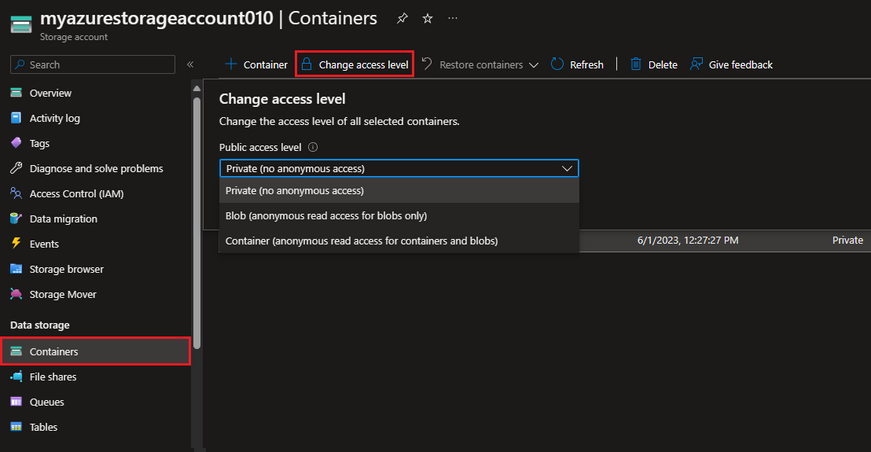
Once you have an account with such permissions, you can work your way through any of the following ways to enable the "Blob public access" setting on your Storage Account:
Azure Portal:

PowerShell:

AZ CLI:

Now, even though you have the ability to enable the Storage Account "allowPublicAccess" setting, we still recommend using the principle of least privilege to ensure that users have the fewest permissions that they need to accomplish their tasks. To that end, you can also set the public access setting at the container and blob levels:
The following table shows the effect that the combination of both settings for a container:

When Blob Storage receives an anonymous request, that request will succeed if all of the following conditions are true:
- Anonymous public access is allowed for the storage account.
- The container is configured to allow anonymous public access.
- The request is for read access.
If any of those conditions are not true, then the request will fail. The response code on failure depends on whether the anonymous request was made with a version of the service that supports the bearer challenge. The bearer challenge is supported with service versions 2019-12-12 and newer:
- If the anonymous request was made with a service version that supports the bearer challenge, then the service returns error code 401 (Unauthorized).
- If the anonymous request was made with a service version that does not support the bearer challenge and anonymous public access is disallowed for the storage account, then the service returns error code 409 (Conflict).
- If the anonymous request was made with a service version that does not support the bearer challenge and anonymous public access is allowed for the storage account, then the service returns error code 404 (Not Found).
I'll now use Postman to show the above scenarios:
Successful anonymous request:

Failed anonymous request (API version 2023-01-03):

Failed anonymous request (API version 2009-09-19)

Failed anonymous request (API version 2009-09-19, public access allowed at the Storage Account level and access level set to "Private" at the container level):

As you can see, you can get different responses for the same scenario and just based on the API version that was used to send the request. Hopefully this article helps on identifying the root cause for the error message you may get and gives you some helpful information on how to approach your specific scenario.
In the meantime, independently on what you are planning to do to meet your business needs, always remember to use the principle of least privilege to lower the potential for security risks.
References
=======
Configure anonymous public read access for containers and blobs
https://learn.microsoft.com/en-us/azure/storage/blobs/anonymous-read-access-configure
Set-AzStorageAccount
https://learn.microsoft.com/en-us/powershell/module/az.storage/set-azstorageaccount
az storage account update
Published on:
Learn moreRelated posts
Azure Storage - TLS 1.0 and 1.1 retirement
Overview TLS 1.0 and 1.1 retirement on Azure Storage was previously announced for Nov 1st, 2024, and it was postponed recently to 1 year later...
Efficient Management of Append and Page Blobs Using Azure Storage Actions
Overview In Azure Storage, Blob Lifecycle Management (BLM) allows you to automate the management of your data based on rules defined by...
[Azure AI Search] Internal Server Error when creating CMK encrypted objects
Scenario Customers follow the Microsoft doc to create CMK encrypted objects (data source, index etc.), but get the 500 Internal Serv...
Optimizing Azure Table Storage: Automated Data Cleanup using a PowerShell script with Azure Automate
Scenario This blog’s aim is to manage Table Storage data efficiently. Imagine you have a large Azure Table Storage that accumulates logs from ...
Optimizing Azure Table Storage: Automated Data Clean-up using a PowerShell script with Azure Automat
Scenario This blog’s aim is to manage Table Storage data efficiently. Imagine you have a large Azure Table Storage that accumulates logs from ...
Restoring Soft-Deleted Blobs with multithreading in Azure Storage Using C#
Blob soft delete is an essential feature that safeguards your data against accidental deletions or overwrites. By retaining deleted data for a...
Performing simple Azure Table Storage REST API operations using curl command.
The blog provides guidance to perform simple Table Storage REST API operations such as Create table, Delete Table, Insert entity, Delete entit...
Bulk delete all the old jobs from the batch account
Deleting a Job also deletes all Tasks that are part of that Job, and all Job statistics. This also overrides the retention period for Task dat...
Utilizing Azure Storage and Runbooks for scheduled automated backups of Azure SQL Databases
In this article, we are going to provide detailed steps to create a scheduled Azure SQL Database backup to storage account using automation. T...
[Azure Service Bus] JMS messages getting dead-lettered
The article discusses a problem where numerous messages end up in the dead letter queue (DLQ) when the JMS service bus consumer connects to th...