
Teams media optimizations now in Public Preview on Azure Virtual Desktop and Windows 365 for macOS
We’re excited to announce that Microsoft Teams media optimizations is now in Public Preview on Azure Virtual Desktop and Windows 365 for macOS. With media optimizations, Teams on Azure Virtual Desktop and Windows 365 now supports audio and video calling and meeting functionality by redirecting audio and video to the local client machine.
Getting Started
To experience Teams media optimizations, please install Microsoft Remote Desktop Beta 10.7.7 from the VS App Center and ensure that the feature is enabled on the client.
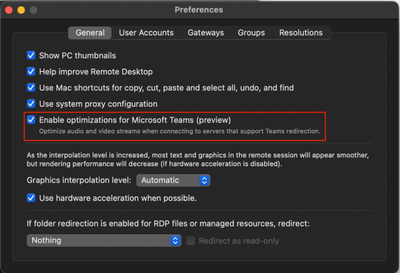
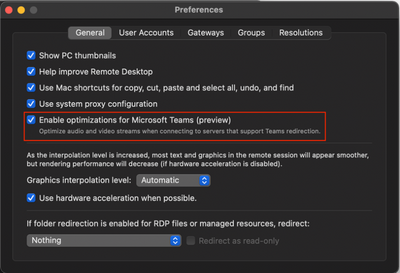
First-time installs of Microsoft Remote Desktop Beta 10.7.7 will have Teams media optimizations enabled by default. For existing Remote Desktop macOS users updating to Beta version 10.7.7, you will need to enable Teams redirection by navigating to Microsoft Remote Desktop Preferences > General, enabling Teams optimizations and restarting the client.
You can verify that Microsoft Teams is optimized by navigating to Overflow Menu (…) > About > Version on Teams. A banner will appear stating that the user is “AVD Media Optimized”.

Setup Teams on Azure Virtual Desktop
New to the service? Refer to the Teams on Azure Virtual Desktop documentation on how to setup Microsoft Teams and our latest WebRTC Redirector Service on Azure Virtual Desktop.
Setup Teams on Windows 365
Microsoft Teams comes included in the Windows 11/10 images optimized for Microsoft 365 apps. For more information on how to enjoy the best Teams experience, refer to the Teams on Cloud PC documentation.
Published on:
Learn moreRelated posts
App attach now integrates with partner solutions
For many IT admins, application delivery management is one of their most complex tasks. However, with the recent general availability of App a...
New features for Azure Virtual Desktop for Azure Stack HCI
Today, we’re excited to announce new features and capabilities for Azure Virtual Desktop for Azure Stack HCI that will benefit admins responsi...
MMR Call Redirection for Azure Virtual Desktop, Windows 365 now available
Today, I am pleased to share the launch of Multimedia Redirection (MMR) Call Redirection for Azure Virtual Desktop and Windows 365. Call Redir...
OneDrive support for RemoteApp in Azure Virtual Desktop
We are excited to announce that Microsoft OneDrive support is now available for RemoteApp in Azure Virtual Desktop! Previously, OneDrive could...
Custom Shortpath settings for host pools now available
We are excited to announce the general availability of custom Shortpath settings at the host pool level. Now you can granularly control how RD...
Recovery options for Azure Virtual Desktop session host VMs
Last week an update issue caused unresponsiveness and startup failures on Windows machines using the CrowdStrike Falcon agent, including some ...
Connection Reliability in Azure Virtual Desktop Insights
We are thrilled to announce that the Connection Reliability tab in Azure Virtual Desktop Insights is now generally available. IT administrator...
Preferred app group type settings enhance user feed display
In line with our commitment to provide seamless and efficient experiences for Azure Virtual Desktop users, we've recently implemented Preferre...
App attach for Azure Virtual Desktop now generally available
App attach for Azure Virtual Desktop allows IT admins to dynamically attach applications from an application package to a user session in Azur...
Hibernation support now available for Azure Virtual Desktop
Today we are happy to announce the general availability of hibernation support in Azure Virtual Desktop. Explore additional capabilities that ...