
Introducing the Application Gateway WAF Triage Workbook

Written in collaboration with
Introduction
Azure Application Gateway combined with its Azure Web Application Firewall (WAF) capabilities allows you to expose web properties in a controlled and secure way. It protects against a wide range of layer 7 attacks, including attempts to SQL injection, cross-site scripting, protocol violations and so on. You can also associate a unique WAF policy to different scopes on Application Gateway: global, per-site, and per-URI.
For more details on this topic, check out this webinar on "Using Azure WAF Policies to Protect Your Web Application at Different Association Levels".
WAF policies can be configured to reject suspicious requests when in "prevention" mode or to just observe traffic when in "detection" mode. In either case, the Application Gateway should be configured to log its activities to a Log Analytics workspace. Both the Application Gateway Access Log as well as the Firewall Log provide insights into which requests got blocked, for what reason and by which WAF rules.
The Challenge
Given the paranoid nature of web application firewalls, there's a reasonable chance that by protecting your web application with a WAF policy, you might accidentally block valid traffic; an effect called a "false positive". This can happen for a variety of reasons: your application might be using certain values or parameters which resemble an attack the WAF policy is actively scanning for; there might be random values or cookies which at times could accidentally look like a SQL injection attack of some sort, or you might be using a protocol (like OData) which by nature uses keywords that are typically used by some well-known attack vectors.
Regardless of the reason, there are two paths we can take to mitigate false positives:
- Adapt the application at the source-code level to play nice with the WAF policy by avoiding the use of any patterns that look like a potential attack.
- Tune the WAF policy to be a little more forgiving with certain requests.
In both cases, you need insight into which exact WAF rules were blocking traffic and which specific traffic was affected by the policy. While the combination of both Access Logs and Firewall Logs can provide you this info, it might not come intuitively or be easy to find at a glance.
Introducing the "Application Gateway WAF Triage Workbook"
We'd love to introduce you to a new workbook which is designed to help you get insights at a glance into which WAF rules got triggered, what their impact was on your application’s traffic, and what those rules were trying to detect or prevent.
The requirements
This workbook is designed to parse WAF logs from Application Gateway WAF V2 configured with WAF Policy.
What's in the workbook?
The workbook provides two "pivots" along which the information can be sliced:
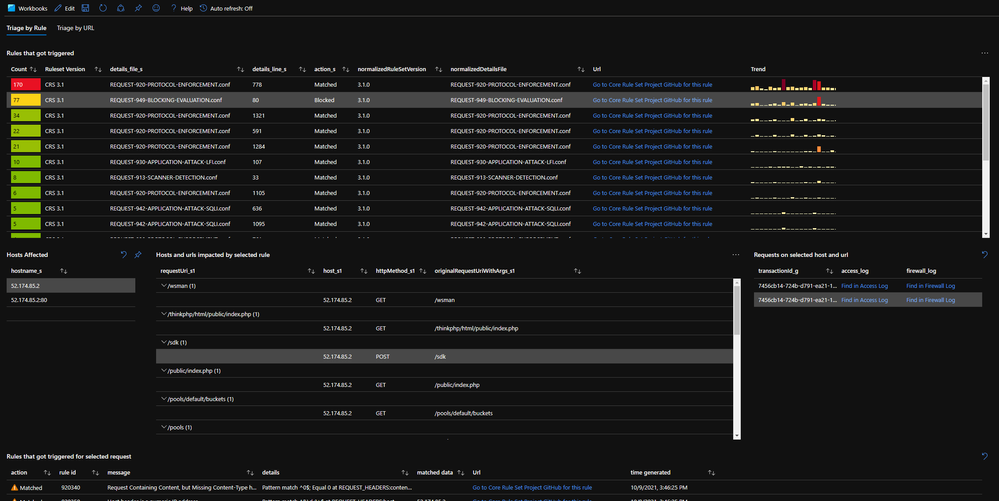
- The first view provides an overview of the WAF rules that got triggered, ordered from “most” to “least” occurrences. This can help prioritize which rules to optimize first and which ones later.
- The other view allows to look for rule violation by request URI path. This is particularly useful if you know that a particular path on the web application is not behaving as expected and you need to find out why. By searching for the path, the workbook will provide an overview of the WAF rules that affected this part of the application.
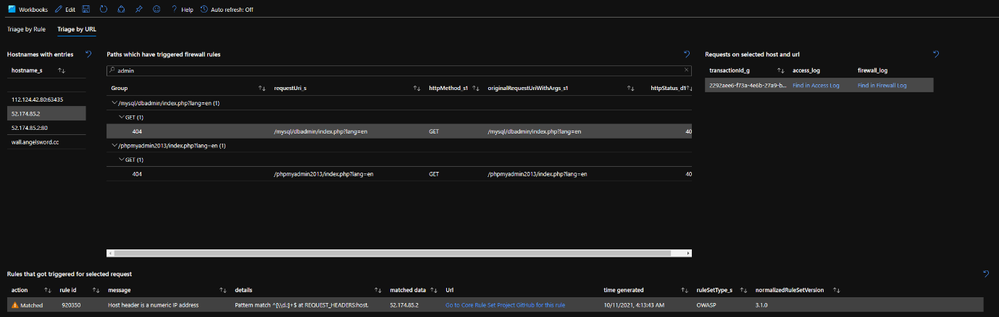
Both views will render a range of example requests which can be used to inspect one level deeper to help identify what happened:
- Any request can immediately be visualized in both the Access Log and the Firewall Log using the "Find in…" links.
- For any request, all co-related matched WAF rules will be shown.
For every rule, there's a link titled "Go to Core Rule Set Project GitHub for this rule". This link will take you to the Core Rule Set GitHub page for right rule and ruleset version. These pages usually provide a good description on what the rule is trying to detect and their logic. This information is very convenient when trying to figure out how to reduce false positives and to adjust the WAF ruleset.
How to deploy?
The workbook can be deployed from the Azure Network Security GitHub.

How to use?
We have a video demonstration of how you can use the workbook.
Conclusion
The new "Application Gateway WAF Triage Workbook" is free of charge and it provides a convenient way to triage WAF events and identify false positives. It gives you the insights you need to better fine-tune your WAF policy. We look forward to hearing how useful this was for you and how we can keep on improving on it.
Published on:
Learn moreRelated posts
IPv6 Adoption: Enhancing Azure WAF on Front Door
The transition to IPv6 is a significant step for enterprise corporations, reflecting the evolution of internet technology and the need for a l...
Azure WAF’s Bot Manager 1.1 and JavaScript Challenge (Preview): Navigating the Bot Threat Terrain
Introduction Bots are a common presence on the internet, serving a range of functions from automating customer service to indexing page...
Private IP DNAT Support (Preview) and Scenarios with Azure Firewall
Introduction Azure Firewall is a cloud native security service to protect your workloads running in Azure. It is a stateful firewall as a serv...
Getting Started with Azure DDoS Protection REST API: A Step-by-Step Guide
REST API is a cornerstone in the management of resources on Azure, providing a streamlined and efficient approach for executing create, read, ...
Monitoring Azure DDoS Protection Mitigation Triggers
Monitoring Azure DDoS Protection Mitigation Triggers In today’s digital landscape, Distributed Denial of Service (DDoS) attacks pose a signifi...
Azure WAF’s Bot Manager 1.1 and JavaScript Challenge: Navigating the Bot Threat Terrain
Introduction Bots are a common presence on the internet, serving a range of functions from automating customer service to indexing page...
Utilizing Azure DDoS Protection Workbook for DDoS attack traffic Analysis
In today's digital age, the security of applications, servers, and networks is paramount. One of the most significant threats to this security...
Independent Configuration of Size Enforcement and Inspection Limits in Application Gateway WAF
Introduction In the constantly changing world of cybersecurity, both flexibility and effective security are essential for safeguarding ...
Private IP DNAT Support and Scenarios with Azure Firewall
Introduction Azure Firewall is a cloud native security service to protect your workloads running in Azure. It is a stateful firewall as a serv...
Monitoring traffic flows in Azure Firewall using Virtual Network Flow Logs
Azure Firewall is a managed service designed to protect your Azure Virtual Network resources, providing advanced threat protection and advance...