
Bring your own IP addresses (BYOIP) to Azure with Custom IP Prefix

Author: Brian Lehr, Azure Networking PM
When planning a potential migration of on-premises infrastructure to Azure, you may want to retain your existing public IP addresses due to your customers' dependencies (for example, firewalls or other IP hardcoding) or to preserve an established IP reputation.
Today, we are excited to announce the general availability of the ability to bring your own IP addresses (BYOIP) to Azure in all public regions. Using the Custom IP Prefix resource, you can now bring your own public IPv4 ranges to Azure and use them like any other Azure-owned public IP ranges.
Once onboarded, these IPs can be associated with Azure resources, interact with private IPs and VNETs within Azure’s network, and reach external destinations by egressing from Microsoft’s Wide Area Network. Read more about how bringing your IP addresses to Azure can help to speed up your cloud migration.
Provisioning a custom IP range
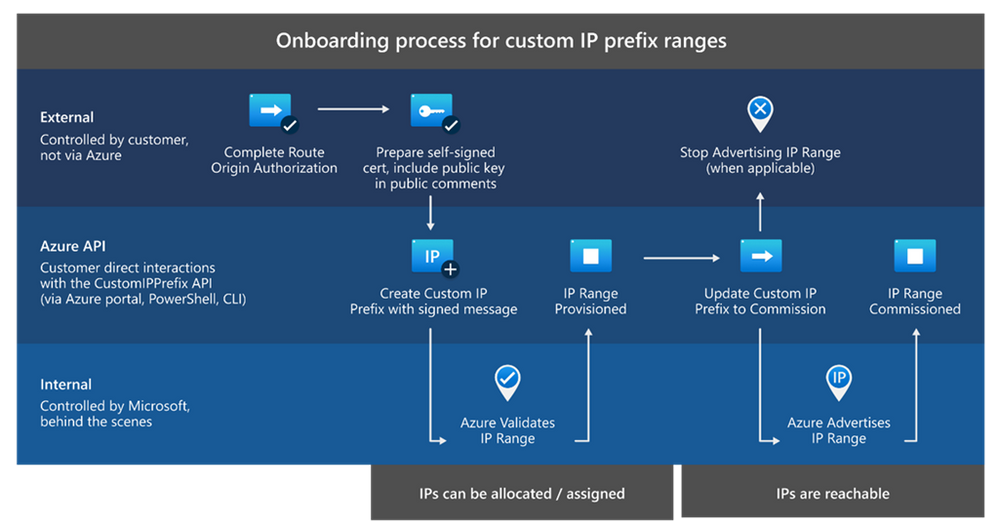
Onboarding your ranges to Azure can be done through the Azure portal, Azure PowerShell, Azure CLI, or by using Azure Resource Manager (ARM) templates. In order to bring a public IP range to use on Azure, you must own and have registered the range with a Routing Internet Registry such as ARIN or RIPE.
When bringing an IP range to use on Azure, it remains under your ownership, but Microsoft is permitted to advertise it from our Wide Area Network (WAN). The ranges used for onboarding must be no smaller than a /24 (256 IP addresses) so that they will be accepted by Internet service providers. When you create a Custom IP Prefix resource for your IP range, Microsoft performs validation steps to verify your ownership of the range and its association with your Azure subscription. Each onboarded range is associated with an Azure region.
Using a custom IP range
Once your range has been provisioned on Azure, you have the option to assign public IP addresses from the range to resources immediately or to begin advertising the range before assigning, depending on what fits your specific use case. After the command is issued to commission a range, Microsoft will advertise it both regionally (within Azure) and globally (to the Internet). The specific region where the range was onboarded will also be posted publicly for geolocation providers.
To assign the BYOIPs, you would create public IP prefixes (contiguous blocks of Standard SKU public IP addresses), from which you can allocate specific individual public IP addresses.
Note that while an IP range is onboarded under the context of an Azure subscription, prefixes from this range can be derived from other subscriptions with appropriate permissions. Onboarded IPs can be associated with any resource that supports Standard SKU public IPs, such as virtual machines, Standard Public Load Balancers, Azure Firewalls, and more. You are not charged for maintenance and hosting of your onboarded Public IPs Prefix; you are charged only for egress bandwidth from the IPs and any attached resources.
Key takeaways
- The ability to bring your own IP addresses (BYOIP) to Azure is currently available in all regions.
- The minimum size of an onboarded range is /24 (256 IP addresses).
- Onboarded IPs are put in a Custom IP Prefix resource for management, from which Public IP Prefixes can be derived and utilized across subscriptions.
- You are not charged for the hosting or management of onboarded ranges brought to Azure.
Additional resources
Published on:
Learn moreRelated posts
IPv6 Adoption: Enhancing Azure WAF on Front Door
The transition to IPv6 is a significant step for enterprise corporations, reflecting the evolution of internet technology and the need for a l...
Azure WAF’s Bot Manager 1.1 and JavaScript Challenge (Preview): Navigating the Bot Threat Terrain
Introduction Bots are a common presence on the internet, serving a range of functions from automating customer service to indexing page...
Private IP DNAT Support (Preview) and Scenarios with Azure Firewall
Introduction Azure Firewall is a cloud native security service to protect your workloads running in Azure. It is a stateful firewall as a serv...
Getting Started with Azure DDoS Protection REST API: A Step-by-Step Guide
REST API is a cornerstone in the management of resources on Azure, providing a streamlined and efficient approach for executing create, read, ...
Monitoring Azure DDoS Protection Mitigation Triggers
Monitoring Azure DDoS Protection Mitigation Triggers In today’s digital landscape, Distributed Denial of Service (DDoS) attacks pose a signifi...
Azure WAF’s Bot Manager 1.1 and JavaScript Challenge: Navigating the Bot Threat Terrain
Introduction Bots are a common presence on the internet, serving a range of functions from automating customer service to indexing page...
Utilizing Azure DDoS Protection Workbook for DDoS attack traffic Analysis
In today's digital age, the security of applications, servers, and networks is paramount. One of the most significant threats to this security...
Independent Configuration of Size Enforcement and Inspection Limits in Application Gateway WAF
Introduction In the constantly changing world of cybersecurity, both flexibility and effective security are essential for safeguarding ...
Private IP DNAT Support and Scenarios with Azure Firewall
Introduction Azure Firewall is a cloud native security service to protect your workloads running in Azure. It is a stateful firewall as a serv...
Monitoring traffic flows in Azure Firewall using Virtual Network Flow Logs
Azure Firewall is a managed service designed to protect your Azure Virtual Network resources, providing advanced threat protection and advance...