
Prohibiting Domain Fronting with Azure Front Door and Azure CDN Standard from Microsoft (classic)
As you may recall, we announced back on November 8, 2022, Azure Front Door (classic, standard, premium SKU), Azure CDN Standard from Microsoft (classic) would no longer support domain fronting starting November 8, 2023, as per Azure’s policy to prohibit domain fronting. We also sent a follow-up announcement in November to remind you we have extended the enforcement date to January 8, 2024, with details of the actions you need to take to ensure your service continuity.
To provide you with more time and additional assistance, we have decided to postpone the enforcement date to January 22, 2024. This means you will have more time to make informed decisions on domain fronting and avoid any service disruption. We are also introducing two new log fields to help you identify if an Azure Front Door or Azure CDN from Microsoft (classic) resources display domain fronting behavior. The new log fields will be available on December 25, 2023. It may require up to two weeks for the enforcement of blocking changes to propagate on the global PoPs (point of presences) starting from January 22, 2024.
What are the mechanisms and implications of domain fronting?
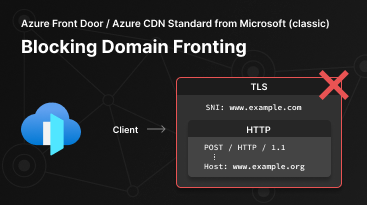
Domain fronting is a network technique that enables an attacker to conceal the actual destination of a request by sending traffic to a different domain in HTTP host header than the one used in the TLS/SSL handshake. For example, an attacker can use a valid domain www.example.com in the TLS/SSL handshake but send traffic to a different domain www.example.org by specifying a different host header in subsequent http requests. The domain www.example.org might have certain restrictions (regional access restrictions, etc.) on it. With domain fronting, it is possible for the attacker to circumvent these restrictions. To the outside observers, all subsequent traffic appears to be headed to www.example.com, with no ability to discern the intended destination of www.example.org for requests within that traffic.
How does Azure Front Door and Azure CDN Standard from Microsoft (classic) block domain fronting?
Azure Front Door and Azure CDN Standard from Microsoft (classic) protects against domain fronting occurring on domains hosted across different Azure subscriptions. The Server Name Indication (SNI) in TLS/SSL handshake and HTTP host header, whether they are the same or different, must be configured under the same Azure subscription. They must be further configured with HTTPS enabled and added to routes as shown in the bullet points below. If a non-standard client creates a TLS/SSL connection to a domain name www.example.com in one Azure subscription, but then makes an HTTPS request for an unrelated name www.example.org in another Azure subscription, Azure Front Door and Azure CDN Standard from Microsoft (classic) returns a HTTP 421 Misdirected Request error code response. This error will be logged with an errorInfo of SSLMismatchedSNI in the log of the host header domain that is hosted on Azure Front Door or Azure CDN Standard from Microsoft (classic). The errorInfo will only be captured under the Azure Front Door or Azure CDN Standard from Microsoft (classic) profile with the configured custom domain. In this example, the error is not logged into the TLS/SSL SNI domain www.example.com logs, but in the logs of the host header domain www.example.org logs.
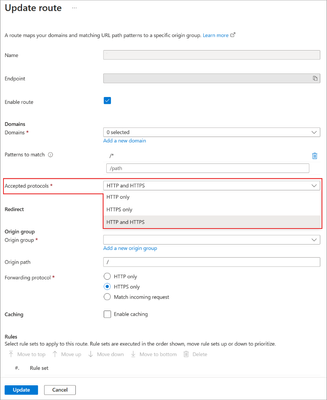
- For Azure Front Door, include the two domains in the routes/routing rules and select HTTP and HTTPS or HTTPS as the Accepted Protocol in the routes/routing rules.
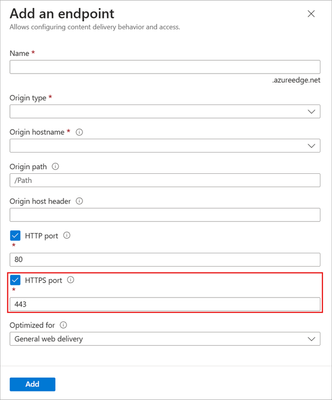
- For Azure CDN Standard from Microsoft (classic), enable the HTTPS port on endpoint as shown below.
What is the outcome of blocking enforcement? How does it affect me? What actions should I take?
The enforcement of prohibiting domain fronting will not affect regular users who access the service through well-behaved browsers, API, SDK, etc. It will only prevent traffic that attempts to evade the domain fronting check by using mismatched SNI extension and HTTP HOST headers.
If you have a specific business requirement for the SNI and host header to be mismatched, you need to configure them properly on Azure Front Door and Azure CDN Standard from Microsoft (classic). Please refer to the steps in the preceding section How does domain fronting block work on Azure Front Door and Azure CDN Standard from Microsoft (classic)?
How can I check if my Azure Front Door and Azure CDN Standard from Microsoft (classic) resources display domain fronting behavior?
Azure Front Door will introduce two new log fields, which will be available by the week of December 25, 2023.
Result- which will indicate if there is a SNI and host mismatch. When you see “SSLMismatchedSNIunder the Result field, it means the request passed through successfully, but with a warning of a mismatch. Such request would be rejected by Azure Front Door after January 22, 2024, due to violating domain fronting. When you seeSSLMismatchedSNIunderErrorInfo, it means the request was already blocked by domain fronting.Sni- which will provide the specific SNI to compare with host fromrequestUrifor further actions.
Once the log fields are supported, you need to enable access log and run the following query to obtain the list of domains with SNI/host mismatch. You can adjust the query per your needs.
Note: To run the query for Azure CDN Standard from Microsoft (classic), please replace the first where condition with | where ResourceProvider == "MICROSOFT.CDN" and Category == "AzureCdnAccessLog". To run the query for Azure Front Door (classic), please replace the first where with | where ResourceProvider == "MICROSOFT.NETWORK" and Category == "FrontdoorAccessLog".
AzureDiagnostics
//AFD standard/premium, run this to determine if any of the resources have domain fronting behavior
| where ResourceProvider == "MICROSOFT.CDN" and Category == "FrontDoorAccessLog"
| where result_s == "SSLMismatchedSNI" or errorInfo_s == "SSLMismatchedSNI"
| project TimeGenerated, clientIp_s, sni_s, requestUri_s, userAgent_s
AzureDiagnostics
//AFD standard/premium, run this to determine if any of the resources have domain fronting behavior but not have domain fronting blocking enabled
| where ResourceProvider == "MICROSOFT.CDN" and Category == "FrontDoorAccessLog"
| where result_s == "SSLMismatchedSNI"
| project TimeGenerated, clientIp_s, sni_s, requestUri_s, userAgent_s
AzureDiagnostics
//AFD standard/premium, run this to determine if any of the resources have domain fronting behavior and have domain fronting blocking enabled.
| where ResourceProvider == "MICROSOFT.CDN" and Category == "FrontDoorAccessLog"
| where result_s == "SSLMismatchedSNI"
| project TimeGenerated, clientIp_s, sni_s, requestUri_s, userAgent_s
Published on:
Learn moreRelated posts
Routing options for VMs from Private Subnets
Virtual Machines deployed in Azure used to have Default Outbound Internet Access. Until today, this allows virtual machines to connect to...
Secure, High-Performance Networking for Data-Intensive Kubernetes Workloads
The intersection of Generative AI and cloud computing has been transforming how organizations build and manage their infrastructure. The deman...
Network Connectivity for RISE with SAP S/4HANA Cloud Private Edition on Azure
In this article, we will explore different ways to connect to RISE with SAP S/4HANA Cloud Private Edition deployment on Azure, guiding yo...
Optimize Azure Landing Zone with Azure Virtual Network Manager IP Address Management
Optimize Azure Landing Zone with Azure Virtual Network Manager IP Address Management What you will learn from this blog This blog explores how...
ExpressRoute Metro is now generally available!!
We are excited to announce general availability of ExpressRoute Metro, a new private connectivity architecture designed to enhance network res...
ExpressRoute guided configuration of multi-site circuits and connections is generally available
ExpressRoute guided experience for configuring multi-site resiliency circuits and connections is generally available in Azure public cloud. Th...
Manage NSG association on Subnets via Azure Policy
In this blog article, we will cover how to deny the creation of a subnet in a Virtual Network if the subnet does not have a Network Sec...
Effortless Private Endpoint Management in Azure Landing Zones: A Streamlined and Compliant Approach
1. Challenge In Azure Landing Zones, the network infrastructure, including components like VNET Gateways and ExpressRoute circuits, is part of...
Unlocking Secure VM Connectivity with Azure Bastion
In today’s digital landscape, where security breaches are an unfortunate reality, safeguarding sensitive data and infrastructure has become mo...
Use cases of Advanced Network Observability for your Azure Kubernetes Service clusters
Introduction Advanced Network Observability is the inaugural feature of the Advanced Container Networking Services (ACNS) suite bringing...