Loading...

Optimizing Azure Firewall logging costs
Optimizing Azure Firewall logging costs

Introduction

Last year Microsoft introduced resource specific structured logging in Azure Firewall, it is well documented here. This year it was announced the general availability as described here.

In this post I will dive deep and show the expected cost optimization of this new structured logging, and what is causing this saving. I will use a sample record of a network rule log to explain it. Please note that this saving applies only if the sink is Log Analytics.

Log Analytics

Log Analytics is a widely used logging solution from Microsoft and its main cost driver is the ingestion, measured in GB. Every ingested network rule, application rule, NAT rule will be logged, if configured, and have some bytes charged against your subscription based on your price sheet.

You can find the amount of charged bytes for a record using the hidden column _BilledSize. The query below show how to extend the output to include it, and can be used on any table. You can find more information about this column here.
 
<table> | extend _BilledSize

Let's now take a look at how much bytes every option will ingest.
 

Legacy Categories

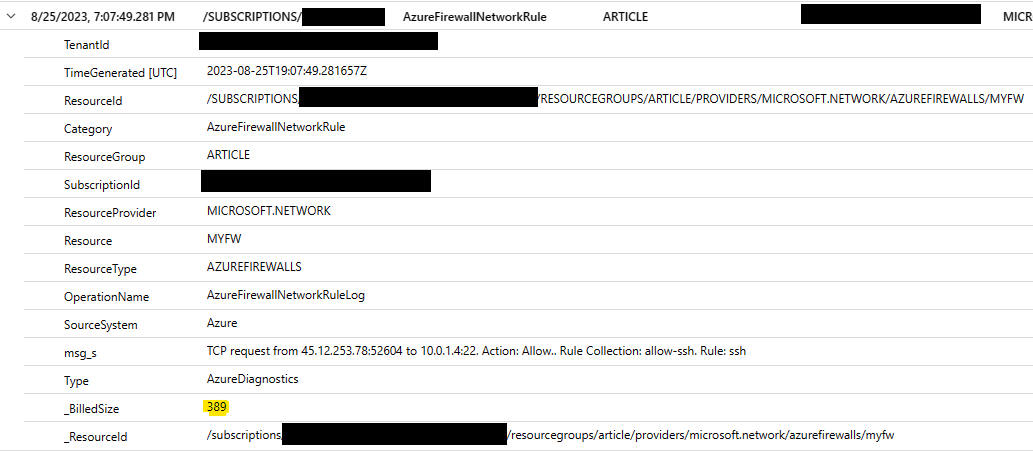
In the image below you can see that this simple network rule log hit will cost around 389 bytes distributed over 15 columns.
All the network connection details are stored inside a single string column called msg_s. There are a lot of other columns present which account for the most part of the _BilledSize.
 
img01.png

For instance, to search all requests made by a specific source IP address we must first parse the msg_s column to extract this IP address, which will need some CPU cycles to manipulate the strings, apply regular expressions, and other operations. For one record the amount of CPU cycles is so low that doesn't matter, but when you have millions or even billions of records it will take a lot of time just to parse this string and this time will add to the total runtime of the query.


New Categories in Resource Specific Table
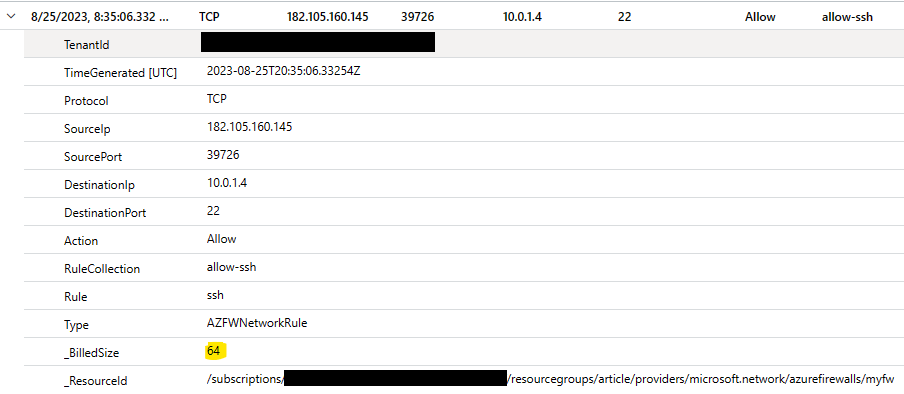
Using the new categories and saving to resource specific tables is the most effective way of storing firewall logs.
 
img03.png

The use of these new tables allowed the Azure Firewall team to tune and exclude around 8 columns which were not needed. Comparing this table with the previous one the number of columns went from 21 to 13. Columns like  ResourceId, Category, ResourceGroup, SubscriptionId, ResourceProvider, Resource, ResourceType, and SourceSystem, all long strings, were completely removed.

The savings were huge, from 389 bytes per record to only 64 bytes!

Conclusion

To conclude this post below you can find a summary of the _BilledSize for the destination tables used to log network rules.
 
Destination Table _BilledSize Saving
Azure Diagnostics 389 0%
Resource Specific 64 83%

The numbers don't lie, using the new categories and storing the data in the resource specific tables expect a cost saving of Log Analytics ingestion of around 80% for Azure Firewall.

From the field with these small changes a customer was able to reduce their Log Analytics ingestion from 28 GB per day to 3 GB per day without losing any information. Just with simples changes in the way the data was logged.

Configure your log settings like shown below to benefit from this.
 
img06.png

The only downside you might face is your queries will need to be changed, but the cost and performance optimizations we have seen are worth.

If this change doesn't help you optimize your Azure Firewall logging cost you can try the approach described here.

Hope it helps you optimize your costs and understand the reason behind the saving!

Published on:

Learn more
Azure Network Security Blog articles

Azure Network Security Blog articles

Share post:

Related posts

IPv6 Adoption: Enhancing Azure WAF on Front Door

The transition to IPv6 is a significant step for enterprise corporations, reflecting the evolution of internet technology and the need for a l...

1 year ago

Azure WAF’s Bot Manager 1.1 and JavaScript Challenge (Preview): Navigating the Bot Threat Terrain

Introduction   Bots are a common presence on the internet, serving a range of functions from automating customer service to indexing page...

1 year ago

Private IP DNAT Support (Preview) and Scenarios with Azure Firewall

Introduction Azure Firewall is a cloud native security service to protect your workloads running in Azure. It is a stateful firewall as a serv...

1 year ago

Getting Started with Azure DDoS Protection REST API: A Step-by-Step Guide

REST API is a cornerstone in the management of resources on Azure, providing a streamlined and efficient approach for executing create, read, ...

1 year ago

Monitoring Azure DDoS Protection Mitigation Triggers

Monitoring Azure DDoS Protection Mitigation Triggers In today’s digital landscape, Distributed Denial of Service (DDoS) attacks pose a signifi...

1 year ago

Azure WAF’s Bot Manager 1.1 and JavaScript Challenge: Navigating the Bot Threat Terrain

Introduction   Bots are a common presence on the internet, serving a range of functions from automating customer service to indexing page...

1 year ago

Utilizing Azure DDoS Protection Workbook for DDoS attack traffic Analysis

In today's digital age, the security of applications, servers, and networks is paramount. One of the most significant threats to this security...

1 year ago

Independent Configuration of Size Enforcement and Inspection Limits in Application Gateway WAF

Introduction   In the constantly changing world of cybersecurity, both flexibility and effective security are essential for safeguarding ...

1 year ago

Private IP DNAT Support and Scenarios with Azure Firewall

Introduction Azure Firewall is a cloud native security service to protect your workloads running in Azure. It is a stateful firewall as a serv...

1 year ago

Monitoring traffic flows in Azure Firewall using Virtual Network Flow Logs

Azure Firewall is a managed service designed to protect your Azure Virtual Network resources, providing advanced threat protection and advance...

1 year ago

Newsletter

Get the latest Dynamics 365 and Power Platform content in your inbox

A curated digest of community blogs, product news, videos, and podcasts — delivered without the noise.

Weekly updates Unsubscribe anytime Fresh community picks
We use your email only for the newsletter and you can unsubscribe at any time.
By subscribing, you agree to the privacy policy.