
Announcing Azure Firewall Upgrade/Downgrade General Availability

We're excited to see Azure Firewall's growing popularity and the positive feedback we are getting from the market. That's why we're pleased to let you know that Azure firewall Standard and Premium now support an easy upgrade and downgrade operation, which is now generally available.
Azure Firewall is a cloud-native firewall as a service offering that enables customers to centrally govern and log all their traffic flows using a DevOps approach. The service supports both application and network-level filtering rules and is integrated with the Microsoft Defender Threat Intelligence feed to filter known malicious IP addresses and domains. Azure Firewall is highly available with built-in auto-scaling.
Why should you upgrade your Firewall Standard? Because Azure Firewall Premium has several additional features compared to Azure Firewall Standard. Some of these features include URL filtering, intrusion detection and prevention, TLS inspection and more comprehensive threat intelligence capabilities. This makes Azure Firewall Premium SKU more suitable for organizations with more complex network architectures, regulatory compliance and security requirements.
In this blog post, we'll explore what this new feature is, how it works, and the benefits it provides.
What is Firewall Upgrade/Downgrade capability?
Azure Firewall Upgrade/Downgrade is a new capability that simplifies the process of upgrading your Azure Firewall Standard to the Premium SKU and downgrading your Azure Firewall Premium to Standard SKU. This feature allows you to upgrade your firewall without service downtime, with a single click of a button. The new capability enhance the existing migration procedure and eliminate the need for manual operations which are prone to errors.
In the upgrade process, users can select the policy to be attached to the upgraded Premium SKU, either by using an existing Premium Policy or by utilizing their existing Standard Policy. Customers can utilize their existing Standard policy and let the system automatically duplicate, upgrade to Premium Policy, and attach it to the newly created Premium Firewall.
Upgrading a firewall can be a time-consuming and complex process, especially in large and complex environments. It requires careful planning, testing, and execution to ensure that the upgrade process goes smoothly and does not cause any disruptions to the network.The new upgrade feature in Azure Firewall simplifies the upgrade process by reducing the effort and time required to upgrade the firewall. Instead of having to go through a lengthy and complex process, administrators can now upgrade the firewall with just a single click of a button.
This means that administrators can spend less time planning and executing upgrades, and more time focusing on other important tasks such as improving network security and performance. Additionally, the reduced time and effort required for upgrades can result in cost savings for organizations, as administrators can allocate their time and resources to other important tasks.
Furthermore, the new upgrade feature also ensures that during the upgrade/downgrade process, the firewall is always up and running and service downtime is not expected. This means that organizations can reduce the risk of cyber-attacks and other security incidents that may occur during Azure Firewall service downtime.
How Does It Work?
The feature simplifies the upgrade/downgrade process by automating the entire process. It automatically upgrades all Azure firewall instances, one after the other. It also ensures that the upgrade process does not impact your network traffic, ensuring business continuity. It allows you to automatically upgrade your standard policy to a premium so it will match your upgraded Premium SKU.
To use the upgrade/downgrade feature, you can follow these simple steps:
- Navigate to the Azure Firewall resource in the Azure portal.
- In the overview section, click on the "Change SKU" button.
- Select the SKU type you wish to upgrade/downgrade your existing firewall to.
- Select the Firewall policy you wish to attach to your upgraded/downgraded firewall.
- Click Upgrade button and Azure Firewall will automatically upgrade to the Premium SKU.
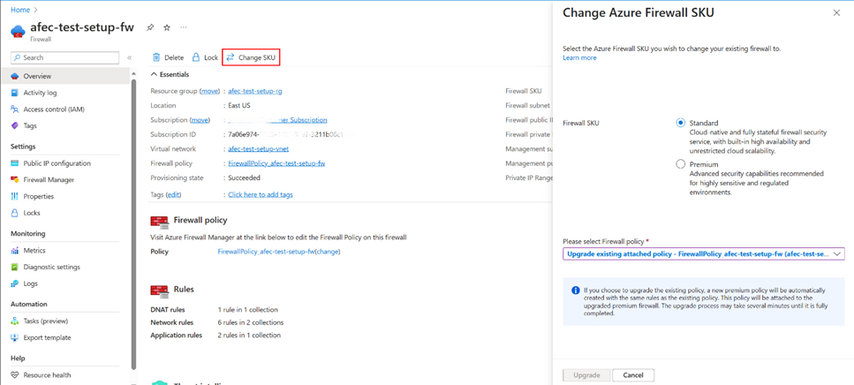
Before beginning the upgrade or downgrade process, it's important to think through the performance considerations of your solution. The process itself usually takes a few minutes and can be tracked via the Azure portal notification bar. Once the operation is complete, users will receive a notification that it has finished.
Benefits of Upgrade/Downgrade capability
The new Upgrade/Downgrade capability provides several benefits, including:
- Simplified process: With just one click of a button, you can upgrade both your firewall and your policy to Premium, eliminating the need for manual operation.
- Ease of Use: The new capability is available through the Azure portal as well as via REST API, PowerShell, and Terraform.
- Improved security: Upgrading to the Premium SKU ensures that your firewall is up to date with the latest security features and patches.
- Reduced downtime: The upgrade process is seamless and does not impact network traffic, ensuring business continuity.
- Time-saving: Adminstrators and SoC personal save time by automating the entire upgrade/downgrade process.
Conclusion
Azure Firewall Upgrade/Downgrade feature is an excellent addition to the Azure Firewall capabilities. It simplifies the upgrade process, improves security, reduces downtime, and saves time. With this new feature, upgrading the Azure Firewall is now more straightforward and hassle-free than ever before. It helps organizations save operational expenses by reducing the time and effort required for upgrades and downgrades. We hope that this blog post has provided you with valuable insights into this new capability in Azure Firewall.
Learn more
- Azure Firewall Documentation
- Azure Firewall Premium
- Azure Firewall Upgrade/Downgrade
- Forrester names Microsoft a Leader in 2023 Infrastructure-as-a-Service Platform Native Security report
Published on:
Learn moreRelated posts
Routing options for VMs from Private Subnets
Virtual Machines deployed in Azure used to have Default Outbound Internet Access. Until today, this allows virtual machines to connect to...
Secure, High-Performance Networking for Data-Intensive Kubernetes Workloads
The intersection of Generative AI and cloud computing has been transforming how organizations build and manage their infrastructure. The deman...
Network Connectivity for RISE with SAP S/4HANA Cloud Private Edition on Azure
In this article, we will explore different ways to connect to RISE with SAP S/4HANA Cloud Private Edition deployment on Azure, guiding yo...
Optimize Azure Landing Zone with Azure Virtual Network Manager IP Address Management
Optimize Azure Landing Zone with Azure Virtual Network Manager IP Address Management What you will learn from this blog This blog explores how...
ExpressRoute Metro is now generally available!!
We are excited to announce general availability of ExpressRoute Metro, a new private connectivity architecture designed to enhance network res...
ExpressRoute guided configuration of multi-site circuits and connections is generally available
ExpressRoute guided experience for configuring multi-site resiliency circuits and connections is generally available in Azure public cloud. Th...
Manage NSG association on Subnets via Azure Policy
In this blog article, we will cover how to deny the creation of a subnet in a Virtual Network if the subnet does not have a Network Sec...
Effortless Private Endpoint Management in Azure Landing Zones: A Streamlined and Compliant Approach
1. Challenge In Azure Landing Zones, the network infrastructure, including components like VNET Gateways and ExpressRoute circuits, is part of...
Unlocking Secure VM Connectivity with Azure Bastion
In today’s digital landscape, where security breaches are an unfortunate reality, safeguarding sensitive data and infrastructure has become mo...
Use cases of Advanced Network Observability for your Azure Kubernetes Service clusters
Introduction Advanced Network Observability is the inaugural feature of the Advanced Container Networking Services (ACNS) suite bringing...