
Top customer-asked capabilities now available for Servicing profiles

We are pleased to announce the general availability of some all-new Servicing profiles capabilities. You spoke, we listened. Based on input from admins from around the world, we added and extended controls for Servicing profiles. The overall goal remains unchanged: Provide a modern and easy way to manage your Microsoft 365 Apps updates. If you haven't yet, check out our documentation or introduction video for Servicing profiles.
But, with no further ado, here are the new capabilities we will cover in the blog post:
- Wave Customization enables you as an admin to create customized deployment rings and stagger the rollout of updates
- Rollback by Groups acts as a safety net in case of regressions
- Exclude Devices allows you to exclude devices from automated updates
- Option to target all devices simplifies the configuration of Servicing profiles if you simply want to go all in
- Adjusted disk space control removes the lower limit of required disk space for updates
Wave Customization aka custom Rollout waves
By default, a Servicing profile staggers an update deployment across four days, updating a random subset of devices each day. With Rollout waves, you can customize which devices/users should get the updates first, second, etc. This allows you to build deployment rings for e.g., testing, piloting, and full release. Leveraging Azure AD (Active Directory) groups, you can create up to three custom waves, a last "catch all" wave will be added automatically.
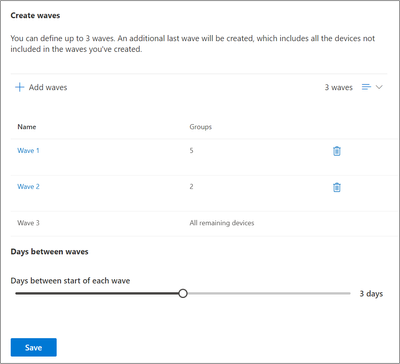
You can also set the number of days between the start of each wave. Going forward, the service will automatically execute set waves with each new update released. On the Overview tab you can always track which wave is currently deploying and how many devices have already installed the assigned updates.
For more information, check out our documentation: Overview of servicing profile in the Microsoft 365 Apps admin center. We also have a deep dive video available with additional details; a full admin UI walkthrough as well as insights into the design process:
Rollback by Groups
We extended the Rollback to support groups. The feature provides you with an extra safety net when it comes to updates. In case one of those is causing issues, you can roll devices back to the last known good build. Instead of manually selecting individual devices, you can now also leverage the flexibility of Azure AD groups.

Exclude Devices
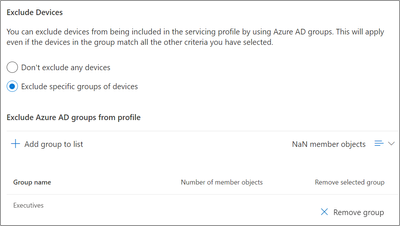
Like the ability to use Azure AD groups to target only specific devices or users with Servicing profiles, now you can implement the reverse approach: Target all devices except for certain ones. This might be useful if you need to update certain devices manually through other processes, such as Remoted Shared Desktop (RDS) hosts, or just them on certain update channels while everything else should be serviced automatically. Just add the users or devices to Azure AD groups, specify them in the profile and those devices/users will be left alone.
Target all devices
Servicing profiles offer you controls to target specific subsets of devices, such as based on the update channel, usage of macros and more. Should you go all in? Should all Microsoft 365 Apps instances, managed or unmanaged, from all update channels, just go to the Monthly Enterprise Channel and be kept current? We got you covered. There is a new toggle in the Servicing profile that simplifies the configuration. Just disable the use of additional selection criteria and all your devices will be serviced (Azure AD group filtering is still available).

Disk space control
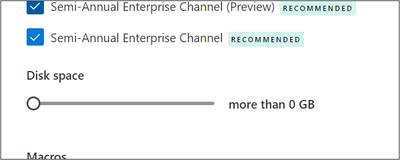
The final feature is a small, but important adjustment. Previously, the lower limit of the disk space selection criteria was five gigabytes. So, devices with less free disk space were excluded from Servicing profiles managing the monthly updates. Most Microsoft 365 Apps updates require less space on disk during the update process, which is why we adjust the lower limit. Now you can bring it down to zero, which means an update attempt will always be performed.
Try it out and share your feedback!
If you haven't before, give Servicing profiles a go. You can use the Azure AD group filtering feature to pilot the service with a small group first. With these new features giving you more control and confidence, consider expanding existing pilots to more devices.
We're looking forward to your feedback! Let us know what you think in the comments below or through the "Give feedback" feature on the Servicing profiles page.
Before we wrap, we want to give a quick shoutout to the customers who partnered with us to bring these features to life! You had a tremendous impact during the design, build and release stages; helping us to meet the needs of admins. We also want to give a shoutout to the Microsoft 365 Apps Ranger team. Check out their YouTube channel and subscribe while you're there!
Thanks, and keep deploying!
Continue the conversation by joining us in the Microsoft 365 Tech Community! Whether you have product questions or just want to stay informed with the latest updates on new releases, tools, and blogs, Microsoft 365 Tech Community is your go-to resource to stay connected!
Published on:
Learn moreRelated posts
Announcing the General Availability of the Microsoft 365 Document Collaboration Partner Program
Empowering Seamless Collaboration for Modern Workforces We are thrilled to announce the general availability of the Microsoft 365 Docume...
Favorite Copilot Prompts
(Amber Plumb interviewing Michael Morales and Allison Sweet) The power of M365 Copilot is transforming the way our support team operates...
Favorite Microsoft 365 Copilot Prompts
(Amber Plumb interviewing Michael Morales and Allison Sweet) The power of M365 Copilot is transforming the way our support team operates...
Boost digital event engagement with Voting and Archiving in Teams Q&A
Managing and delivering effective town halls is key to enabling two-way dialogue with leaders in today’s hybrid world. Microsoft Teams Q&A...
Prepare now for key end of support moments in 2025
One year from today, on October 14, 2025, support will end for all Office 2016 and 2019 suites, standalone apps, and servers. This includes:&n...
Everything you should know about Visio 2016 and Visio 2019 end of support
On October 14, 2025, Visio 2016 and Visio 2019 will reach end of support. After this date, Visio 2016 and Visio 2019 will no longer receive se...
Limit frontline worker access to Teams when off shift
We’re excited to announce that the frontline working time feature is now generally available! This feature allows admins to block or warn acce...
We are removing Feed on Microsoft 365 (Office)
As part of our ongoing efforts to streamline and enhance user experiences, we will be retiring the Feed feature (shown in figure 1 below) on t...
Leveraging Partner Apps to Deliver on the Promise of AI-Led Productivity
The advent of generative AI is driving a rethink of what outcomes we deserve from our productivity software – from gains in efficiency to more...
What’s new in FLW shared devices
Discover the Latest Enhancements in Shared Device Mode (SDM) We are excited to announce a series of new features in Shared Device Mode ...