
Azure landing zones custom archetypes using Terraform
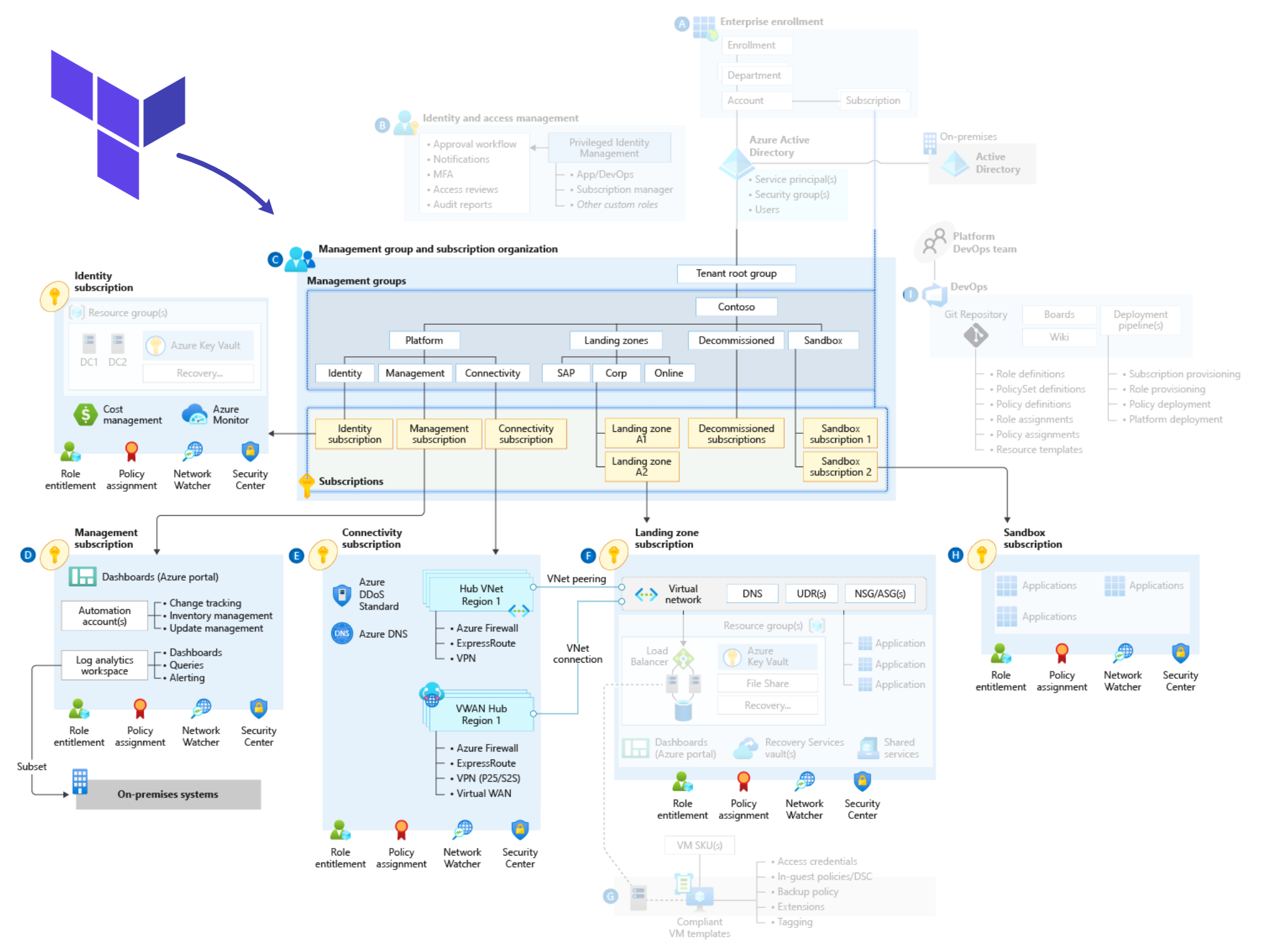
In this post, I will explain how to use custom archetypes of Azure Landing Zones and how to automate this deployment using enterprise landing zones module in terraform
Azure Landing Zones are an important aspect of cloud adoption for organizations. They provide a foundation for consistent deployment of resources, governance, and security across an organization's Azure environment. However, out-of-the-box Azure Landing Zones may not meet the specific needs of all organizations. This is where custom archetypes can help us to meet these particular requirements.
Custom archetypes are based on the organization's specific needs, such as its industry, regulatory compliance, and security requirements. Custom archetypes can be designed to meet the specific needs of different business units within an organization.
One of the biggest benefits of custom archetypes is that they can help organizations reduce the time and effort required to deploy a Landing Zone. Custom archetypes can be pre-configured with the necessary components, such as virtual networks, subnets, security policies, and Azure resources, that are required to support the organization's workload. This can help organizations speed up the deployment process and ensure consistency across all of their Azure environments.
Another benefit of custom archetypes is that they can help organizations ensure compliance with regulatory requirements. Custom archetypes can be designed to meet specific regulatory requirements, such as SWIFT, HIPAA, PCI, or GDPR. This can help organizations avoid costly fines and reputational damage that can result from non-compliance.
Custom archetypes can also help organizations improve their security posture. By designing custom archetypes with security in mind, organizations can ensure that their Azure environments are secure from the ground up.
Custom archetypes can be designed to include security policies, such as network segmentation, access control (custom azure roles) , and encryption, that meet the organization's specific security requirements.
In conclusion, custom archetypes are a powerful tool that organizations can use to tailor Azure Landing Zones to meet their specific needs. By designing custom archetypes, organizations can reduce the time and effort required to deploy a Landing Zone, ensure compliance with regulatory requirements, and improve their security posture. If you're considering adopting Azure, it's worth exploring the benefits of custom archetypes for your organization.
In this example I will create a custom archetype particularly for financial organizations that require more strict controls to comply with the industry regulation.
Components
Let review the components that make part of this example so there is a clear understanding on how create and integrate a custom archetype in azure landing zones This set of instructions will get you started with the deployment of a custom archetype and custom roles using the terraform module.
- We will find the custom archetype definition in the archetype_definition_es_bankonline.json file, the name of the custom archetype is "es_bankonline" and it has assigned to it the SWIFT-CSP policy that enables particular controls for workloads that have to be complaint with SWIFT framework, also has assigned other two policies that determine the authorized regions to deploy resources.
{ "es_bankonline": { "policy_assignments": ["Deny-Resource-Locations", "Deny-RSG-Locations","SWIFT-CSP-CSCF"], "policy_definitions": [], "policy_set_definitions": [], "role_definitions": [], "archetype_config": { "parameters": { "Deny-Resource-Locations": { "listOfAllowedLocations": [ "East Us", "West Us" ] }, "Deny-RSG-Locations": { "listOfAllowedLocations": [ "East Us", "West Us" ] } }, "access_control": { } } } } - The assignment to an existing azure policy is done in the policy_assignment_SWIFT-CSP-CSCF-v2022.json file
{ "name": "SWIFT-CSP-CSCF", "type": "Microsoft.Authorization/policyAssignments", "apiVersion": "2019-09-01", "properties": { "description": "SWIFT's Customer Security Programme (CSP) helps financial institutions ensure their defences against cyberattacks are up to date and effective, to protect the integrity of the wider financial network. Users compare the security measures they have implemented with those detailed in the Customer Security Controls Framework (CSCF). These policies address a subset of SWIFT controls. For more information, visit https://docs.microsoft.com/azure/governance/policy/samples/swift-cscf-v2021", "displayName": "SWIFT-CSP-CSCF", "notScopes": [], "parameters": { }, "policyDefinitionId": "/providers/Microsoft.Authorization/policySetDefinitions/7bc7cd6c-4114-ff31-3cac-59be3157596d", "nonComplianceMessages": [ { "message": "SWIFT-CSP-CSCF controls {enforcementMode} be enforced" } ], "scope": "${current_scope_resource_id}", "enforcementMode": null }, "location": "${default_location}", "identity": { "type": "SystemAssigned" } } - The custom role definition is described in the role_definition_es_bankonline_appowner.tmpl.json file
{ "name": "617e86e8-e111-4d69-a120-ed3aec64717a", "type": "Microsoft.Authorization/roleDefinitions", "apiVersion": "2018-01-01-preview", "properties": { "roleName": "bankOnline app owner", "description": "Owner for the bankonline management group, it has all permission except modify / delete vnets", "type": "customRole", "permissions": [ { "actions": [ "*" ], "notActions": [ "Microsoft.Network/virtualNetworks/write" ], "dataActions": [], "notDataActions": [] } ], "assignableScopes": [ "${current_scope_resource_id}" ] } } - This custom role is assigned to the root management group by extending the root archetype in the archetype_extension_es_root.tmpl.json file
{ "extend_es_root": { "policy_assignments": [], "policy_definitions": [], "policy_set_definitions": [], "role_definitions": ["bankOnline app owner"], "archetype_config": { "parameters": {}, "access_control": {} } } } Deployment steps
This set of instructions will get you started with the deployment of a custom archetype and custom roles using the terraform module
-
login to azure using az cli
az login -
clone github repo to get started
git clone https://github.com/mblanco77/alzcustomarchetypetf -
Optionally you can change in the variables.tf file the name of the root_id , root_name and the location where you will deploy the resources.
variable "root_id" { type = string default = "alz-tf1" } variable "root_name" { type = string default = "alz tf1" } variable "primary_location" { type = string default = "eastus" } -
Deploy using Terraform it usually takes around 20 minutes to complete
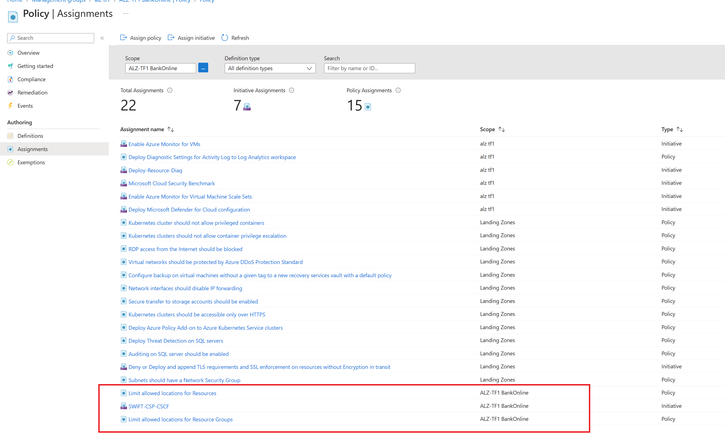
terraform init terraform plan terraform apply - After the deployment finishes, verify the creation of the custom management group creation and the policies that are aplied to it
- Management Group (BankingOnline)
SWIFT policy applied to the management Group
- The final step is to move/create the desired subscription(s) to the bankonline management group in order to inherit the policies and access control that we want to apply to workloads that need to be compliant with the SWIFT framework.
-
Hope this post helps getting you started using custom archetypes in Azure Landing Zones,
additionally you can find all the artifacts related in this github repo https://github.com/mblanco77/alzcustomarchetypetf
Published on:
Learn moreWe can help you with Azure landing zones custom archetypes using Terraform
If you want help implementing, troubleshooting, or improving this product, contact us and we’ll point you in the right direction.
Related posts
Enable IP restriction for a public facing App service
In this blog article, we will cover how to control the app service deployment to support only public facing app service with IP restriction en...
Selecting the Optimal Container for Azure AI: Docker, ACI, or AKS?
Deploying Azure AI services in containers like Docker, Azure Container Instances (ACI), or Azure Kubernetes Service (...
Securing Hardware and Firmware Supply Chains
In the modern cloud data center, ensuring the authenticity, integrity, and security of hardware and firmware is paramount. Firmware is the low...
Liquid Cooling in Air Cooled Data Centers on Microsoft Azure
With the advent of artificial intelligence and machine learning (AI/ML), hyperscale datacenters are increasingly accommodating AI accelerators...
Mt Diablo - Disaggregated Power Fueling the Next Wave of AI Platforms
Authors: Jason Adrian – General Manager, Azure Platform Architecture Laurentiu Olariu – Power Architect, Azure Platform Architecture Banha Sok...
Deny inbound NSG Rule creation via Azure Policy
In this blog article, we will cover how to deny the creation of inbound Network Security Group Rules if the inbound NSG Rule contains&n...
Azure Extended Zones: Optimizing Performance, Compliance, and Accessibility
Azure Extended Zones are designed to bring the power of Azure closer to end users in specific metropolitan areas or jurisdictions, cate...
Inside Maia 100: Revolutionizing AI Workloads with Microsoft's Custom AI Accelerator
Authored by: Sherry Xu, Partner Lead SoC Architect, Azure Maia Chandru Ramakrishnan, Partner Software Engineering Manager As the advanc...
Accelerate Cloud Potential for Your SAP Workloads on Azure with these Learning Paths
Accelerate Cloud Potential for Your SAP Workloads on Azure with these Learning Paths In today's rapidly evolving digital landsc...
Azure Role Assignments Audit Report
Overview: Azure Administrators often come across challenges while tracking multiple Azure role assignments and removals. At present Azur...