
Review and remove AAD inactive users in Public Preview

Howdy folks,
I’m excited to share with you the public preview of access reviews for inactive users, part of Azure Active Directory Identity Governance. We have seen an explosion in collaboration growth over the past two years, both within and between organizations. While this growth has been great for productivity, it’s also expanded the likelihood that “stale” accounts—accounts that were needed at one time, but not any longer—might be lurking in your environment. Examples include former employees who have left the organization, or contractors whose assignments have ended. It’s an easy but powerful way to reduce security risks by uncovering these stale accounts, and removing them if they truly have no purpose going forward.
The public preview of access reviews for inactive users enables administrators to review and remove stale accounts that have not signed in for a certain number of days. Both interactive and non-interactive sign-in activities are covered under sign-in activity. As part of the review process, stale accounts can automatically be removed. This, in turn, improves your organization’s security posture.
Want to help reduce the risk of inactive users? Try the access reviews now. You can specify an inactive duration for up to two years for guest users, or all users.
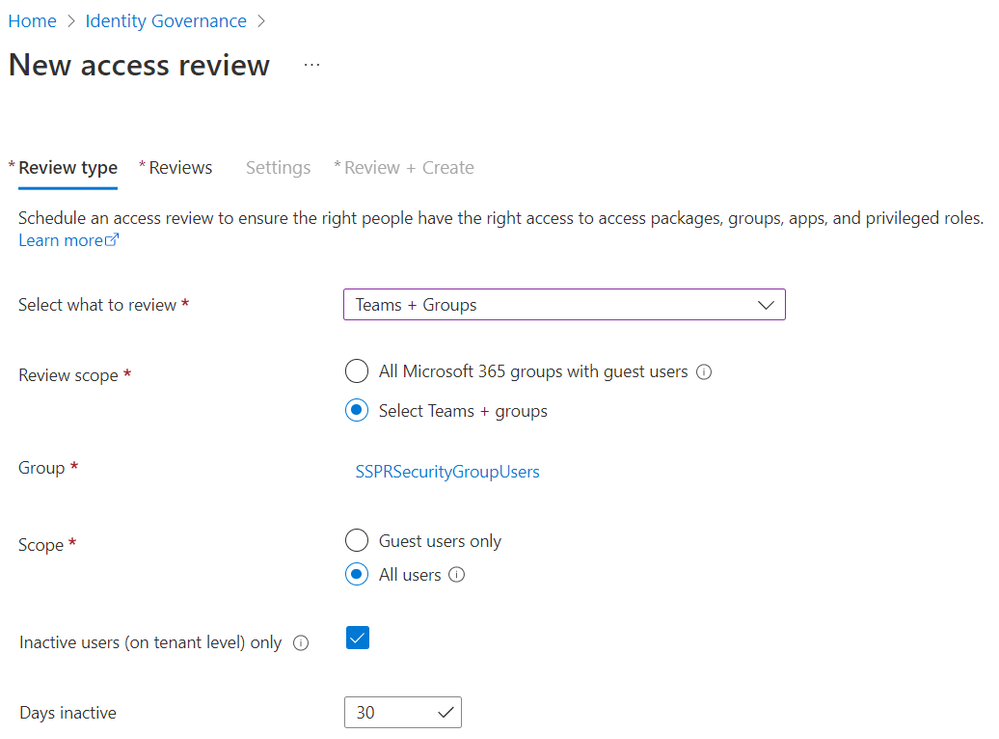
For detailed instructions on how to set up inactive user reviews, see our Azure AD access review documentation. To try these reviews out via our MS Graph APIs (beta), review our MS Graph API documentation.
Best regards,
Alex Simons (Twitter: @Alex_A_Simons)
Corporate Vice President of Program Management
Microsoft Identity Division
Learn more about Microsoft identity:
- Return to the Azure Active Directory Identity blog home
- Join the conversation on Twitter and LinkedIn
- Share product suggestions on the Azure Feedback Forum
Published on:
Learn moreRelated posts
Sync identities from Rippling to Microsoft Entra ID
Today, we’re thrilled to announce that customers using Rippling HCM can now automatically provision users to on-premises Active Directory and ...
Microsoft Entra ID Governance for government
I’m pleased to announce that as of November 1, 2024, Microsoft Entra ID Governance is available for federal agencies, state and local governme...
Update to security defaults
As part of the Secure Future Initiative, we’ve evolved our security approach to align with three security principles: secure by design, secure...
Meet Microsoft Entra at Ignite 2024: November 18-22
Microsoft Ignite is just around the corner, taking place from Monday, November 18, 2024 through Friday, November 22, 2024, in Chicago, Illinoi...
Manage Microsoft Entra ID role assignments with Microsoft Entra ID Governance
I’m excited to announce that we now support Microsoft Entra role assignments in Microsoft Entra ID Governance's Entitlement Management feature...
The latest enhancements in Microsoft Authenticator
Hi folks, I'm thrilled to announce three major Microsoft Entra ID advancements that will help you protect your users with phishing-resi...
Microsoft Security announcements and demos at Authenticate 2024
The Microsoft Security team is excited to connect with you next week at Authenticate 2024 Conference, taking place October 14 to 16 in Carlsba...
What's new in Microsoft Entra - September 2024
We’re excited to announce the general availability of Microsoft Entra Suite—one of the industry’s most comprehensive secure access solutions f...
Explore the key benefits of Microsoft Entra Private Access
The traditional network security models are becoming increasingly ineffective in a world where remote work and cloud services are the norm. Co...
Join us at the Microsoft Entra Suite Showcase!
This fall, we are bringing the Microsoft Entra Suite Showcase to cities worldwide. Join us to explore how our latest advancements in secure id...