
Troubleshooting Service Bus Message Abandon Issue when using JMS Listener
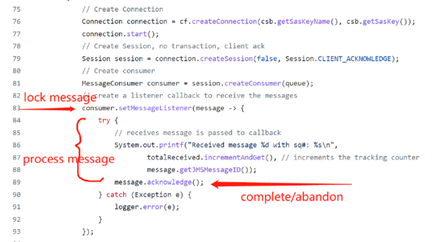
Introduction:
In the Service Bus Peek&Lock receive mode, there are three API that might be invoked after a message is Peeked.
- Complete() API – Message received. Completes the receive operation on a message.
- Abandon() API – Message deliver failed, put the message back to queue with delivery count increased
- Defer() API – Indicates that the receiver wants to defer the processing of the message.
This article will analyze a scenario where messages are abandoned instead of completed when using the JMS approach of the Service Bus receiver.
There are mainly 3 sections in this article:
- What is JMS?
- JMS and Service Bus integration?
- How to mitigate the 'messages abandon' issue?
Section 1: What is JMS?
JMS (Java Message Service) is an API that provides the facility to create, send and read messages. It provides loosely coupled, reliable and asynchronous communication.
For a more comprehensive understanding of JMS, here’s a tutorial: The JMS API Programming Model - The Java EE 6 Tutorial (oracle.com)
Section 2: How is it integrated with Service Bus?
Initially, we need to download the JMS JAR file and we recommend you download the latest version of the Apache Qpid JMS AMQP 1.0 client library: Releases - Apache Qpid™
In JMS source code, there’s a property called ACK_TYPE which is used to identify message status.
For example, as the sample code shared on this GitHub, when executing the message.acknowledge() API, it will internally pass the value of ACK_TYPE to Service Bus Server. According to the ACK_TYPE, Service Bus will invoke the correlated API accordingly.
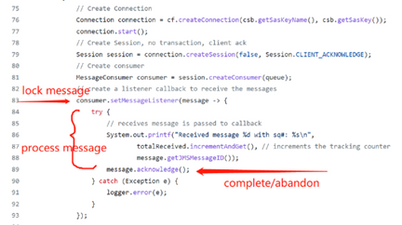
From JmsMessageConsumer class, we can know that the ACK_TYPE property will be internally used by JMS SDK when invoking the acknowledge() method. For example:
|
private JmsInboundMessageDispatch doAckConsumed(final JmsInboundMessageDispatch envelope) throws JMSException { try { session.acknowledge(envelope, ACK_TYPE.ACCEPTED); } catch (JMSException ex) { signalExceptionListener(ex); throw ex; } return envelope; } |
Accordingly, there are declarations for all 5 ACK_TYPE in the class above.
When using Service Bus JMS approach, the AMQP disposition and Service Bus operation mapping is shown below:
|
ACCEPTED = 1; -> Complete() REJECTED = 2; -> DeadLetter() RELEASED = 3; (just unlock the message in service bus, will then get redelivered) MODIFIED_FAILED = 4; -> Abandon() which increases delivery count MODIFIED_FAILED_UNDELIVERABLE = 5; -> Defer() |
Section 3: How to mitigate the ‘messages abandon’ issue?
Now, back to our topic today, what can we do when we see a lot of abandoned messages in the backend?
Usually, the abandon API will be called mainly in below two scenarios:
- Client disconnects with Server and the abandon API will be called by Service Bus server side in case message lost
- Client calls the Abandon API to put the message back in to queue because the client cannot process the message at present.
We could check the metrics in the service bus portal, to confirm whether the server is in a healthy status.
However, in most scenario, the abandon API is invoked due to the performance issue on client side which result in the client can’t process the message in time and even exceeding the max Lock duration. This will also lead to a lock lost issue. To improve the client consumer performance, we could check the following things:
- Check whether the client machine that is running the code is experiencing performance issues such as some low threads in the thread pool, high CPU on the Client machine or low memory etc.
- Check application receive mode. If there are large volumes of messages, we could suggest using asynchronous receives JMS Listener. Here is the reference.
- Check whether your client is using JmsDefaultPrefetchPolicy with the default setting of a prefetch value of 1000.
In JmsConnectionFactory (qpid-jms-client-0.59.0_source\qpid-jms-client-0.59.0_source_from_Procyon\org\apache\qpid\jms)

JmsDefaultPrefetchPolicy( qpid-jms-client-0.59.0_source\qpid-jms-client-0.59.0_source_from_Procyon\org\apache\qpid\jms\policy\JmsDefaultPrefetchPolicy.java)

It means that if the Client is not able to process a 1000-messages within the Service Bus lock duration, it will likely end up losing locks on some of the already prefetched messages. In this case, we can reduce this prefetch size
4. If some particular messages are expected to take more time to process, we could consider increasing the lock duration to a greater value. We need to notice that the maximum Lock duration is 5 mins.
Published on:
Learn moreRelated posts
Azure Storage - TLS 1.0 and 1.1 retirement
Overview TLS 1.0 and 1.1 retirement on Azure Storage was previously announced for Nov 1st, 2024, and it was postponed recently to 1 year later...
Efficient Management of Append and Page Blobs Using Azure Storage Actions
Overview In Azure Storage, Blob Lifecycle Management (BLM) allows you to automate the management of your data based on rules defined by...
[Azure AI Search] Internal Server Error when creating CMK encrypted objects
Scenario Customers follow the Microsoft doc to create CMK encrypted objects (data source, index etc.), but get the 500 Internal Serv...
Optimizing Azure Table Storage: Automated Data Cleanup using a PowerShell script with Azure Automate
Scenario This blog’s aim is to manage Table Storage data efficiently. Imagine you have a large Azure Table Storage that accumulates logs from ...
Optimizing Azure Table Storage: Automated Data Clean-up using a PowerShell script with Azure Automat
Scenario This blog’s aim is to manage Table Storage data efficiently. Imagine you have a large Azure Table Storage that accumulates logs from ...
Restoring Soft-Deleted Blobs with multithreading in Azure Storage Using C#
Blob soft delete is an essential feature that safeguards your data against accidental deletions or overwrites. By retaining deleted data for a...
Performing simple Azure Table Storage REST API operations using curl command.
The blog provides guidance to perform simple Table Storage REST API operations such as Create table, Delete Table, Insert entity, Delete entit...
Bulk delete all the old jobs from the batch account
Deleting a Job also deletes all Tasks that are part of that Job, and all Job statistics. This also overrides the retention period for Task dat...
Utilizing Azure Storage and Runbooks for scheduled automated backups of Azure SQL Databases
In this article, we are going to provide detailed steps to create a scheduled Azure SQL Database backup to storage account using automation. T...
[Azure Service Bus] JMS messages getting dead-lettered
The article discusses a problem where numerous messages end up in the dead letter queue (DLQ) when the JMS service bus consumer connects to th...