
Validate SpringShell Vulnerabilities with Azure Network Security
Author: Eliran Azulai, Principal Program Manager, Azure Networking
Co-author: Gunjan Jain, Principal PM Manager, Azure Networking
If you were wondering how to protect your resources from the latest Spring Framework exploits, this blog will guide you step-by-step on how to detect and protect against SpringShell vulnerabilities using our native network security services, Azure Firewall Premium and Azure Web Application. You can utilize one of these services or all of them for a Multi-layered security approach.
For more in-depth information on the SpringShell vulnerability and guidance for protection and detection, please check out the blog published by the Microsoft Threat Intelligence Team.
Prerequisites for each service
- Enable IDPS and TLS inspection on Azure Firewall Premium
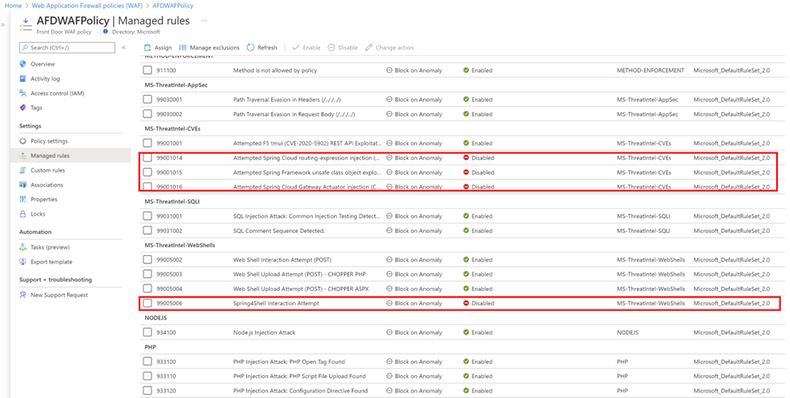
- Enable SpringShell WAF rules on your Azure Front Door WAF (they are disabled by default):
- Rule group: MS-ThreatIntel-WebShells, Rule Id: 99005006 – Spring4Shell Interaction Attempt
- Rule group: MS-ThreatIntel-CVEs, Rule Id: 99001014 – Attempted Spring Cloud routing-expression injection (CVE-2022-22963)
- Rule group: MS-ThreatIntel-CVEs, Rule Id: 99001015 – Attempted Spring Framework unsafe class object exploitation (CVE-2022-22965)
- Rule group: MS-ThreatIntel-CVEs, Rule Id: 99001016 – Attempted Spring Cloud Gateway Actuator injection (CVE-2022-22947)
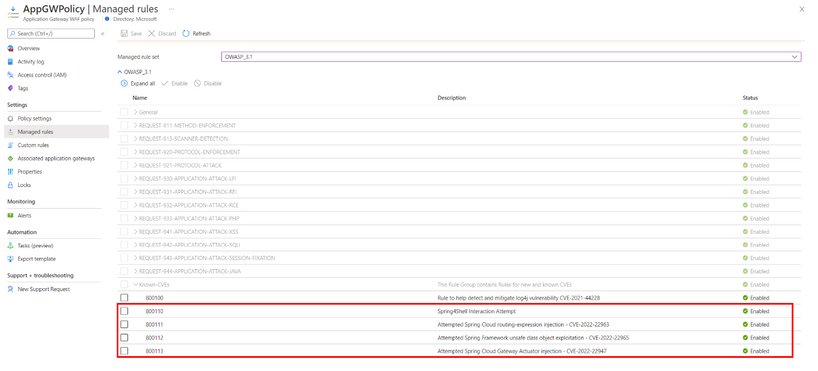
3. No need to enable SpringShell WAF rules on Azure Application Gateway WAF V2 as they are enabled by default:
- Rule Id: 800110 – Spring4Shell Interaction Attempt
- Rule Id: 800111 – Attempted Spring Cloud routing-expression injection – CVE-2022-22963
- Rule Id: 800112 – Attempted Spring Framework unsafe class object exploitation – CVE-2022-22965
- Rule Id: 800113 – Attempted Spring Cloud Gateway Actuator injection – CVE-2022-22947
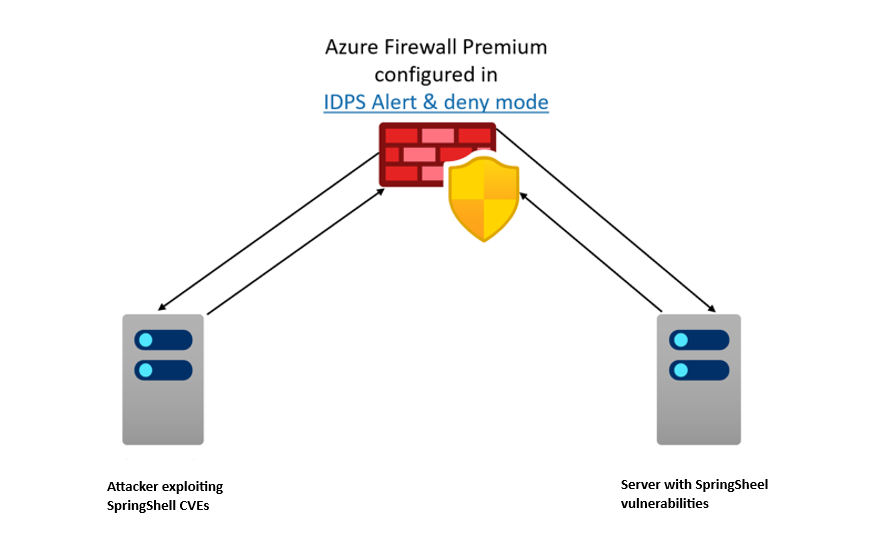
Testing the exploit in Azure Firewall Premium lab
To provide customers with a safe environment to simulate the exploits, we developed a lab setup built with an application that is vulnerable to the Spring4Shell exploit (CVE-2022-22965). You can follow the instructions provided in this GitHub repository to build your own setup.

- Setup requires deploying VNETs in hub-and-spoke model. Firewall, in the hub and spokes, is configured to forward traffic to the hub Firewall for inspection.
- Configure two Linux machines in the spokes as shown in the diagram above.
- Make sure the Spring application is available at http://localhost:8080/helloworld/greeting

- Run the exploit.py script locally to view the exploit impact on the server, as shown below:

- Run the exploit.py script across the network and verify Azure Firewall blocks the exploit.

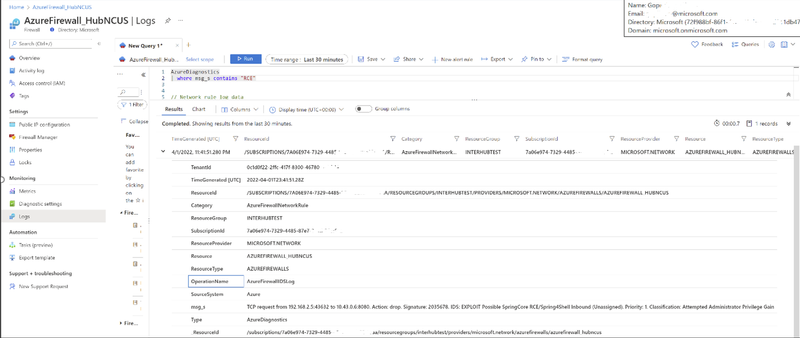
- Check out Premium Firewall logs to verify the exploit was blocked.
Testing the exploit with Azure WAF on Azure Front Door
- Setup Azure Front Door with an attached WAF policy. You can use your existing Azure Front Door deployment or set up a new Azure Front Door with an attached WAF policy.
- Ensure WAF SpringShell rules are enabled to get protection from SpringShell threats.
- Replace domain name with your domain name in the following command and run the command in a browser to simulate the exploit:
- Check Azure Front Door WAF logs to verify the exploit is blocked.

Testing the exploit with Azure WAF on Azure Application Gateway
- Setup Azure Application Gateway WAF v2 with an attached WAF policy. You can use your existing Azure Application Gateway setup or create a new Azure Application Gateway with a WAF policy.
- Replace domain name with your domain name in the following command and run the command in a browser to simulate the exploit:
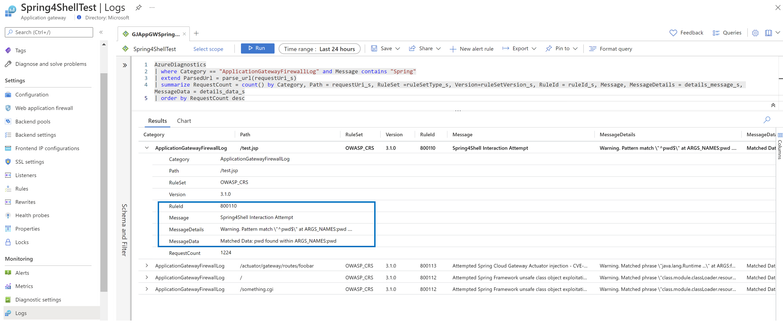
- Check Azure Application Gateway WAF logs to verify the exploit is blocked.
Learn More
Azure Firewall Premium and Azure WAF provide advanced threat protection capabilities to help detect and protect against SpringShell and other exploits. For more information on everything we covered above, please see the following documentation:
- Azure Firewall Premium features | Microsoft Docs
- Deploy and configure Azure Firewall Premium | Microsoft Docs
- Azure WAF DRS rules documentation for Azure Front Door
- Azure WAF CRS rules documentation for Azure Application Gateway
Published on:
Learn moreRelated posts
IPv6 Adoption: Enhancing Azure WAF on Front Door
The transition to IPv6 is a significant step for enterprise corporations, reflecting the evolution of internet technology and the need for a l...
Azure WAF’s Bot Manager 1.1 and JavaScript Challenge (Preview): Navigating the Bot Threat Terrain
Introduction Bots are a common presence on the internet, serving a range of functions from automating customer service to indexing page...
Private IP DNAT Support (Preview) and Scenarios with Azure Firewall
Introduction Azure Firewall is a cloud native security service to protect your workloads running in Azure. It is a stateful firewall as a serv...
Getting Started with Azure DDoS Protection REST API: A Step-by-Step Guide
REST API is a cornerstone in the management of resources on Azure, providing a streamlined and efficient approach for executing create, read, ...
Monitoring Azure DDoS Protection Mitigation Triggers
Monitoring Azure DDoS Protection Mitigation Triggers In today’s digital landscape, Distributed Denial of Service (DDoS) attacks pose a signifi...
Azure WAF’s Bot Manager 1.1 and JavaScript Challenge: Navigating the Bot Threat Terrain
Introduction Bots are a common presence on the internet, serving a range of functions from automating customer service to indexing page...
Utilizing Azure DDoS Protection Workbook for DDoS attack traffic Analysis
In today's digital age, the security of applications, servers, and networks is paramount. One of the most significant threats to this security...
Independent Configuration of Size Enforcement and Inspection Limits in Application Gateway WAF
Introduction In the constantly changing world of cybersecurity, both flexibility and effective security are essential for safeguarding ...
Private IP DNAT Support and Scenarios with Azure Firewall
Introduction Azure Firewall is a cloud native security service to protect your workloads running in Azure. It is a stateful firewall as a serv...
Monitoring traffic flows in Azure Firewall using Virtual Network Flow Logs
Azure Firewall is a managed service designed to protect your Azure Virtual Network resources, providing advanced threat protection and advance...