
Announcing general availability of Azure Virtual Desktop Custom Image Templates

We are excited to announce that Azure Virtual Desktop Custom image templates is now general available in Azure Public Cloud and entering public preview in Azure Government Cloud and China.
Custom image templates allow admins to build a custom “golden image” using the Azure Virtual Desktop management user interface. Leverage a variety of built-in customizations or add your own customization scripts to install applications or configurations.
Below is an example that showcases a selection of customizations that admins can choose from. These customizations cover common configurations used in golden images. Admins won't need to write their own scripts. They can also select install language packs, FSLogix agents or Teams as well as configure popular features like time zone redirection, screen capture protection or RDP Shortpath.
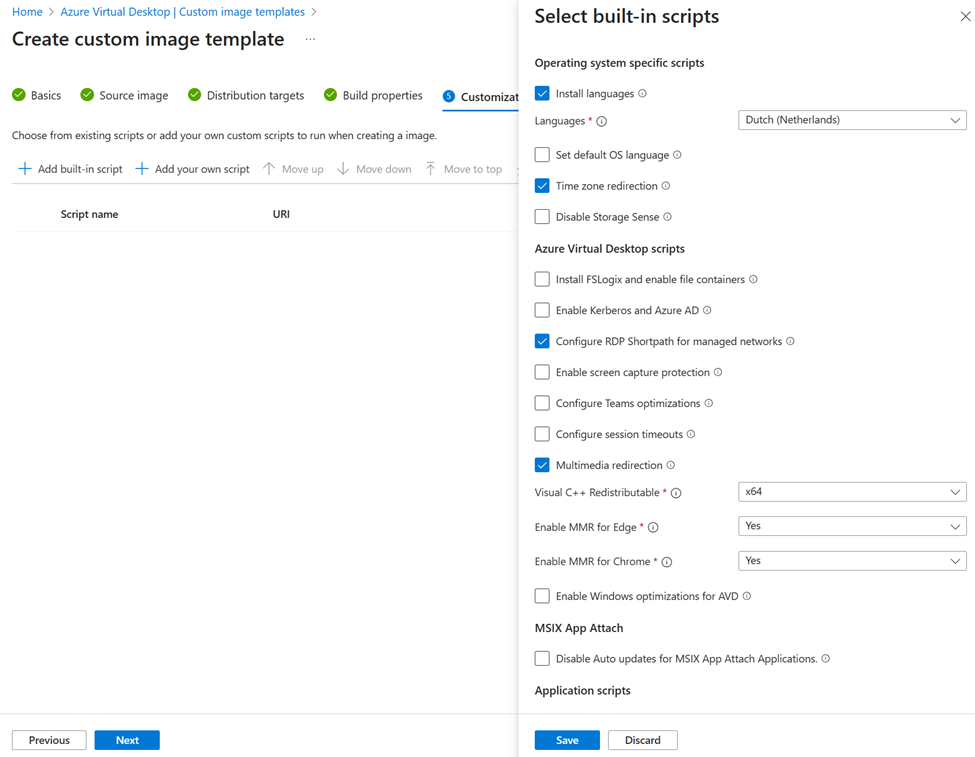
This feature is a wrapper for the Azure Image Builder (AIB) service. Once you have completed creating the template, Azure Virtual Desktop passes it to the AIB service. AIB will then distribute the resulting image to either a managed image or to the Azure Compute Gallery which supports capabilities such as automated versioning and image replication across any Azure region.
Once this golden image has been created, you can then create a host pool from this image.
You can also use any existing tooling to use this image and update your existing session hosts within a host pool.
Getting Started
Get started with the Custom image template documentation here. As this feature uses Azure Image Builder behind the scenes it is recommended that you familiarize yourself with this capability.
Also, check out this new video titled “The AVD Admins Super Power!!!" from Azure Academy which was produced for public preview. The GA UI has had minor updates since initial release, including language improvements and enhanced tool tips with documentation links.

Published on:
Learn moreRelated posts
App attach now integrates with partner solutions
For many IT admins, application delivery management is one of their most complex tasks. However, with the recent general availability of App a...
New features for Azure Virtual Desktop for Azure Stack HCI
Today, we’re excited to announce new features and capabilities for Azure Virtual Desktop for Azure Stack HCI that will benefit admins responsi...
MMR Call Redirection for Azure Virtual Desktop, Windows 365 now available
Today, I am pleased to share the launch of Multimedia Redirection (MMR) Call Redirection for Azure Virtual Desktop and Windows 365. Call Redir...
OneDrive support for RemoteApp in Azure Virtual Desktop
We are excited to announce that Microsoft OneDrive support is now available for RemoteApp in Azure Virtual Desktop! Previously, OneDrive could...
Custom Shortpath settings for host pools now available
We are excited to announce the general availability of custom Shortpath settings at the host pool level. Now you can granularly control how RD...
Recovery options for Azure Virtual Desktop session host VMs
Last week an update issue caused unresponsiveness and startup failures on Windows machines using the CrowdStrike Falcon agent, including some ...
Connection Reliability in Azure Virtual Desktop Insights
We are thrilled to announce that the Connection Reliability tab in Azure Virtual Desktop Insights is now generally available. IT administrator...
Preferred app group type settings enhance user feed display
In line with our commitment to provide seamless and efficient experiences for Azure Virtual Desktop users, we've recently implemented Preferre...
App attach for Azure Virtual Desktop now generally available
App attach for Azure Virtual Desktop allows IT admins to dynamically attach applications from an application package to a user session in Azur...
Hibernation support now available for Azure Virtual Desktop
Today we are happy to announce the general availability of hibernation support in Azure Virtual Desktop. Explore additional capabilities that ...