
Improve your app posture and hygiene using Microsoft Defender for Cloud Apps

In today's digital age, where Software as a Service (SaaS) has become ubiquitous, it is critical to have a line of sight into the SaaS applications being used in your organization. The challenge is managing the growing number of apps and knowing which apps may be misconfigured or unused. This leaves an open attack vector that can be easily taken advantage of by adversaries. In our recent announcement, we shared that Microsoft Defender for Cloud Apps is shifting to a comprehensive SaaS Security solution and how critical it is to implement holistic SaaS Security strategy. Strengthening app posture and maintaining app hygiene are two critical capabilities that can help drastically reduce your app attack surface.
We are excited to share that our expanded SaaS Security Posture Management (SSPM) capabilities in Defender for Cloud Apps are now in public preview. In this post, we will also allow a peak into the new App Hygiene features which will be rolling out in the coming weeks.
Identify and remediate misconfigurations with SSPM
Having visibility into apps this enables security teams to gain an initial understanding of their SaaS app landscape and approve the ones for corporate use. A subset of these SaaS apps holds the most critical data to your organization. Understanding best practices and putting the emphasis on ensuring these apps are configured securely is critical to preventing attacks. With our SSPM capabilities, you will get deeper visibility and automatically identify misconfigurations and gaps in each app.
Defender for Cloud Apps can help assess security posture to your managed SaaS apps, such as and more. This experience is integrated into Microsoft 365 Defender, providing you a holistic view into security posture across the organization via Microsoft Secure Score.
Simply, connect Defender for Cloud Apps to the SaaS app and you will automatically get out-of-the-box posture assessments.
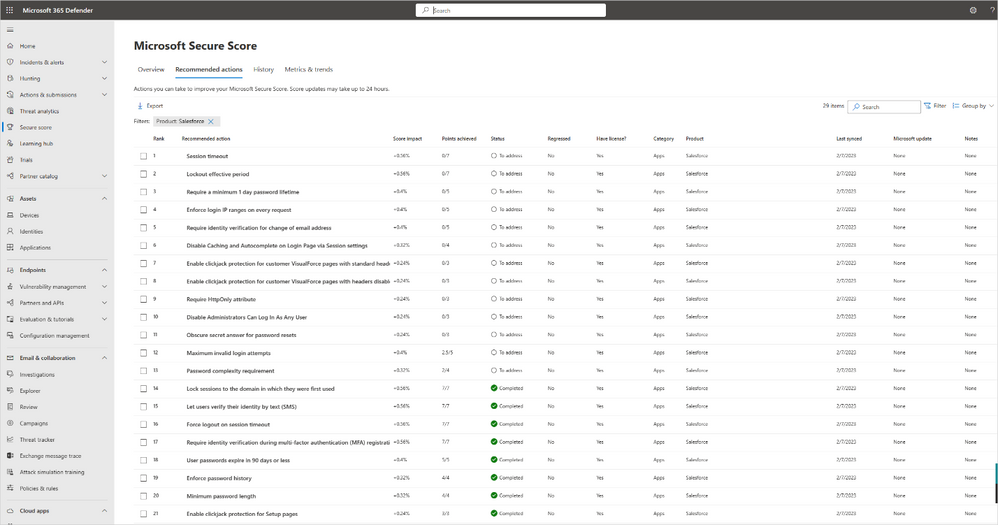
Figure 1. Defender for Cloud apps enables you to manage your security posture of apps such as Salesforce directly via Microsoft Secure Score.
For each security posture assessment, you can see its status and if it is compliant. In addition, you can get a step-by-step guide that can be shared with the app admin. The app admin can follow this guide to remediate on all incompliant assessments. Each time an assessment becomes compliant in the app, the status in Microsoft Secure Score is updated automatically.
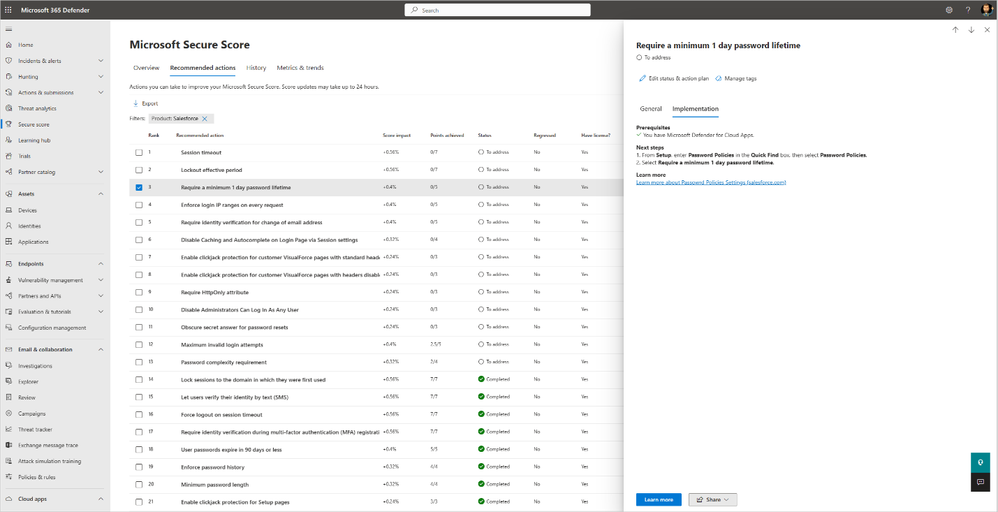
Figure 2. Get step-by-step remediation guide to every security posture assessment to be shared with the app admin.
App hygiene capabilities
App Governance allows you to sort and filter on app last used date, credential unused since, and credential expiration date. You can export this custom list for easy reporting and triage across your organization.
Customize your policies
App Governance provides a policy out-of-the-box to automatically alert you on apps that haven’t been used for a certain number of days. For example, you could create a policy to automatically disable any app that hasn’t been used in the past 90 days, has high privilege permissions, and can access priority account information. This policy is also integrated with Secure Score to help drive awareness to potential vulnerabilities.
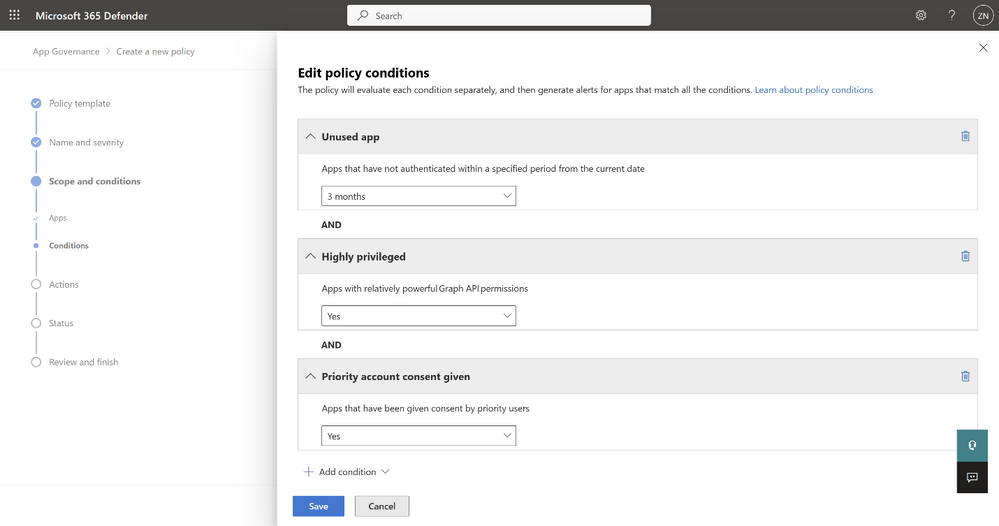
Figure 3. Configure your policy based on multiple conditions such as unused app, highly privileged and priority account consent given.
Get started
By strengthening your app posture and improving your app hygiene, you can drastically reduce your potential attack surface. Here are some ways to help you in your SaaS Security journey:
- Start using App Governance with our trial
- Have questions? Join us for our upcoming Ask Microsoft Anything session
Published on:
Learn moreWe can help you with Improve your app posture and hygiene using Microsoft Defender for Cloud Apps
If you want help implementing, troubleshooting, or improving this product, contact us and we’ll point you in the right direction.
Related posts
Monthly news - November 2024
Microsoft Defender XDRMonthly newsNovember 2024 Edition This is our monthly "What's new" blog post, summarizing product updates and v...
Monthly news - August 2024
Microsoft Defender XDRMonthly newsAugust 2024 Edition This is our monthly "What's new" blog post, summarizing product updates and var...
Defender for Identity: the critical role of identities in automatic attack disruption
In today's digital landscape, cyber-threats are becoming increasingly sophisticated and frequent. Advanced attacks are often multi-workload an...
New Security Copilot skill: Identity Summary
“Can you summarize Defender insights about this user over the last two days?” Microsoft’s latest innovation for Copilot for Security, sim...
Demystify potential data leaks with Insider Risk Management insights in Defender XDR
In today's complex security landscape, understanding and mitigating data exfiltration risks is more critical than ever. Earlier this year, we ...
Monthly news - October 2024
Microsoft Defender XDRMonthly newsOctober 2024 Edition This is our monthly "What's new" blog post, summarizing product updates and va...
AI-Driven Guided Response for SOCs with Microsoft Copilot for Security
In today's evolving cybersecurity landscape, security operation centers (SOCs) are constantly bombarded with incidents ranging from minor aler...
Identity Summary: New Security Copilot skill within Defender XDR
“Can you summarize Defender insights about this user over the last two days?” Microsoft’s latest innovation for Copilot for Security, sim...
Detecting browser anomalies to disrupt attacks early
Detecting browser anomalies is crucial for early identification and prevention of cyber threats, preventing data breaches and attacks by monit...
Microsoft Defender for Identity: the critical role of identities in automatic attack disruption
In today's digital landscape, cyber-threats are becoming increasingly sophisticated and frequent. Advanced attacks are often multi-workload an...