
Pushing Azure AD B2C Custom Policies Through GitHub Actions Using Federated Credentials

I have been using Azure AD B2C for a couple years now, and I'm mostly happy with the product. (A little complexity is what makes things fun.) When the built-in user flows don't cut it you have to create custom policies based on XML, but it has been a somewhat bumpy ride getting the custom policies you craft uploaded to Azure. In the beginning you could only do it through the Azure Portal which made for a manual and error-prone deployment process. After a couple of interim improvements along the way we have eventually gotten to where it's possible to have an Azure DevOps based pipeline setup invoking REST APIs to get the policies into the right place. It's not perfect though so I thought I'd take a crack at improving further upon this.
The current API for uploading policies is the Graph API, but the tooling has been substandard compared to other Azure services. Fortunately there are some new (albeit horribly documented) PowerShell cmdlets for the TrustFramework. They need to be tested.
Since I've been working through the various ways to use Federated Credentials lately I figured it should be possible to use this for Azure AD B2C tenants as well - spoiler alert; yes it is. It means we will be using GitHub for source code and GitHub Actions for deployment as Azure DevOps is not in target for this type of authentication currently.
This is not a post about Azure AD B2C in general, so there are some pre-reqs and shortcuts.
You need to have a working B2C tenant already. And you should probably have dabbled with B2C to understand what this is all about as well.
#1
You should perform the configuration steps (creating keys and registering apps) described here:
I used the SocialAndLocalAccounts policies from the Custom Policy Starter Pack:
#2
The steps for configuring Azure AD to trust GitHub repos also works for B2C so follow the instructions here to set this up:
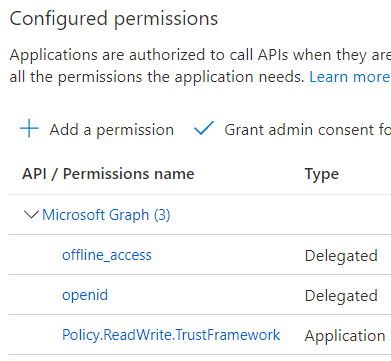
Make sure the app has the Policy.ReadWrite.TrustFramework Application permission (and that you perform the admin consent in the portal):
In the GitHub repo you created you should create some Environment secrets:
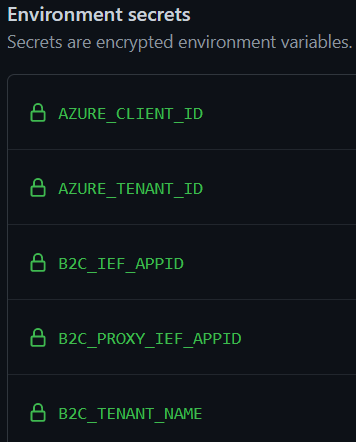
The values are as follows:
AZURE_CLIENT_ID => The clientId of the app you registered in #2.
AZURE_TENANT_ID => TenantId of the B2C tenant. Can also be copied based on #2.
B2C_IEF_APPID => The clientId of the IdentityExperienceFramework application in #1.
B2C_PROXY_IEF_APPID => The clientId of the ProxyIdentityExperienceFramework application in #1.
B2C_TENANT_NAME => The string representation of the tenant. This would be "Contoso" if your tenant is contoso.onmicrosoft.com.
The policies are generic and the correct values are swapped in on deploy so to account for this I made some tweaks to make the substitution easier. For instance:
yourtenant.onmicrosoft.com => ${B2C_TENANT_NAME}.onmicrosoft.com
Piecing together the workflow there are three parts:
Connecting to Azure
Replacing values
Upload
Note that we only use clientId and tenantId for the authentication as B2C tenants don't usually have subscriptions and we need to pass in an extra parameter for that to work.
In the upload step we also need to acquire an access token specifically to be able to connect to the Graph API. With a subsequent connection dance we can follow up by uploading the files from our repo with the Set-MgTrustFrameworkPolicyContent cmdlet.
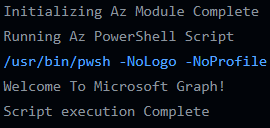
With a bit of luck you'll get something like this in your logs:
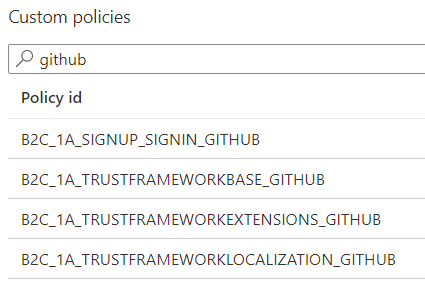
I suffixed the policies with "GitHub" so it's easy to find them:
Testing the policy through the portal should load up something like this:
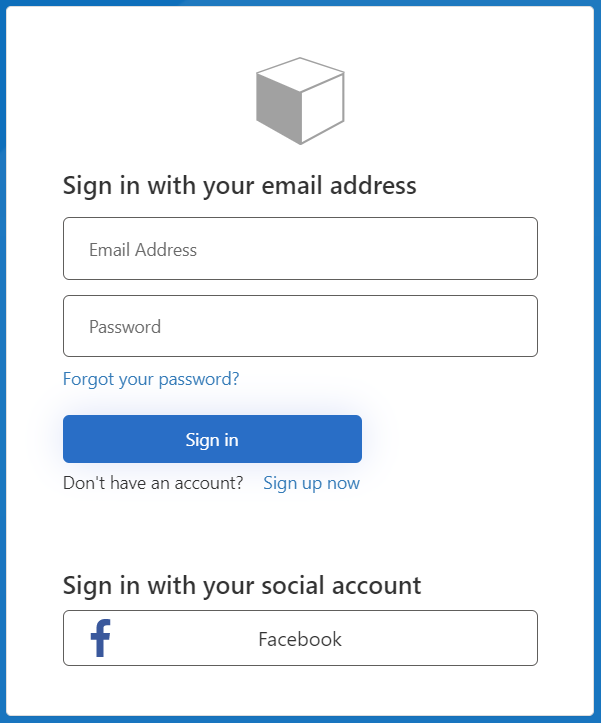
Just trust me when I say it works 
And that's all there is to it really. Should be easy to adapt to a less PoC-like setup as well. The complete code can be found here:
Published on:
Learn moreWe can help you with Pushing Azure AD B2C Custom Policies Through GitHub Actions Using Federated Credentials
If you want help implementing, troubleshooting, or improving this product, contact us and we’ll point you in the right direction.
Related posts
This Month in Azure Static Web Apps | 09/2024
We are back with another edition of the Azure Static Web Apps Community! :party_popper: September was yet another month ...
GitHub Copilot for Azure: 6 Must-Try Features
As developers, we are constantly seeking tools that streamline our workflows and boost productivity. … Enter GitHub Copilot for Azure, now in ...
Responsible AI Mitigation Layers
Generative AI is increasingly being used in various kinds of systems to augment humans and infuse intelligent behavior into existing and new a...
Streamline Your Azure Workflow: Introducing GitHub Copilot for Azure in VS Code
I'm excited to announce the public preview of GitHub Copilot for Azure - a new addition to your toolkit that seamlessly integrates with G...
Build Intelligent Apps Code-First with Prompty and Azure AI
Building Generative AI applications can feel daunting for traditional app developers. What does the end-to-end applicati...
Certificación AI-900 (Fundamentos de IA) con Chicas en IA
La inteligencia artificial ha llegado para quedarse, ¡y más aún con la revolucionaria IA generativa! Para ayudar a los profesionales a especia...
Get certified with Learn Live GitHub series!
GitHub Universe is coming, and Microsoft and GitHub are partnering to offer a new special Learn Live series in Brazilian Portuguese, English a...
Certifícate con Learn Live GitHub en Español
Microsoft y GitHub se han unido para ofrecer una nueva serie especial de Learn Live en inglés y español: GitHub 2024. Del 10 al 24 de Octubre,...
Evaluating generative AI: Best practices for developers
As a developer working with generative AI, you've likely marveled at the impressive outputs your models can produce. But how do you ensure the...
Introducing Azure Product Retirement Livestreams
The Azure Retirements team, in collaboration with key partner groups, is excited t...