
Leverage Bicep: Standard model to Automate Azure IaaS deployment (2 of 3)

Chapter 2
- Bicep Development Environment
Bicep is a language. You will need an editor to write the language and an environment to run it.
Required
Visual Studio Code
reference: Deploy Bicep files from Visual Studio Code
Azure CLI or Azure PowerShell
reference: How to deploy resources with Bicep and Azure CLI
Deploy resources with Bicep and Azure PowerShell
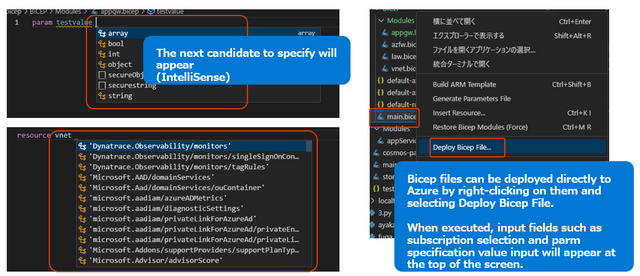
!! The bicep file can be run from Visual Studio Code, so if you have VS Code installed, you do not need a command line.
Recommend
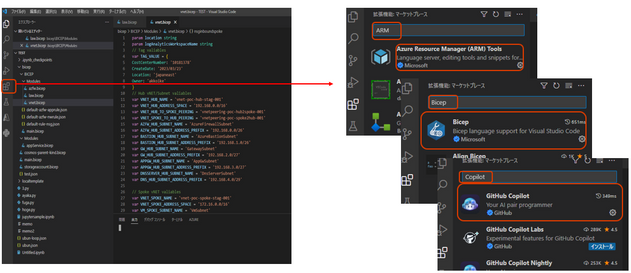
Visual Studio Code Extension
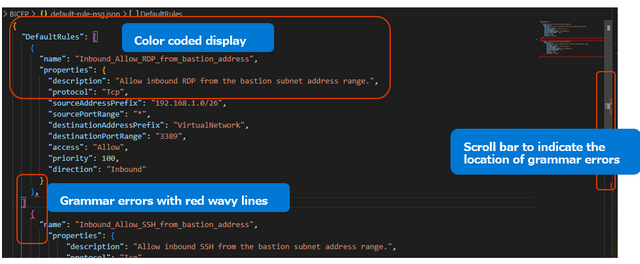
A feature called IntelliSense is useful. While you are coding in bicep, a pull-down pop up with options for the next candidate function, API version, etc. GitHub Copilot can also be used as an extension to make your work more efficient. (OpenAI Technology)
GitHub Account
Use it as a repository for bicep files.
- Tips
Install extensions from VS Code-- Only GitHub Copilot is available for a fee.
Azure Resource manager Tools Extensions
Bicep Extensions
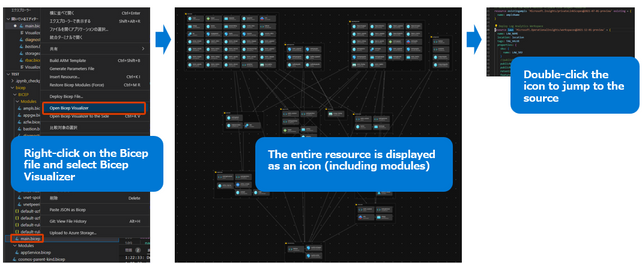
Bicep Visualizer
GitHub Copilot - Sample code and explanation
localtemplate/bicep/BICEP at master · akkoike/localtemplate (github.com)
- Application sequence mapping
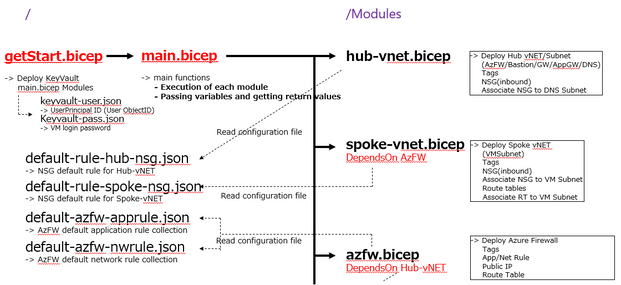
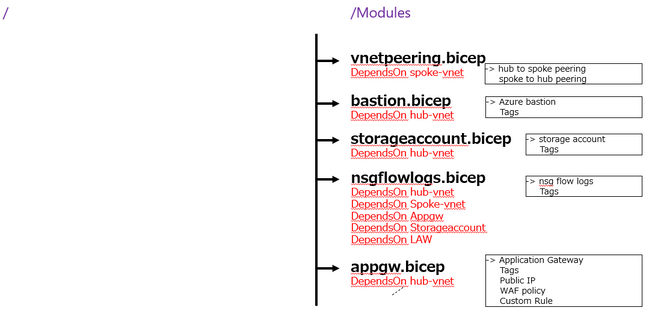
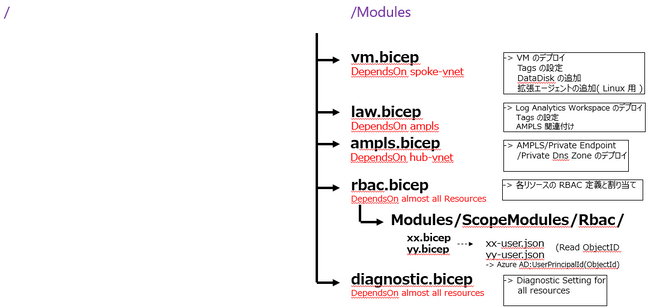
Based on vNET Hub&Spoke environment. Frequently updated settings were individually defined in JSON configuration files. Azure KeyVault was created first because I wanted to obtain a secure password using the getSecret function. RBAC and Diagnostic Setting are done at the end of the process for extended functions. NSG rules and Azure Firewall ruleset basically stated only the targets that should be allowed. All external communication from Azure VM is configured with a default route through Azure Firewall. Only Log Analytics with AMPLS may not work properly.
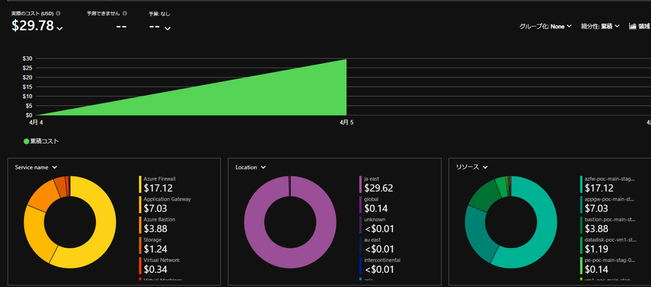
Almost 30 USD / day

>> Next Chapter (Traps and Avoidance)
Published on:
Learn moreRelated posts
Enable IP restriction for a public facing App service
In this blog article, we will cover how to control the app service deployment to support only public facing app service with IP restriction en...
Selecting the Optimal Container for Azure AI: Docker, ACI, or AKS?
Deploying Azure AI services in containers like Docker, Azure Container Instances (ACI), or Azure Kubernetes Service (...
Securing Hardware and Firmware Supply Chains
In the modern cloud data center, ensuring the authenticity, integrity, and security of hardware and firmware is paramount. Firmware is the low...
Liquid Cooling in Air Cooled Data Centers on Microsoft Azure
With the advent of artificial intelligence and machine learning (AI/ML), hyperscale datacenters are increasingly accommodating AI accelerators...
Mt Diablo - Disaggregated Power Fueling the Next Wave of AI Platforms
Authors: Jason Adrian – General Manager, Azure Platform Architecture Laurentiu Olariu – Power Architect, Azure Platform Architecture Banha Sok...
Deny inbound NSG Rule creation via Azure Policy
In this blog article, we will cover how to deny the creation of inbound Network Security Group Rules if the inbound NSG Rule contains&n...
Azure Extended Zones: Optimizing Performance, Compliance, and Accessibility
Azure Extended Zones are designed to bring the power of Azure closer to end users in specific metropolitan areas or jurisdictions, cate...
Inside Maia 100: Revolutionizing AI Workloads with Microsoft's Custom AI Accelerator
Authored by: Sherry Xu, Partner Lead SoC Architect, Azure Maia Chandru Ramakrishnan, Partner Software Engineering Manager As the advanc...
Accelerate Cloud Potential for Your SAP Workloads on Azure with these Learning Paths
Accelerate Cloud Potential for Your SAP Workloads on Azure with these Learning Paths In today's rapidly evolving digital landsc...
Azure Role Assignments Audit Report
Overview: Azure Administrators often come across challenges while tracking multiple Azure role assignments and removals. At present Azur...