
UI Library - Mobile Support and Web GA

We are very excited to release new communications capabilities for developers: the Azure Communication Services Web UI Library is now Generally Available and Mobile UI Library is now in Public Preview. Microsoft developers can use the open-source UI Library to deliver beautiful, custom visual communication applications for end-users.
These open-source UI components can reduce engineering time and help you quickly deliver a great communication experience for end-users. The Web library supports both desktop and mobile browsers, while the mobile library targets native iOS and Android apps. While you can use these components directly out-of-the-box, there are dozens of customization controls available to you, and of course being open-source, you have edit the components liberally and get down into the underlying Calling and Chat SDKs.
You can use these components for a variety of calling and chat communication experiences, but we're especially proud of our collaboration with Microsoft Teams. Using Azure Communication Services Teams interoperability and these UI components, you can easily build a custom client to join Teams meetings. This is ideal for a variety of virtual visit scenarios where a business hosts a Teams meeting that external consumers join via a custom app: virtual healthcare, virtual banking, and online education.
This developer offering reflects Microsoft’s commitment to building a cohesive One Microsoft communications platform spanning our products, providing freedom-of-action for developers, and technology that is inclusive and accessible.
Key Features of the UI library:
- Production-ready components to drop into Web and Mobile apps
- Dozens of customization controls e.g., icons, fonts, and themes (including a Teams Theme) to tailor the UX to a customer’s existing style
- Open-source flexibility to further customize the front-end and back-end
- Accessibility and localization support out-of-the-box
- Interoperability with Teams!!
Web UI Library – General Availability
The Web UI Library provides composable UI Components and turn-key Composites that can be used to build visual communication experiences. The UI Library supports customization in the form of theming, styling, custom icons, fonts, and layouts. As part of Microsoft’s commitment to diversity and inclusion, the UI Library is built with accessibility from the ground up and conforming to Microsoft’s accessibility standards. The UI Library features localization to enable developers to build experiences that connect with their customers wherever they are.
Visit aka.ms/acsstorybook to learn more about it. Same sample composites are show below.
Call Composite: Calling experience that allows users to start or join a call. Inside the experience users can configure their devices, participate in the call with video, and see other participants, including those participants with video turn on. For Teams Interop includes lobby functionality for user to wait to be admitted.
Chat Composite: Chat experience where user can send and receive messages. Thread events like typing, read receipts, participants entering and leaving are displayed to the user as part of the chat thread.
UI Components: Collection of composable components that can be used to build communication experiences. We offer components for both chat and calling experiences. Pick one or multiple components that can be easily connected to Azure Communication Services client SDKs.
Get Started
To get started check out quickstarts:
If you want to see it in action, check out our Azure Friday episode.
Mobile UI Library – Public Preview

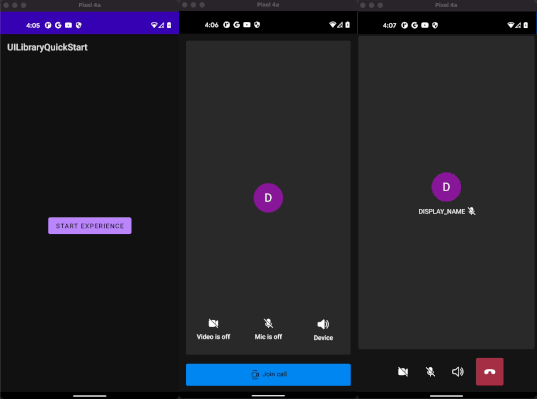
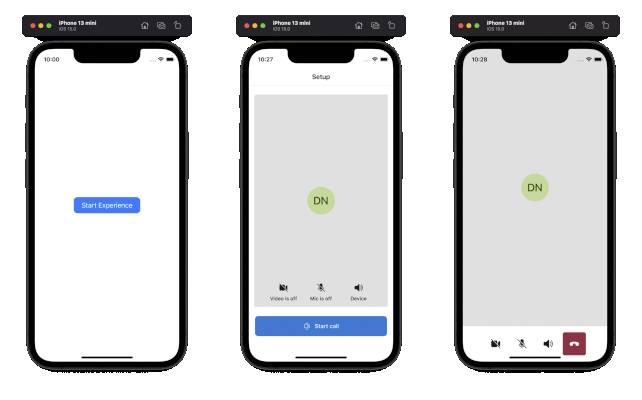
The Mobile UI library extends our work for Web with native iOS and Android components. This public preview is our first release and focuses on Calling Composites. In the coming months we will deliver additional capabilities including chat, more customization, accessibility, and localization. Learn more on our overview and use cases documentation.
Calling composite.
The Calling Composite enables users to configure a call, participate in it by sharing voice and video, and view other participants video streams including screen shares. The Calling Composite supports Teams meetings and Azure Communication Services Group Call.
|
|
|
Get Started
To get started check out quickstarts:
- iOS: Get Started with Composites
- Android: Get Started with Composites
Thank you
We're incredibly thankful for customers who were early adopters of the UI library and gave us valuable feedback. Please keep tuned for future updates here on our blog and post feedback to our feedback page. You can also send feature ideas and asks on User Voice.
Published on:
Learn moreRelated posts
Azure Communication Services Ideas Board: Share your feedback with the product team
Innovation is not a solitary pursuit, and we recognize that some of the best ideas come from you, our Azure Communication Services community. ...
Engage with the Azure Community Services Ideas Board: Your Voice Matters
Innovation is not a solitary pursuit, and we recognize that some of the best ideas come from you, our Azure Communication Services community. ...
Part 2 - Multichannel notification system using Azure Communication Services and Azure Functions
In the first part of this topic, we setup all the Azure resources like the Azure Communication Services for Email, SMS, WhatsApp for...
Part 1 - Multichannel Notification System with Azure Communication Services and Azure Functions
In the interconnected digital era, it's crucial for businesses and services to communicate effectively with their audience. A robust notificat...
Building a WhatsApp AI bot for customer support
Building a WhatsApp AI Bot for customer support In this blog post, we’ll explore how to build a customer support application that integ...
Azure Communication Services September 2024 Feature Updates
The Azure Communication Services team is excited to share several new product and feature updates released in August 2024. (You can view previ...
Azure Communication Services at the DEVIntersection Conference
Join us for the DEVintersection Conference from September 10 to 12, 2024, in Las Vegas, Nevada. This event gathers technology enthusiasts from...
Azure Communication Services June 2024 Feature Updates
Data Retention with Chat threads Developers can now create chat threads with a retention policy between 30 and 90 days. This feat...
Azure Communication Services August 2024 Feature Updates
The Azure Communication Services team is excited to share several new product and feature updates released in July 2024. (You can view previou...
Anywhere365 integrates Azure Communication Services into their Dialogue Cloud Platform
Every day, companies aim to help their customers realize the most value from their products and services. They do this by providing ef...