
Introducing Restricted Management Administrative Units in Microsoft Entra ID

We’re excited to share the public preview of restricted management administrative units, a new role-based access control (RBAC) feature in Microsoft Entra ID.
What you can do with restricted management administrative units
With restricted management administrative units, you can now designate specific users, security groups, or devices in your Microsoft Entra ID tenant that you want to protect from modification by tenant-level administrators.
Here are some situations in which this is useful:
- You want to protect sensitive user accounts, such as C-level executives, from being able to have their password or multifactor authentication settings changed by regular helpdesk administrators.
- You want to ensure that certain user accounts, security groups, or devices from a specific country can only be modified by designated administrators from that country.
- You have specific security groups granting access to sensitive data and you want to restrict who can modify the membership only to a small set of administrators.
By placing your sensitive objects in a restricted management administrative unit, your tenant-level administrators will not be able to modify them. Only the administrators you explicitly assign to the scope of the administrative unit itself will be able to make changes.
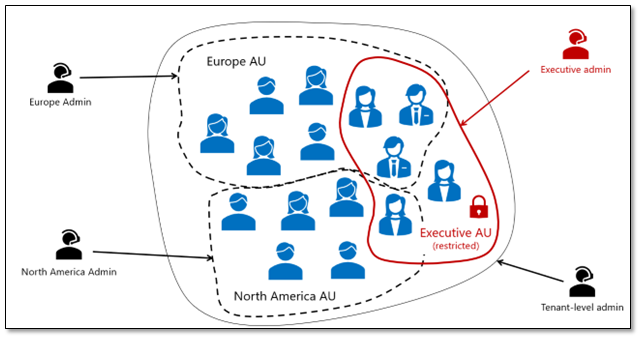
This is a much easier way to protect your sensitive objects than having to identify and scope every single role assignment in the tenant just to your non-sensitive objects.
How to use restricted management administrative units in your tenant
Here’s a quick example of how restricted management administrative units make it a breeze to secure a few sensitive user accounts in your tenant:
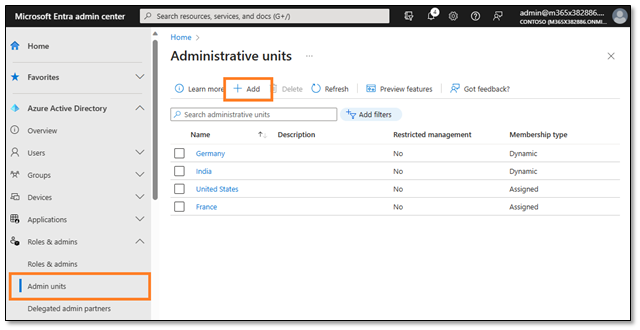
1. Under Roles & admins, select Admin units and click Add to create a new administrative unit.
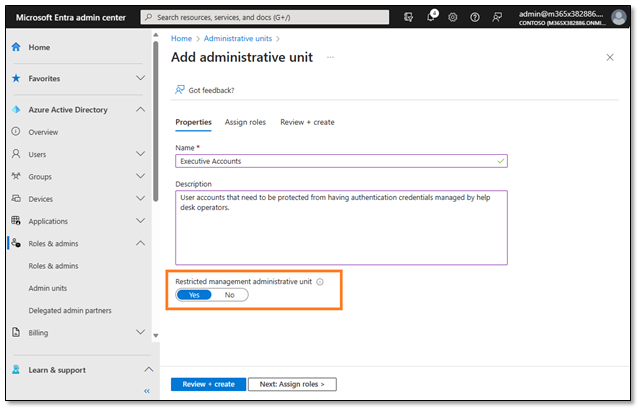
2. Set the Restricted management administrative unit setting to “Yes” and click Next: Assign Roles
3. Add the designated administrator(s) who should be the helpdesk administrators for these sensitive accounts (these are the people who you do want to manage the accounts) and finish creating the administrative unit.

4. Now, you can go ahead and add the sensitive user accounts to the restricted management administrative unit you just created (just like you would for any other administrative unit).
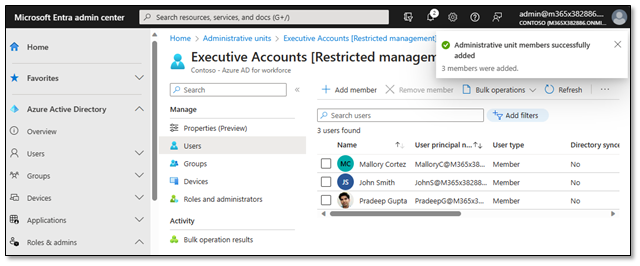
That’s it! Now the sensitive user accounts can only be modified by the users you designated, regardless of how many other administrative roles may be assigned in your tenant.
To learn more details about how restricted management administrative units can help you secure sensitive resources in your tenant, check out our product documentation!
Best Regards,
Stuart Kwan
Partner Manager, Product Management
Microsoft Identity Division
Learn more about Microsoft identity:
- See recent Microsoft Entra blogs
- Dive into Microsoft Entra technical documentation
- Join the conversation on the Microsoft Entra discussion space and Twitter
- Learn more about Microsoft Security
Published on:
Learn moreRelated posts
Sync identities from Rippling to Microsoft Entra ID
Today, we’re thrilled to announce that customers using Rippling HCM can now automatically provision users to on-premises Active Directory and ...
Microsoft Entra ID Governance for government
I’m pleased to announce that as of November 1, 2024, Microsoft Entra ID Governance is available for federal agencies, state and local governme...
Update to security defaults
As part of the Secure Future Initiative, we’ve evolved our security approach to align with three security principles: secure by design, secure...
Meet Microsoft Entra at Ignite 2024: November 18-22
Microsoft Ignite is just around the corner, taking place from Monday, November 18, 2024 through Friday, November 22, 2024, in Chicago, Illinoi...
Manage Microsoft Entra ID role assignments with Microsoft Entra ID Governance
I’m excited to announce that we now support Microsoft Entra role assignments in Microsoft Entra ID Governance's Entitlement Management feature...
The latest enhancements in Microsoft Authenticator
Hi folks, I'm thrilled to announce three major Microsoft Entra ID advancements that will help you protect your users with phishing-resi...
Microsoft Security announcements and demos at Authenticate 2024
The Microsoft Security team is excited to connect with you next week at Authenticate 2024 Conference, taking place October 14 to 16 in Carlsba...
What's new in Microsoft Entra - September 2024
We’re excited to announce the general availability of Microsoft Entra Suite—one of the industry’s most comprehensive secure access solutions f...
Explore the key benefits of Microsoft Entra Private Access
The traditional network security models are becoming increasingly ineffective in a world where remote work and cloud services are the norm. Co...
Join us at the Microsoft Entra Suite Showcase!
This fall, we are bringing the Microsoft Entra Suite Showcase to cities worldwide. Join us to explore how our latest advancements in secure id...