
Introducing the Microsoft Defender for Cloud Apps data protection series
One of the core challenges our customers face is how to protect data in their environment. While the cloud enables new scenarios with hybrid and remote workforces, the boundaries have shifted considerably. In the past, data was stored inside a trusted perimeter protected by network boundaries, but that’s no longer the case. With the nature of modern work, sensitive documents are stored in SaaS apps rather than on a network appliance sitting on-premises. Organizations need to adapt to keep workers productive while still protecting their data.
Data protection is complex in the modern infrastructure and a common question we get from customers is “What tools should I use for which scenario?”.
This will be a series of blogs where the goal is to help shed light on when to use Defender for Cloud Apps and Purview to protect your data. Additionally, we want to provide guidance on best practices of implementing policies for your use cases.
Over this blog series we will cover:
- How to define a use case
- Protecting different data types and common methods to secure data
- Best practices for implementing policies in Defender for Cloud Apps
Today, we will be reviewing the key components of defining a use case.
What tools can you use?
Microsoft Defender for Cloud Apps and Microsoft Purview both offer Data Loss Prevention (DLP) policies to help protect your organizations’ cloud data. In the future, we will work towards a unified DLP experience which will allow organizations to configure their policies in a single location. While we work towards that unified experience, customers can create policies in both Defender for Cloud Apps and Purview to provide a wide range of protection across Microsoft and non-Microsoft SaaS apps.
Defender for Cloud Apps allows organizations to implement Data Loss Prevention (DLP) policies to data in motion through session policies on web applications. Data at rest and in use can also be protected using file policies. Defender for Cloud Apps can protect data in Microsoft applications such as Office and non-Microsoft SaaS apps such Box, Dropbox, and Salesforce.
Purview is primarily used to enforce DLP controls in Microsoft applications; this includes both web applications and native clients.
The first step to being successful with Defender for Cloud Apps and Purview is to understand and decide what you specifically need to protect. Focusing on what allows you to properly define and scope the how.
It is critical to have a list of specific use cases because doing so can help organizations identify which policies need to be implemented to satisfy an organization’s requirements. Security is implemented in layers and protecting across different data types is the best practice.
A well-defined use case should answer a few different questions to focus on a specific scenario and the desired outcome.
Here is an example of a well-defined use case:
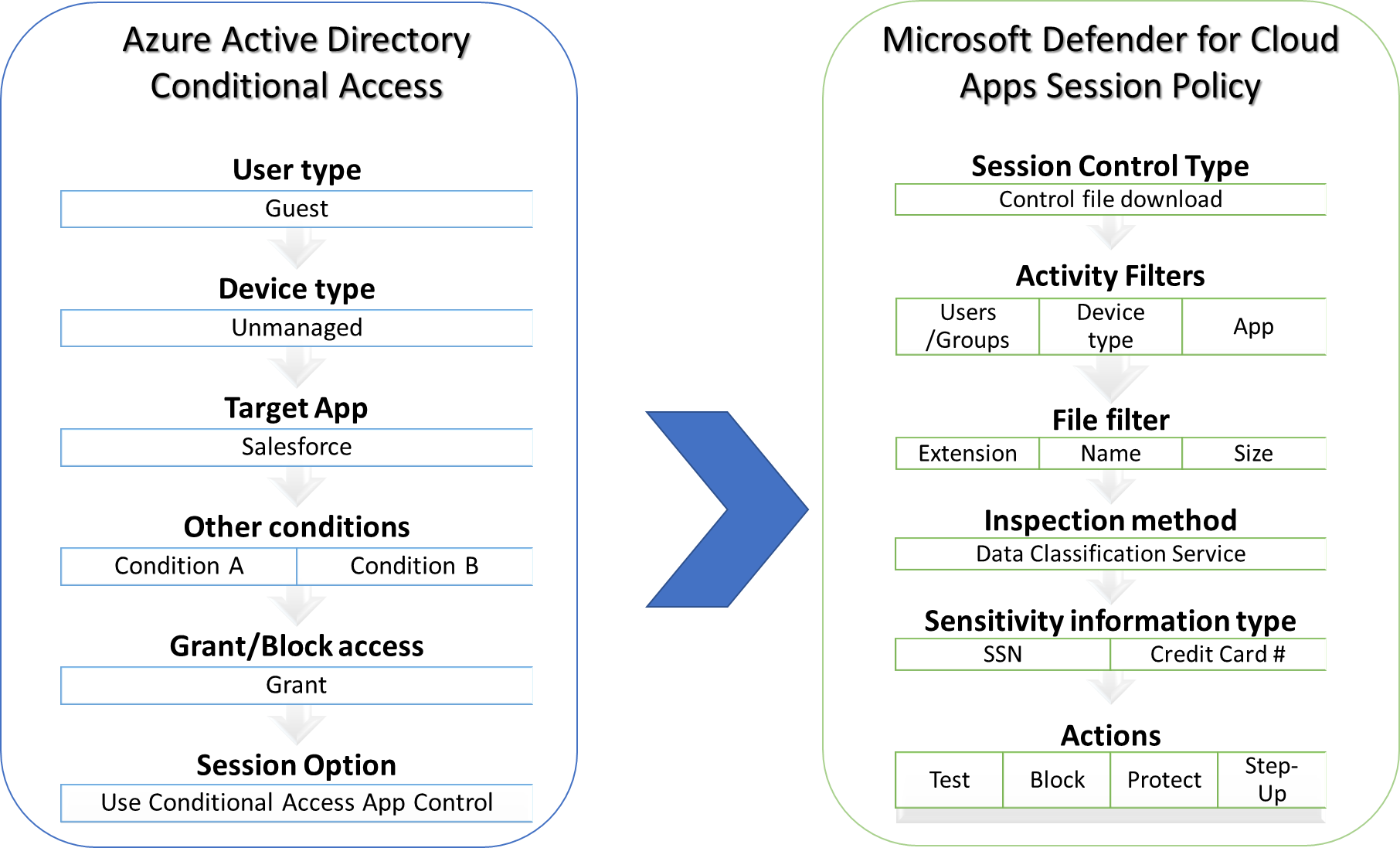
“Contoso has contractors who are guest users in Azure Active Directory. These users will need to access resources in Salesforce to perform their job duties.
Since they are contractors, they will not be assigned a corporate device. they will be accessing from endpoints which the organization does not control (unmanaged devices).
Blocking access completely isn’t an option because it prevents the users from performing the functions they are contracted to do.
Contoso needs to allow these users access to Salesforce while preventing documents containing PII from being saved on contractor devices.”
You can see from the diagram below that the use case contains all the information required to create the necessary policies in Azure Active Directory and Defender for Cloud Apps.
Next, we will take a closer look at some of the questions that should be answered to satisfy the use case. In the next post of the series, we will discuss the different data types and common methods for protecting data.
Who is in scope of the policy?
Identity has become an incredibly important part of security. It is one of the core boundaries that was previously defined by a network perimeter. The proliferation of SaaS apps allows data to reside anywhere, be accessed by anyone, on any device, at any time. Because of this, identity has become the new control plane and security perimeter.
A use case must consider the identities which are in scope for a particular policy. This might be a specific group of users who handle or access sensitive data. There could also be scenarios where this should apply globally to all users or only to specific applications. We recommend keeping policies targeted only to the users and apps where controls are required. This helps to ensure the users who do not need the policies are not unnecessarily impacted.
What type of devices are involved?
One of the main pillars of zero trust is to explicitly verify endpoint health during authentication. Typically, this information is passed from the identity provider (AAD) during login and can be used downstream in the creation of policies. This is primarily applicable for session policies but can also be used with app enforced restrictions. The type of devices involved will determine which specific controls can be applied.
Defender for Cloud Apps can distinguish these types of devices and apply policies to both managed and unmanaged devices.
Purview Endpoint DLP provides strong granular controls to managed devices.
What do you consider sensitive?
Organizations have different definitions of what is considered sensitive. When defining a use case, it’s important to understand what is considered sensitive. For instance, financial institutions might have data containing credit card information which needs to be monitored and protected. Defender for Cloud Apps and Purview utilize the same data classification service to match sensitive information types. This allows organizations to know when content might contain sensitive data.
While some organizations might need to perform content inspection to look for PII or PHI. Others might consider data sensitive depending on who is handling it, so this could mean end users from human resources or finance departments need to have different policies applied.
Conclusion
Having well defined and specific use cases is the first step in implementing a data loss prevention strategy. Once you are aware of what you specifically want to protect then you can dive deeper into how this is accomplished.
Please tune in for our next blog in the series which will discuss the different data types that can protected with Microsoft solutions.
If you would like to learn more about Defender for Cloud Apps and Purview we also recommend starting with the ninja guides.
Microsoft Defender for Cloud Apps Ninja Training
Microsoft Purview Data Loss Prevention Ninja Training
Microsoft Purview Customer Experience Engineering (CxE) Deployment Acceleration Guide
We also value your feedback and would love to hear from you so feel free to add your comments below or post your questions in the Tech Community!
Published on:
Learn moreRelated posts
Monthly news - November 2024
Microsoft Defender XDRMonthly newsNovember 2024 Edition This is our monthly "What's new" blog post, summarizing product updates and v...
Monthly news - August 2024
Microsoft Defender XDRMonthly newsAugust 2024 Edition This is our monthly "What's new" blog post, summarizing product updates and var...
Defender for Identity: the critical role of identities in automatic attack disruption
In today's digital landscape, cyber-threats are becoming increasingly sophisticated and frequent. Advanced attacks are often multi-workload an...
New Security Copilot skill: Identity Summary
“Can you summarize Defender insights about this user over the last two days?” Microsoft’s latest innovation for Copilot for Security, sim...
Demystify potential data leaks with Insider Risk Management insights in Defender XDR
In today's complex security landscape, understanding and mitigating data exfiltration risks is more critical than ever. Earlier this year, we ...
Monthly news - October 2024
Microsoft Defender XDRMonthly newsOctober 2024 Edition This is our monthly "What's new" blog post, summarizing product updates and va...
AI-Driven Guided Response for SOCs with Microsoft Copilot for Security
In today's evolving cybersecurity landscape, security operation centers (SOCs) are constantly bombarded with incidents ranging from minor aler...
Identity Summary: New Security Copilot skill within Defender XDR
“Can you summarize Defender insights about this user over the last two days?” Microsoft’s latest innovation for Copilot for Security, sim...
Detecting browser anomalies to disrupt attacks early
Detecting browser anomalies is crucial for early identification and prevention of cyber threats, preventing data breaches and attacks by monit...
Microsoft Defender for Identity: the critical role of identities in automatic attack disruption
In today's digital landscape, cyber-threats are becoming increasingly sophisticated and frequent. Advanced attacks are often multi-workload an...