
Dynamic automated access with Azure AD entitlement management

We continue to enhance Azure Active Directory (Azure AD) Identity Governance to help you meet security needs and preserve employee productivity at scale. Recent enhancements include the introduction of multi-stage access reviews and custom workflows in entitlement management using Azure Logic Apps.
Based on your feedback, we’ve made it even easier for you to automate your processes for access lifecycle management with a new preview of automatic assignment policies in entitlement management. In this preview, Azure AD adds and removes users’ access across groups, Teams, SharePoint sites, and apps as their attributes change (such as when someone joins, moves between departments, or goes on leave). The inclusion of this policy in an access package simplifies managing at scale; users don’t need to make requests, which not only ensures their access doesn’t remain longer than necessary, but also does so without the need for administrative interaction when someone moves teams.
Assigning access based on attributes
Building on the example in the previous blog post, suppose Contoso uses Salesforce and that the Sales team has an access package in Azure AD entitlement management. The package enables members of the Sales team and their colleagues to access relevant resources, including SharePoint sites, and provisions their access into Salesforce.
Such an access package may include two policies for employees and guests to request access:
- Employees can request access and, if approved, have access, which is reviewed every 90 days.
- Non-employees, such as external sales reps, can also request access and, if approved, have access, which is reviewed every 60 days.
Now they can add a third policy using the preview of auto-assignment policies.
- Employees in the Sales department, based on users’ “department” attribute, have access automatically, so long as they’re in the department.

In this policy, you specify a rule for how entitlement management will select the users who need assignments. The rule is based on the attributes of the user, such as department, that typically come from your organization’s HR system, where many people with the same value of the attribute need the same access.
If you’ve used Azure AD dynamic groups before, this concept will be familiar. Soon after the policy is created, Azure AD will automatically begin creating resource assignments for those users who meet the rule. Based on the properties of new users provided by the HR system, employees moving into Sales will receive access automatically, without the need to request.
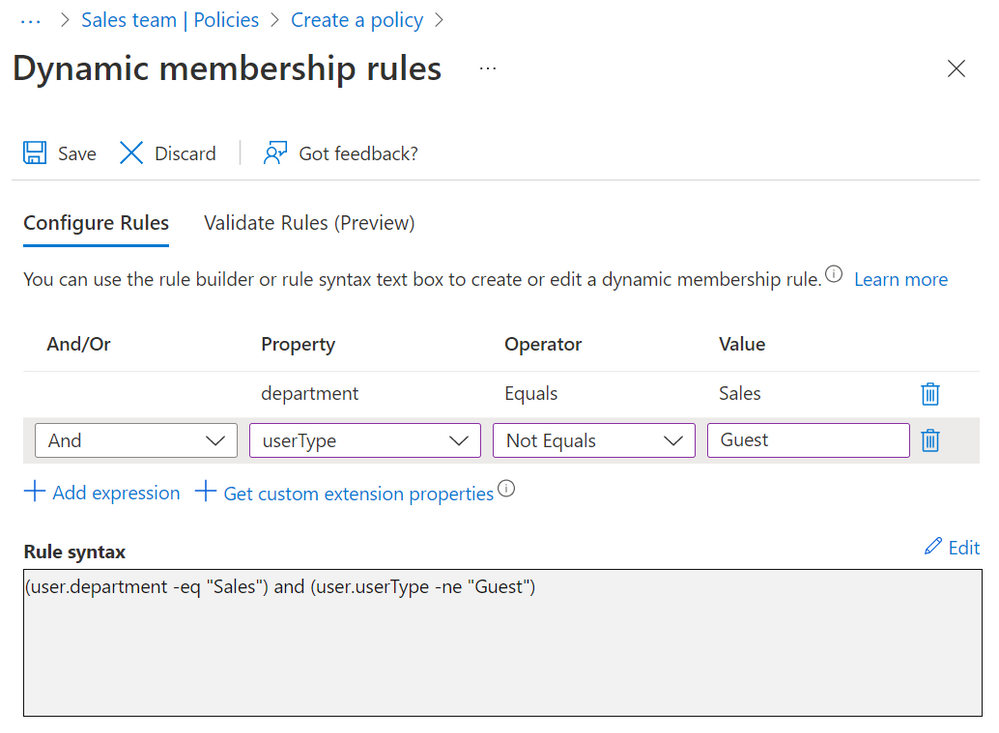
In addition to what you can do with dynamic groups, you can also use entitlement management with automatic assignment policies for:
- Managing access across multiple resources, including applications, SharePoint Online sites, existing Azure AD groups and Teams, and groups that are provisioned to on-premises AD.
- Managing access with a combination of policies to have both rules (e.g., everyone in a department) and exceptions (e.g., people in other departments who will need the same access) so that the exceptions can be regularly reviewed and removed, if no longer needed
- Further automating tasks across Microsoft and third-party applications through entitlement management’s custom extensions, which run workflows when users receive or lose assignments.
These are just a couple scenarios for how you can now address even more use cases with entitlement management by automating some of the assignments. We encourage you to try it out by adding an automatic assignment policy to an access package and to let us know what you think. For more information on how to create an automatic assignment policy through the portal or Graph API, please view the documentation.
We want to hear from you! Feel free to leave comments down below with ideas for the next topic or add other product suggestions at the feedback forum.
Learn more about Microsoft identity:
- Related articles: Configure an automatic assignment policy for an access package in Azure AD entitlement management
- Entitlement management extensions with custom workflows
- Return to the Azure Active Directory Identity blog home
- Join the conversation on Twitter and LinkedIn
- Share product suggestions on the Azure Feedback Forum
Published on:
Learn moreRelated posts
Sync identities from Rippling to Microsoft Entra ID
Today, we’re thrilled to announce that customers using Rippling HCM can now automatically provision users to on-premises Active Directory and ...
Microsoft Entra ID Governance for government
I’m pleased to announce that as of November 1, 2024, Microsoft Entra ID Governance is available for federal agencies, state and local governme...
Update to security defaults
As part of the Secure Future Initiative, we’ve evolved our security approach to align with three security principles: secure by design, secure...
Meet Microsoft Entra at Ignite 2024: November 18-22
Microsoft Ignite is just around the corner, taking place from Monday, November 18, 2024 through Friday, November 22, 2024, in Chicago, Illinoi...
Manage Microsoft Entra ID role assignments with Microsoft Entra ID Governance
I’m excited to announce that we now support Microsoft Entra role assignments in Microsoft Entra ID Governance's Entitlement Management feature...
The latest enhancements in Microsoft Authenticator
Hi folks, I'm thrilled to announce three major Microsoft Entra ID advancements that will help you protect your users with phishing-resi...
Microsoft Security announcements and demos at Authenticate 2024
The Microsoft Security team is excited to connect with you next week at Authenticate 2024 Conference, taking place October 14 to 16 in Carlsba...
What's new in Microsoft Entra - September 2024
We’re excited to announce the general availability of Microsoft Entra Suite—one of the industry’s most comprehensive secure access solutions f...
Explore the key benefits of Microsoft Entra Private Access
The traditional network security models are becoming increasingly ineffective in a world where remote work and cloud services are the norm. Co...
Join us at the Microsoft Entra Suite Showcase!
This fall, we are bringing the Microsoft Entra Suite Showcase to cities worldwide. Join us to explore how our latest advancements in secure id...