
Emphasizing Security by Default with Advanced Microsoft Authenticator Features.

We‘ve repeatedly emphasized the importance of multifactor authentication (MFA) and emphasized that not all MFA is equal – the Authenticator is much more secure than phone authentication (so hang up!). Through the implementation of number matching, we've successfully thwarted criminals engaging in MFA fatigue attacks.
While this has been very effective, attackers attempting these methods can still annoy users, and Authenticator prompts—while extremely helpful when a user is trying to log in—can provide a “hook” for social phishing when triggered by a hacker. In response to this, we took additional steps to keep users happy and secure by suppressing Authenticator pop-up notifications when a request is anomalous. The rollout of these changes was completed at the end of September, and we’ve successfully reduced the number of otherwise unworthy notifications. We've prevented more than 6 million passwordless and MFA notifications since the deployment began. By the vast majority, these were hacker-initiated notifications serving no value to customers.
About Suppressing Risky Authenticator Notifications
Following the deployment of this feature, we now suppress Authenticator notifications when a request displays potential risks, such as when it originates from an unfamiliar location or is exhibiting other anomalies. This approach significantly reduces user inconvenience by eliminating irrelevant authentication prompts.
When everything looks acceptable, users receive notifications on their mobile devices as depicted below:
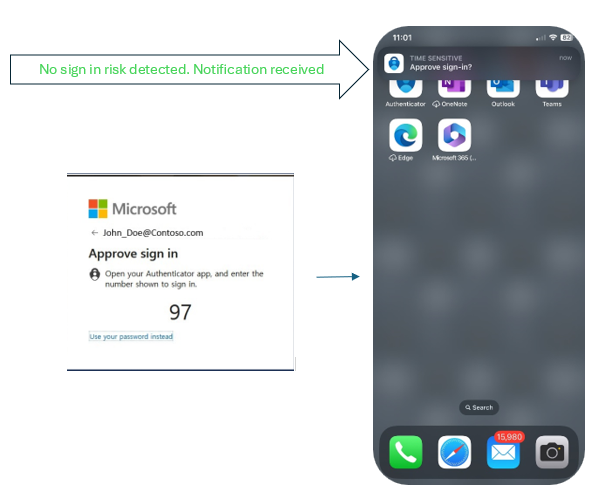
But in the event of a login request that looks risky to us, the standard notification will not be sent to the user. Instead, they’ll be given the following instructions: “Open your Authenticator app and enter the number shown to sign in,” with no corresponding notification displayed on the user's phone.
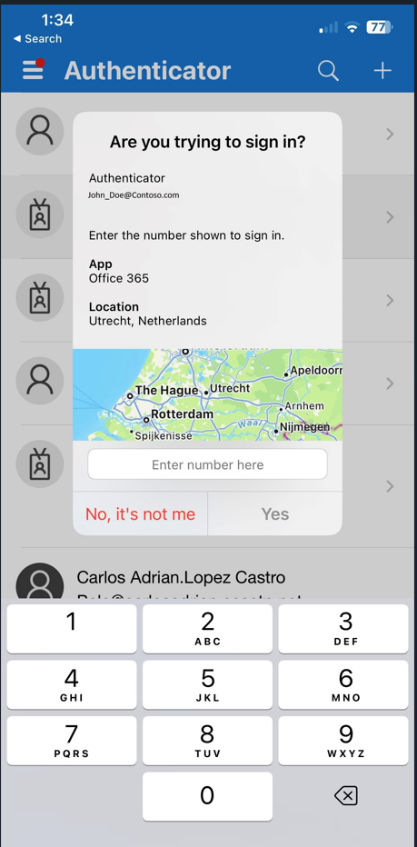
When the user opens their Authenticator app, it will present the request, allowing the user to take appropriate action.

When the user opens the Authenticator App, the request will be available for the user:
Retrieving Authenticator Notifications
It’s important to note that the notifications are not deleted. They’re simply suppressed and can still be accessed by the user within the Authenticator App. If a user encounters a genuine request from an unusual source, they can retrieve the notification by accessing their authenticator app. The app serves as a repository for all authenticator notifications, ensuring users have a convenient way to retrieve any missed requests.
Conclusion
Implementation of this feature has led to a smoother and more secure experience for users. As technology evolves, enhancing user convenience while also enhancing security is crucial, and this new approach is a great example.
Best regards,
Alex Weinert
VP Director of Identity Security, Microsoft
Learn more about Microsoft Entra:
- Authentication strength – choose the right auth method for your scenario!
- See recent Microsoft Entra blogs
- Dive into Microsoft Entra technical documentation
- Join the conversation on the Microsoft Entra discussion space and Twitter
- Learn more about Microsoft Security
Published on:
Learn moreWe can help you with Emphasizing Security by Default with Advanced Microsoft Authenticator Features.
If you want help implementing, troubleshooting, or improving this product, contact us and we’ll point you in the right direction.
Related posts
Sync identities from Rippling to Microsoft Entra ID
Today, we’re thrilled to announce that customers using Rippling HCM can now automatically provision users to on-premises Active Directory and ...
Microsoft Entra ID Governance for government
I’m pleased to announce that as of November 1, 2024, Microsoft Entra ID Governance is available for federal agencies, state and local governme...
Update to security defaults
As part of the Secure Future Initiative, we’ve evolved our security approach to align with three security principles: secure by design, secure...
Meet Microsoft Entra at Ignite 2024: November 18-22
Microsoft Ignite is just around the corner, taking place from Monday, November 18, 2024 through Friday, November 22, 2024, in Chicago, Illinoi...
Manage Microsoft Entra ID role assignments with Microsoft Entra ID Governance
I’m excited to announce that we now support Microsoft Entra role assignments in Microsoft Entra ID Governance's Entitlement Management feature...
The latest enhancements in Microsoft Authenticator
Hi folks, I'm thrilled to announce three major Microsoft Entra ID advancements that will help you protect your users with phishing-resi...
Microsoft Security announcements and demos at Authenticate 2024
The Microsoft Security team is excited to connect with you next week at Authenticate 2024 Conference, taking place October 14 to 16 in Carlsba...
What's new in Microsoft Entra - September 2024
We’re excited to announce the general availability of Microsoft Entra Suite—one of the industry’s most comprehensive secure access solutions f...
Explore the key benefits of Microsoft Entra Private Access
The traditional network security models are becoming increasingly ineffective in a world where remote work and cloud services are the norm. Co...
Join us at the Microsoft Entra Suite Showcase!
This fall, we are bringing the Microsoft Entra Suite Showcase to cities worldwide. Join us to explore how our latest advancements in secure id...