
A description of the behavior of Shared Access Key when LCM is enabled on the storage account.

Scenario:
As part of a company compliance policy and security review [Audit] you may be advised to disable SAS access policy on existing Azure storage account.
The SAS key in Azure storage must be disabled as recommended by the best practices. The impact of disabling Shared Access Key on the storage account when LCM is enabled. By default, storage Access key is enabled at storage account level.
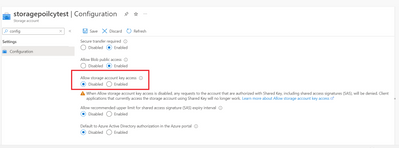
In order to disable this property as part of best practice suggested above on existing storage account, we need to identify which Application/process is using storage account with this SAS key.
Solution
As mentioned in this public article below you need to enable storage logging, you may observe in the logs its showing LCM is using is SAS based authentication in case you have configured LCM policy in storage account.
Prevent authorization with Shared Key - Azure Storage | Microsoft Docs
These log files are irrelevant since LCM uses System Key SAS, so we can ignore these logs. System Key and Admin Keys are still supported for SAS and Shared Key when AllowSharedKeyAccess=false.
Therefore, the final conclusion and the result is that this property will not affect your LCM policy.
Published on:
Learn moreRelated posts
Azure Storage - TLS 1.0 and 1.1 retirement
Overview TLS 1.0 and 1.1 retirement on Azure Storage was previously announced for Nov 1st, 2024, and it was postponed recently to 1 year later...
Efficient Management of Append and Page Blobs Using Azure Storage Actions
Overview In Azure Storage, Blob Lifecycle Management (BLM) allows you to automate the management of your data based on rules defined by...
[Azure AI Search] Internal Server Error when creating CMK encrypted objects
Scenario Customers follow the Microsoft doc to create CMK encrypted objects (data source, index etc.), but get the 500 Internal Serv...
Optimizing Azure Table Storage: Automated Data Cleanup using a PowerShell script with Azure Automate
Scenario This blog’s aim is to manage Table Storage data efficiently. Imagine you have a large Azure Table Storage that accumulates logs from ...
Optimizing Azure Table Storage: Automated Data Clean-up using a PowerShell script with Azure Automat
Scenario This blog’s aim is to manage Table Storage data efficiently. Imagine you have a large Azure Table Storage that accumulates logs from ...
Restoring Soft-Deleted Blobs with multithreading in Azure Storage Using C#
Blob soft delete is an essential feature that safeguards your data against accidental deletions or overwrites. By retaining deleted data for a...
Performing simple Azure Table Storage REST API operations using curl command.
The blog provides guidance to perform simple Table Storage REST API operations such as Create table, Delete Table, Insert entity, Delete entit...
Bulk delete all the old jobs from the batch account
Deleting a Job also deletes all Tasks that are part of that Job, and all Job statistics. This also overrides the retention period for Task dat...
Utilizing Azure Storage and Runbooks for scheduled automated backups of Azure SQL Databases
In this article, we are going to provide detailed steps to create a scheduled Azure SQL Database backup to storage account using automation. T...
[Azure Service Bus] JMS messages getting dead-lettered
The article discusses a problem where numerous messages end up in the dead letter queue (DLQ) when the JMS service bus consumer connects to th...