
New: Require reauthentication for Intune enrollment or risk

Good afternoon!
Explicitly verifying identity and devices is a top priority for organizations adopting Zero Trust. For some critical operations, it’s important to be able to re-prompt the user to ensure no one is “borrowing” their device or has stolen their tokens. That’s why we’re excited to announce the public preview of re-authentication support in Azure AD Conditional Access.
Ricky Pullan, a product manager on the team, is here to tell you more and get you started!
-Alex Weinert
-----------------------------
Hey everyone! I’m Ricky Pullan, a PM on the team that worked on Conditional Access reauthentication policies, and I’m excited to help you get started. We’ve gotten a ton of feedback from customers who want extra protection during scenarios where people may have wandered away from their desks, lent their devices to their kids, or if a device became infected with token stealing malware. Our customers have given us great feedback as we co-engineered this with them, and we’re excited to get your feedback as we go into public preview.
With this new capability, you can explicitly re-verify identity, device, and any other Conditional Access conditions for high-risk scenarios. Reauthentication requires an interactive user authentication and performs all the associated policy checks for scenarios like:
- User risk
- Session risk
- Microsoft Intune device enrollment
We’ll be extending the supported scenarios over time, so stay tuned!
Getting started
Let’s say you want to require users to verify their identity by reauthenticating before they can enroll their device with Microsoft Intune. We can enable this functionality with a few quick clicks:
- Create a new Conditional Access policy
- Select the “test” group you want to include in the policy
- Select “Microsoft Intune enrollment” under “Cloud apps or actions”
- Optionally, select any other conditions for the policy
- Select the “Require multi-factor authentication” grant control
- Select “Sign-in frequency” session control and set it to “Every time”
- Enable the policy and save
Any users in the “test” group will now be required to reauthenticate when enrolling their device with Microsoft Intune if they haven’t done so within the last five minutes.
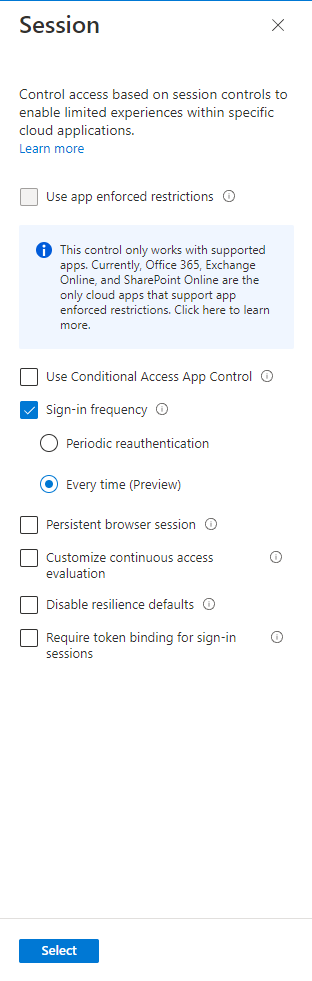
To get a better understanding of the impact these policies will have on your users, enable each policy in Report-only mode before turning on the policy for all of your users.
What’s next
We hope that this new public preview capability allows you to improve your security posture for high-risk scenarios. This release provides the best experience for passwordless end-users, but this is just the beginning! Stay tuned for announcements around expanded credential capabilities for end-users, and new reauthentication scenarios like securing VPN access, and PIM elevations. In the meantime, we'd love to hear your feedback, thoughts, and suggestions.
Learn more about Microsoft identity:
- Related Articles: Configure authentication session management with Conditional Access / Conditional Access: Session controls
- Return to the Azure Active Directory Identity blog home
- Join the conversation on Twitter and LinkedIn
- Share product suggestions on the Azure Feedback Forum
Published on:
Learn moreWe can help you with New: Require reauthentication for Intune enrollment or risk
If you want help implementing, troubleshooting, or improving this product, contact us and we’ll point you in the right direction.
Related posts
Sync identities from Rippling to Microsoft Entra ID
Today, we’re thrilled to announce that customers using Rippling HCM can now automatically provision users to on-premises Active Directory and ...
Microsoft Entra ID Governance for government
I’m pleased to announce that as of November 1, 2024, Microsoft Entra ID Governance is available for federal agencies, state and local governme...
Update to security defaults
As part of the Secure Future Initiative, we’ve evolved our security approach to align with three security principles: secure by design, secure...
Meet Microsoft Entra at Ignite 2024: November 18-22
Microsoft Ignite is just around the corner, taking place from Monday, November 18, 2024 through Friday, November 22, 2024, in Chicago, Illinoi...
Manage Microsoft Entra ID role assignments with Microsoft Entra ID Governance
I’m excited to announce that we now support Microsoft Entra role assignments in Microsoft Entra ID Governance's Entitlement Management feature...
The latest enhancements in Microsoft Authenticator
Hi folks, I'm thrilled to announce three major Microsoft Entra ID advancements that will help you protect your users with phishing-resi...
Microsoft Security announcements and demos at Authenticate 2024
The Microsoft Security team is excited to connect with you next week at Authenticate 2024 Conference, taking place October 14 to 16 in Carlsba...
What's new in Microsoft Entra - September 2024
We’re excited to announce the general availability of Microsoft Entra Suite—one of the industry’s most comprehensive secure access solutions f...
Explore the key benefits of Microsoft Entra Private Access
The traditional network security models are becoming increasingly ineffective in a world where remote work and cloud services are the norm. Co...
Join us at the Microsoft Entra Suite Showcase!
This fall, we are bringing the Microsoft Entra Suite Showcase to cities worldwide. Join us to explore how our latest advancements in secure id...