
Azure Tips and Tricks - How to run Logic Apps in a Docker container

How to run Logic Apps in a Docker container
Azure Logic Apps can run anywhere
You can run Azure Logic Apps anywhere, on the Azure Functions Runtime. This enables you to deploy and run Logic Apps on your local machine, in your own datacenter, or in another cloud. And you can also run Azure Logic Apps in a Docker container.
In this post, we'll run an Azure Logic App in a Docker container.
Prerequisites
If you want to follow along, you'll need the following:
- An Azure subscription (If you don't have an Azure subscription, create a free account before you begin)
- Create an Azure Logic App in VS Code with the newest extension by following this previous tip.
- Docker Desktop
- Postman for sending requests
Deploy a Logic App to a container
The Logic App is triggered by an HTTP trigger and creates a queue message in Azure Storage. Let's deploy the Logic App to a container.
- In VS Code, create a Dockerfile in the project of the Logic App. The file has no file extension, and is just called Dockerfile. It should have the following contents:
Fill in your Azure Storage connection string for the AzureWebJobsStorage environment variable so that the Logic App in the container can use it.
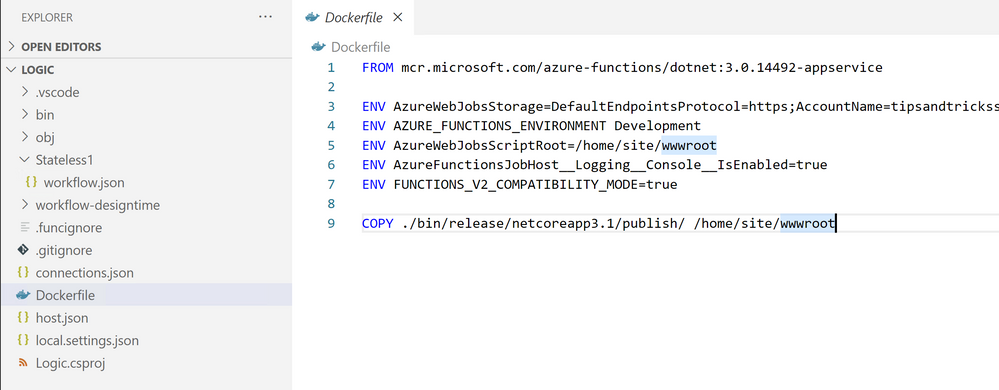
2. Next, open the Terminal in VS Code and build and publish the project with these commands:
- Now create the container image with this command:
- Run the container with the following command. This makes the Logic App accessible through localhost:8080
- Now for the most difficult part. We need to discover the URL for the HTTP trigger. To do that, we first need to get the masterKey to gain access to the Logic App. You can find this key in the Azure Storage Account that you've indicated in the Dockerfile. Go to the Azure Storage Account and navigate to Containers/azure-webjobs-secrets/{id} and open the host.json file.
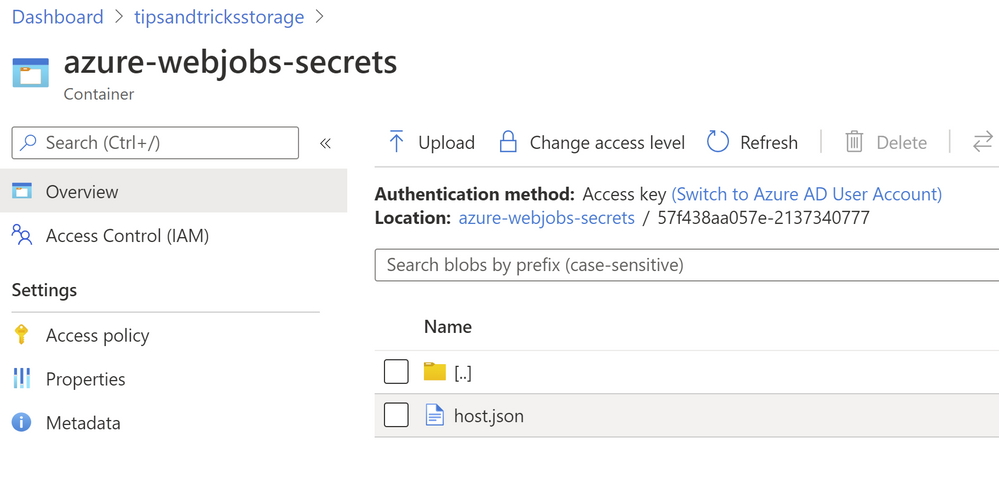
Copy the value of the masterKey. We'll need that in the next step.
- Open Postman
- Create a new POST request for http://localhost:8080/runtime/webhooks/workflow/api/management/workflows/{your logic app workflow name}/triggers/manual/listCallbackUrl?api-version=2020-05-01-preview&code={masterKey value} and send it

The results from the post contain the URL of the HTTP trigger to call and the query parameters to add to the URL.
- Open a browser and trigger the Logic App with a URL like this: http://localhost:8080/api/{your logic app workflow name}/triggers/manual/invoke?api-version=2020-05-01-preview&sp={value for sp}&sv={value for sv}&sig={value for sig}&myqueuetext
The final querystring is a text, which the Logic App takes and puts in a new queue message in Azure Storage
That's it! The Logic App is now triggered and should run successfully and place a message on the Azure Storage queue, like in the image below:

Conclusion
Azure Logic Apps enable you to easily create complex workflows. Now, you can run Azure Logic Apps anywhere, including in a Docker container. Create a trial account today and go and check it out!
Published on:
Learn moreWe can help you with Azure Tips and Tricks - How to run Logic Apps in a Docker container
If you want help implementing, troubleshooting, or improving this product, contact us and we’ll point you in the right direction.
Related posts
This Month in Azure Static Web Apps | 09/2024
We are back with another edition of the Azure Static Web Apps Community! :party_popper: September was yet another month ...
GitHub Copilot for Azure: 6 Must-Try Features
As developers, we are constantly seeking tools that streamline our workflows and boost productivity. … Enter GitHub Copilot for Azure, now in ...
Responsible AI Mitigation Layers
Generative AI is increasingly being used in various kinds of systems to augment humans and infuse intelligent behavior into existing and new a...
Streamline Your Azure Workflow: Introducing GitHub Copilot for Azure in VS Code
I'm excited to announce the public preview of GitHub Copilot for Azure - a new addition to your toolkit that seamlessly integrates with G...
Build Intelligent Apps Code-First with Prompty and Azure AI
Building Generative AI applications can feel daunting for traditional app developers. What does the end-to-end applicati...
Certificación AI-900 (Fundamentos de IA) con Chicas en IA
La inteligencia artificial ha llegado para quedarse, ¡y más aún con la revolucionaria IA generativa! Para ayudar a los profesionales a especia...
Get certified with Learn Live GitHub series!
GitHub Universe is coming, and Microsoft and GitHub are partnering to offer a new special Learn Live series in Brazilian Portuguese, English a...
Certifícate con Learn Live GitHub en Español
Microsoft y GitHub se han unido para ofrecer una nueva serie especial de Learn Live en inglés y español: GitHub 2024. Del 10 al 24 de Octubre,...
Evaluating generative AI: Best practices for developers
As a developer working with generative AI, you've likely marveled at the impressive outputs your models can produce. But how do you ensure the...
Introducing Azure Product Retirement Livestreams
The Azure Retirements team, in collaboration with key partner groups, is excited t...