
How to secure Exchange Online and ensure connectivity for customers

Interview with Amir Haque
Ross: Welcome to our session, where we will talk to a Microsoft Expert about an ongoing important initiative for our Microsoft 365 customers. We are going to speak with Amir from Modern Work Supportability team today, but first, a little background.
Since 2015 Microsoft has been working hard to enable use of modern authentication for client connectivity in Exchange Online. After releasing support for Modern authentication in all currently supported versions of Outlook & working with our partners, we started planning to turn off the use of Basic authentication. It has been a known fact that use of Basic authentication results in security breaches in organizations. We announced in June last year that we are starting to turn off the use of Basic authentication for customers in Microsoft 365 Exchange Online, especially where we see no or very infrequent use of it. This would help to secure those customers by turning off the door that may have been left open as Basic authentication is enabled in those organizations. For more info, please see: Microsoft retires Basic Authentication in Exchange Online | Microsoft 365 Blog.
Ross: Thanks for joining us today, Amir. Can you tell us a bit about yourself and your background?
Amir: Sure, my name is Amir Haque and I’m a Principal Supportability Program Manager covering Exchange Online, Outlook, and mobility areas in Microsoft 365. I have been working with Exchange and Outlook-related technologies for the last two decades. My current focus is on working with our Microsoft 365 customers to help them upgrade their users to utilize modern authentication for email access on their devices.
Ross: Wow, that’s cool - you have an amazing job with such a huge impact across all of Exchange! So, with disabling Basic authentication and ensuring customers upgrade to modern authentication, what was the process?
Amir: We had announced that we will randomly select customers with no usage of Basic authentication, send them a Message center post informing them that in 30 days we’re going to turn off Basic authentication. 30 days later, we’ll turn it off and send another Message center post to confirm it was done. Customer protected...check!
We told them that we’ve already done this for a pilot set of tenants, so we feel good about how this works, but before we scale up, we wanted to build a tool to help our customers just in case we get it wrong. Why would we get it wrong? Well, very low usage is hard to detect if connections are rare, and some customers might even suddenly start using Basic authentication.
Also, in the first week of October, we started to turn off use of Basic authentication for all tenants unless they need more time to work through upgrading their users to utilize modern authentication. These customers can now take advantage of three months additional time to work on it until the end of December 2022. Starting in January 2023, we will then permanently disable the use of Basic authentication for all tenants in Exchange Online. For more details, please see: Exchange Online email applications stopped signing in, or keep asking for passwords? Start here.
Ross: What should a customer do after you disable use of Basic authentication for them, and they realize they still need to use it?
Amir: Well, that’s where a new tool we’ve been building comes in – a tool that provides self-service re-enablement. We’ve built a new diagnostic into the Microsoft 365 admin center. These automated diagnostics have proven really popular with customers, so we simply built on that technology. Read more about troubleshooting with automated diagnostics here.
Ross: What do customers do if they want to re-enable?
Amir: If you want to re-enable connectivity for a protocol that we have disabled for Basic authentication, or want to see what protocols we have disabled, open the Microsoft 365 admin center and click the small green "?" symbol in the lower right-hand corner of the screen.

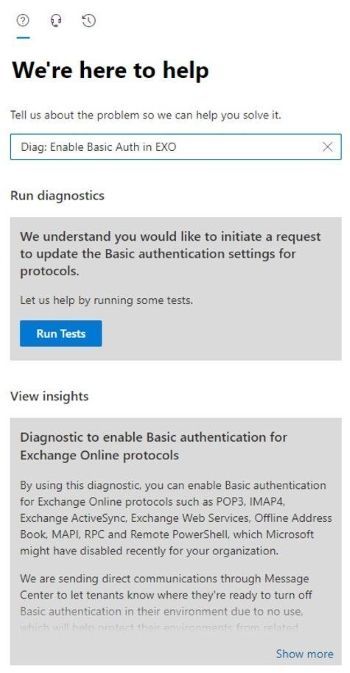
Once you do that, you enter the self-help system which, in case you didn’t know, can use some very clever logic to help you find a solution to all kinds of problems. If you want to get straight to the new Basic authentication self-help diagnostic, simply enter the magic phrase, “Diag: Enable Basic Auth in EXO” or you can click on the following button (shown below) and it will quickly launch the diagnostics in the Microsoft 365 admin center for you.

Once you do that, you'll see a page very similar to this:
Ross: How do you know it worked?
Amir: Once you click the Run Tests button, this automated diagnostic will check your tenant settings to see if we have disabled Basic authentication for any protocols, and then display the results.
If we have not disabled Basic authentication for any protocols, we’ll tell you just that. But assuming we have done something, you’ll see a list of protocols that are disabled. In the image below, you can see my test tenant has the full set of protocols disabled:
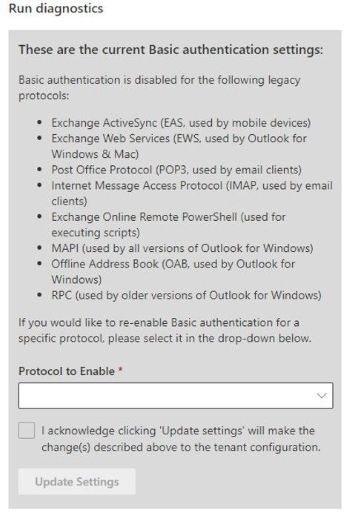
Now, that's great you can see what we did, but the best thing is, you can also re-enable the protocols yourself if you want to. Simply select the protocol (or a group of protocols, as in the case of Outlook), check the box to agree to the warning (you know turning Basic authentication back on is bad right?) and then click Update Settings:

If you want to re-enable another protocol (again – why would you do that…?) re-run the diagnostic and you can do just that. That’s it – that’s how you can re-enable a protocol if we turn it off as part of this larger security effort. This is the only way at this time to re-enable Basic authentication for eight of the nine Exchange Online protocols included in the scope of this effort.
Ross: What is the impact of this work?
Amir: This automated diagnostic has been used hundreds of thousands of times by our customers to manage Basic authentication setting for different connectivity protocols in Exchange Online. Our telemetry tells us that this works almost 100% of the time to help our customers achieve their objective without needing any help from our Support Agents, with a self-help success rate of three nines.
When it fails, most times we were able to track it back to inadvertent code changes in the platform that’s being utilized to host this diagnostic. Those code changes are usually meant to enhance the platform and make it better, but at times we run into regressions that also impact hosted diagnostics.
Ross: Thanks Amir – this is amazing to see. Thank you for joining us today! Is there anything you’d recommend if people have further questions?
Amir: Sure, please check out our main technical articles linked below if you want to know more about this initiative, and what you should be working on as an Exchange Online customer in Microsoft 365. And feel free to post your questions below. I’ll be glad to answer those for you. Thank you!
Ross Smith leads the worldwide Modern Work Supportability team in the Customer Service & Support (CSS) organization at Microsoft.
Helpful resources
- Deprecation of Basic authentication in Exchange Online | Microsoft Learn
- Disable Basic authentication in Exchange Online | Microsoft Learn
Continue the conversation by joining us in the Microsoft 365 community! Want to share best practices or join community events? Become a member by "Joining" the Microsoft 365 community. For tips & tricks or to stay up to date on the latest news and announcements directly from the product teams, make sure to Follow or Subscribe to the Microsoft 365 Blog space!
Published on:
Learn moreRelated posts
Announcing the General Availability of the Microsoft 365 Document Collaboration Partner Program
Empowering Seamless Collaboration for Modern Workforces We are thrilled to announce the general availability of the Microsoft 365 Docume...
Favorite Copilot Prompts
(Amber Plumb interviewing Michael Morales and Allison Sweet) The power of M365 Copilot is transforming the way our support team operates...
Favorite Microsoft 365 Copilot Prompts
(Amber Plumb interviewing Michael Morales and Allison Sweet) The power of M365 Copilot is transforming the way our support team operates...
Boost digital event engagement with Voting and Archiving in Teams Q&A
Managing and delivering effective town halls is key to enabling two-way dialogue with leaders in today’s hybrid world. Microsoft Teams Q&A...
Prepare now for key end of support moments in 2025
One year from today, on October 14, 2025, support will end for all Office 2016 and 2019 suites, standalone apps, and servers. This includes:&n...
Everything you should know about Visio 2016 and Visio 2019 end of support
On October 14, 2025, Visio 2016 and Visio 2019 will reach end of support. After this date, Visio 2016 and Visio 2019 will no longer receive se...
Limit frontline worker access to Teams when off shift
We’re excited to announce that the frontline working time feature is now generally available! This feature allows admins to block or warn acce...
We are removing Feed on Microsoft 365 (Office)
As part of our ongoing efforts to streamline and enhance user experiences, we will be retiring the Feed feature (shown in figure 1 below) on t...
Leveraging Partner Apps to Deliver on the Promise of AI-Led Productivity
The advent of generative AI is driving a rethink of what outcomes we deserve from our productivity software – from gains in efficiency to more...
What’s new in FLW shared devices
Discover the Latest Enhancements in Shared Device Mode (SDM) We are excited to announce a series of new features in Shared Device Mode ...