
General Availability: Azure Active Directory Kerberos with Azure Files for hybrid identities

We are excited to announce General Availability of Azure Files integration with Azure Active Directory (Azure AD) Kerberos for hybrid identities. With this release, identities in Azure AD can mount and access Azure file shares without the need for line-of-sight to an Active Directory domain controller.
Until now, Azure Files supported identity-based authentication over Server Message Block (SMB) through two types of Domain Services: on-premises Active Directory Domain Services (AD DS) and Azure Active Directory Domain Services (Azure AD DS). On-premises AD DS requires clients to have line-of-sight to the domain controller, while Azure AD DS requires deploying domain services onto Azure AD and domain joining to Azure AD DS. Azure AD Kerberos is a new addition to these identity-based authentication methods. Azure AD Kerberos allows Azure AD to issue Kerberos service tickets over HTTPS for service applications in Azure AD. This removes the need to setup and manage another domain service, while also removing the line-of-sight requirement to the domain controller when authenticating with Azure Files. For this experience, the clients connecting to Azure Files need to be Azure AD-joined clients (or hybrid Azure AD-joined), and the user identities must be hybrid identities, managed in Active Directory. Hybrid identities require maintaining the AD Domain Controllers where the identities have originated from.
Here are examples of how you can leverage Azure AD Kerberos with Azure Files, based on your identity-based authentication needs:
- Taking advantage of an existing Azure AD setup: If your organization has already adopted Azure AD, for example to use Office 365, you can now use the same identity-based authentication solution with Azure Files. No additional domain service management will be required.
- Migrating from on-premises: If you have on-premises AD, and on-premises file servers, you can start your migration by syncing to Azure AD. You can then migrate your file servers to Azure Files and start leveraging cloud for file server scenarios. Once cloud-native identities are supported, you can take further steps to migrate to Azure AD fully.
-
Your organization requires keeping AD on-premises: Your organization, for example a financial institution, may have a policy to maintain on-premises AD, and managing identities on-premises. Assigning a default share-level permission for all authenticated users allows continuing to manage permissions through on-premises domain services, without needing to sync to Azure AD. Azure AD Kerberos with Azure Files supports default share-level permissions. Also, with this release, we added a simplified Azure Portal experience for default share-level permissions.
Enable and Configure Azure AD Kerberos for Azure Files:
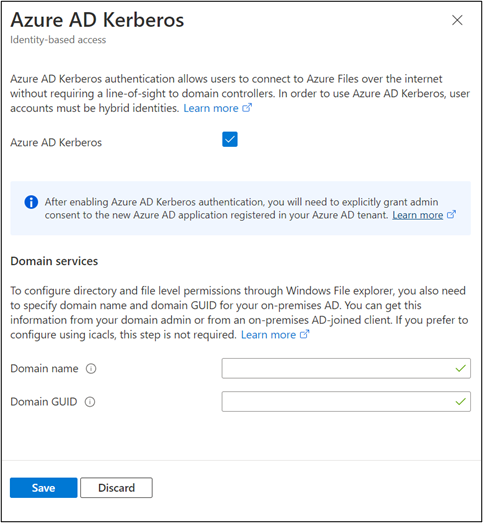
Set Default Share-level Permissions:

To learn more and get started, visit our documentation page.
For a demo of configuring Azure Files with Azure AD Kerberos, watch the Shared storage for all enterprise file-workloads Ignite on-demand session.
To learn more on default share level permissions, visit here.
To see the announcement for FSLogix user profiles support, visit here.
Published on:
Learn moreRelated posts
Update on classic storage account retirement and upcoming changes for classic storage customers
We previously announced that support would end for retired Azure classic storage accounts on 31 August 2024. Now that we are past the retireme...
Azure Elastic SAN for Azure VMware Solution: now Generally Available
Have you been looking to expand your storage on Azure VMware Solution (AVS), but do not need the extra compute performance and the associated ...
Accelerate metadata heavy workloads with Metadata Caching preview for Azure Premium Files SMB & REST
Azure Files previously announced the limited preview of Metadata caching highlighting improvements on the metadata latency (up to 55...
Announcing UNLIMITED Public Preview of Metadata Caching for Azure Premium SMB/REST File Shares
Azure Files is excited to announce the Unlimited public preview of Metadata Caching for the premium SMB/REST file share tier. Unlimited ...
Azure Backup-SAP HANA DB Backup Delivers More Value at Lower TCO with Reduced Protected Instance Fee
Azure Backup for SAP HANA Database Delivers More Value at Lower TCO with Reduced Protected Instance Fees starting 1st Sept’2024 At Azur...
Switch to Azure Business Continuity Center for your at scale BCDR management needs
In response to the evolving customer requirements and environments since COVID-19, including the shift towards hybrid work models and the incr...
The Azure Storage product group is heading to the SNIA Developer Conference 2024
The Azure Storage product group is heading to the SNIA Developer Conference (SDC) 2024 in Santa Clara, California, USA from September 16th thr...
Latest advancements in Premium SSD v2 and Ultra Azure Managed Disks
We are excited to share the latest advancements in Premium SSD v2 (Pv2) and Ultra disks, the next generation of Azure disk stor...
Unlocking the Potential of Unstructured Data with Microsoft Copilot and Azure Native Qumulo
It has been a true pleasure to see our friends at Qumulo constantly innovating and delivering a service that adds more value with every releas...
Public Preview: Customer Managed Planned Failover for Azure Storage
We are excited to announce customer managed Planned Failover for Azure Storage is now available in public preview. Over the past few ye...