
Working with Stored Access Policy to Control SAS

The blog talks about controlling SAS in terms of permissions and expiry time via Stored Access Policy.
When working with SAS, in case a SAS gets compromised, to prevent any un-authorized access via that SAS, the only option to revoke SAS is to recycle the Access Keys being used to sign the SAS. This in turn will affect all the SAS that have been signed using those set of keys. Also, if you are using those keys anywhere in the application, you will have to update the configuration on all those places.
To prevent this, we can make use of a stored access policy. The advantage of using the storage access policy is that you can control expiry time and permissions. Furthermore, if SAS gets compromised, you can edit the permissions of the SAS, make it expired or even delete the access policy completely. This will also prevent you from re-cycling the keys as well.
I am making use of Azure Portal to set up policy, SAS generation however you can make use of REST API or PS cmdlets for the same.
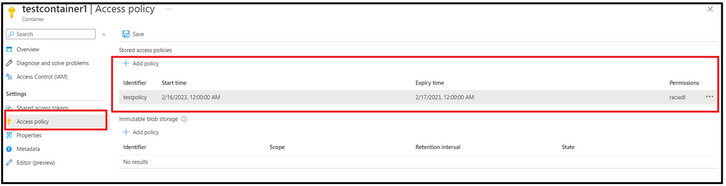
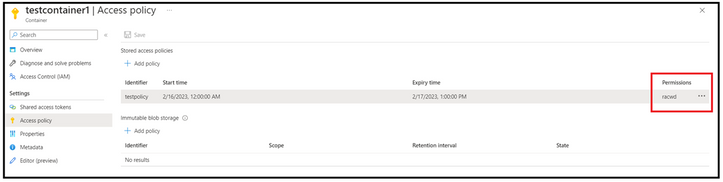
To being with, we have created an access policy with certain expiry time and permission.
Thereafter, we create a SAS token, and we selected the policy created in first step. The fields of permissions and start/expiry times gets disabled are the values associated with the policy are picked automatically.
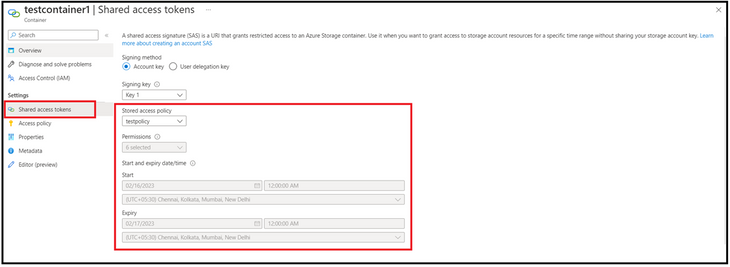
The SAS that will get generated with look something like below and will have service identifier field.
https://<StorageAccountName>.blob.core.windows.net/testcontainer1?si=testpolicy&spr=https&sv=2021-06-08&sr=c&sig=XXXXXXXX
Now, let's make use of the above generated SAS and see the effects of tweaking SAS parameters on the operations.
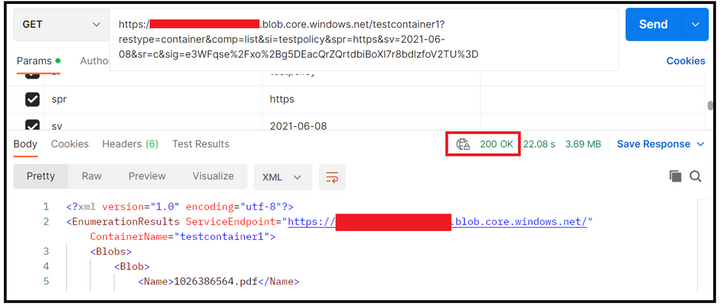
In the first sample test, I made use of the above SAS and tried preforming List Blob operation via REST API using POSTMAN. We could see that the call is successful, and we got the appropriate response as well.
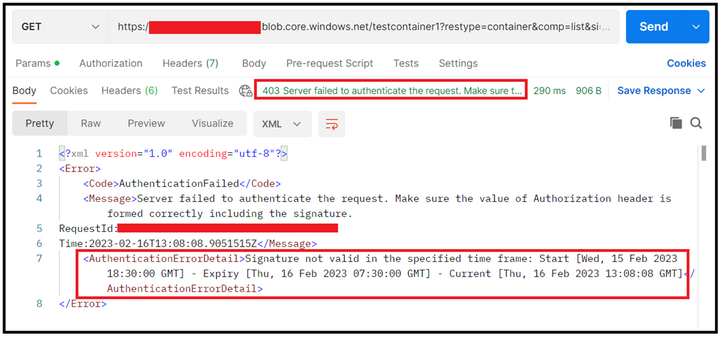
In the below sample, we have updated the expiry time of the SAS.
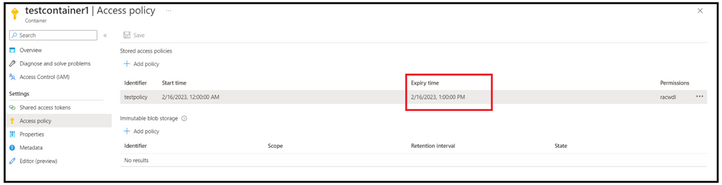
When performing the operation now, the authentication failed with 403 status and the error details clearly pointed the reason for the same. Considering you have generated a SAS with larger expiry time, you can tweak the expiry period to revoke that, and you don’t have to recycle the keys.
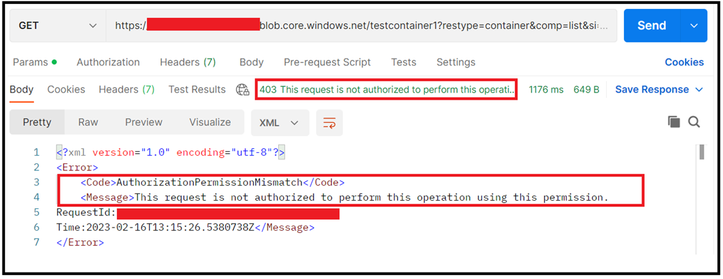
In the below sample, we revoked the listing permissions.
In the response, you will notice that the authentication failed however the calls was not authorized due to permission mismatch. In scenario wherein you want to revoke any particular set of permissions, but still want to continue with same SAS, this can be achieved.
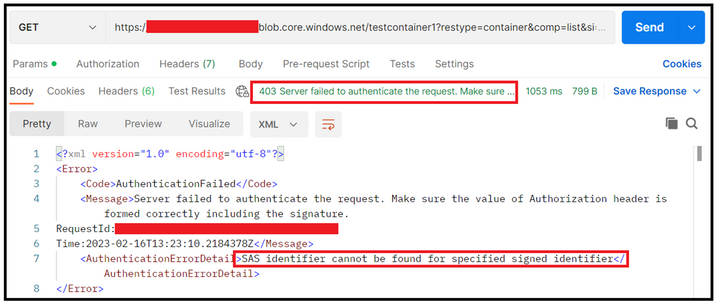
The last sample is that we deleted the entire policy and this in tur failed the authentication. The error message pointed that the identified couldn’t be found, hence the failure.
In all these sample, the demonstration was on controlling the SAS without recycling the keys.
You can have a maximum of 5 stored access policies per blob container. When you edit a policy, the changes might take up to 30 seconds to take effect.
Reference Links:
Define a stored access policy - Azure Storage | Microsoft Learn
Set Container ACL (REST API) - Azure Storage | Microsoft Learn
Set-AzStorageContainerStoredAccessPolicy (Az.Storage) | Microsoft Learn
Hope this helps!
Published on:
Learn moreRelated posts
Azure Storage - TLS 1.0 and 1.1 retirement
Overview TLS 1.0 and 1.1 retirement on Azure Storage was previously announced for Nov 1st, 2024, and it was postponed recently to 1 year later...
Efficient Management of Append and Page Blobs Using Azure Storage Actions
Overview In Azure Storage, Blob Lifecycle Management (BLM) allows you to automate the management of your data based on rules defined by...
[Azure AI Search] Internal Server Error when creating CMK encrypted objects
Scenario Customers follow the Microsoft doc to create CMK encrypted objects (data source, index etc.), but get the 500 Internal Serv...
Optimizing Azure Table Storage: Automated Data Cleanup using a PowerShell script with Azure Automate
Scenario This blog’s aim is to manage Table Storage data efficiently. Imagine you have a large Azure Table Storage that accumulates logs from ...
Optimizing Azure Table Storage: Automated Data Clean-up using a PowerShell script with Azure Automat
Scenario This blog’s aim is to manage Table Storage data efficiently. Imagine you have a large Azure Table Storage that accumulates logs from ...
Restoring Soft-Deleted Blobs with multithreading in Azure Storage Using C#
Blob soft delete is an essential feature that safeguards your data against accidental deletions or overwrites. By retaining deleted data for a...
Performing simple Azure Table Storage REST API operations using curl command.
The blog provides guidance to perform simple Table Storage REST API operations such as Create table, Delete Table, Insert entity, Delete entit...
Bulk delete all the old jobs from the batch account
Deleting a Job also deletes all Tasks that are part of that Job, and all Job statistics. This also overrides the retention period for Task dat...
Utilizing Azure Storage and Runbooks for scheduled automated backups of Azure SQL Databases
In this article, we are going to provide detailed steps to create a scheduled Azure SQL Database backup to storage account using automation. T...
[Azure Service Bus] JMS messages getting dead-lettered
The article discusses a problem where numerous messages end up in the dead letter queue (DLQ) when the JMS service bus consumer connects to th...