
Analyze HAR trace when importing an Azure Appservice/Webapp on API Management from Azure Portal.

Introduction:
The Azure PaaS product API management allows to expose APIs hosted on Azure App Services, also known as webapps. The process of importing and publishing the App service is described in document: Import Azure Web App to Azure API Management ; however, on this article we will analyze what actions Azure Portal performs behind the scenes to complete the import and figure out the cause of common scenarios.
Steps to collect a Browser Trace: HAR
Troubleshooting:
Background steps to import a WebApp to API Management:
-
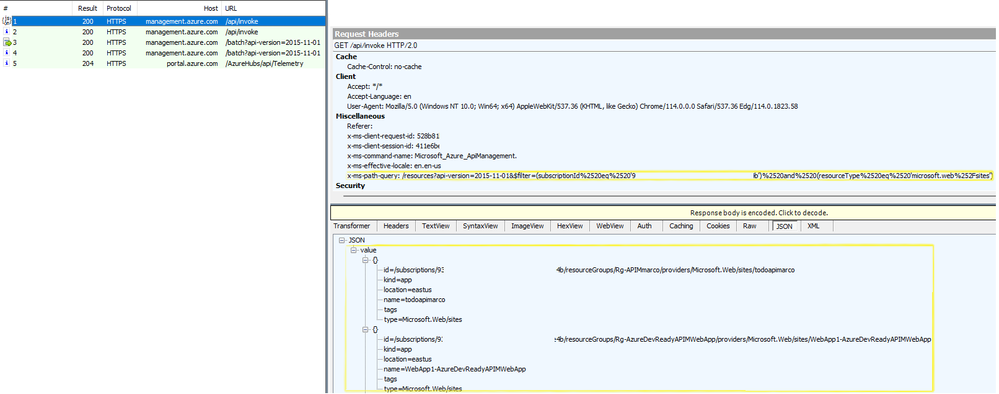
Once you clicked on the Azure Portal > APIM > APIs > App Service and Browse, there's a rest API call made to Azure Resource Manager by the Azure Portal to list the "Microsoft.Web" resources (this includes the App Service resources) present on your subscriptions.
-
Once you choose the App service to import and click on select. There are a couple of rest calls made:
-
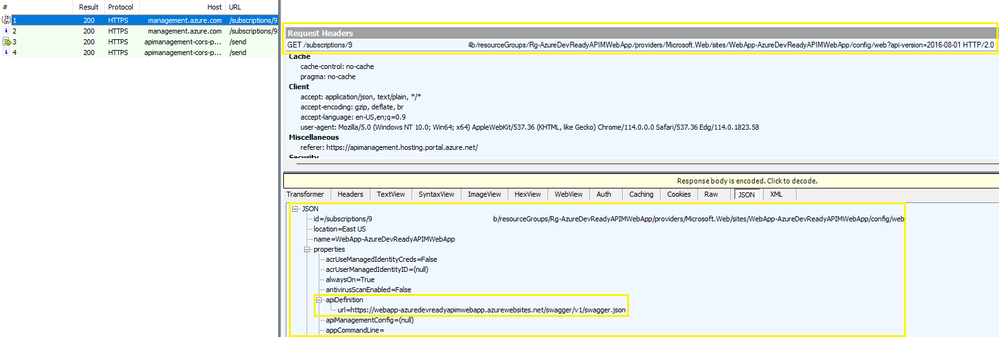
An Azure Resource Manager GET call to the web site selected in order to list the app service configuration. Note that there's a specific field on the response called apiDefinition with the complete URL of the API specification returned by app services (example: https://webapp-azuredevreadyapimwebapp.azurewebsites.net/swagger/v1/swagger.json ).
-
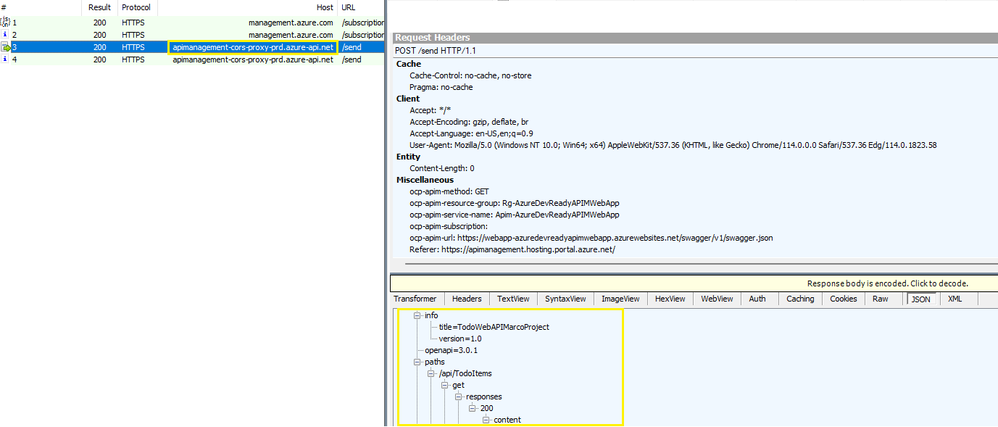
A POST call to apiDefinition URL specified on below step to collect the OpenAPI specification. It's very important to mention that call is made from APIM cors proxy API Management "apimanagement-cors-proxy-prd.azure-api.net ".
-
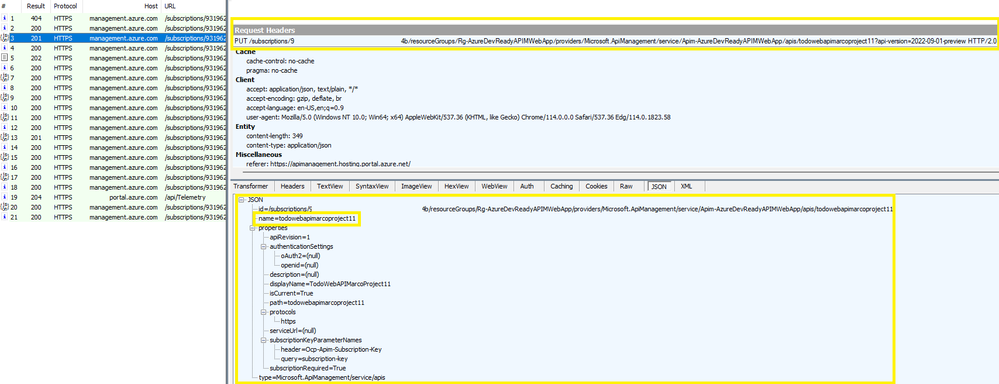
An Azure Resource Manager HEAD call to resource provider "Microsoft.ApiManagement" is made to determine whether the API name already exist or not, API name should be a unique identifier name. In this case result is 404 because API with name: "todowebapimarcoproject11" does not exist yet and name can be used.

-
An Azure Resource Manager PUT call to resource provider "Microsoft.ApiManagement" to create the simple API with the above name.
-
An Azure Resource Manager PUT call to resource provider "Microsoft.ApiManagement" to import the openAPI specification validated on step # 2.b to the API previously created. Important: This is an asynchronous call, so you might see other GET calls validating the status of the import operation.
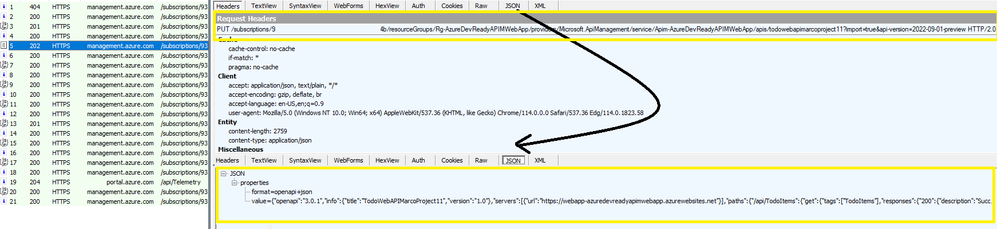
-
An Azure Resource Manager GET call to resource provider "Microsoft.ApiManagement" to list the new API details, and get prepared to create a new API Management backend object. The next request you will see is the PUT call to resource provider "Microsoft.ApiManagement" to create the backend for this specific resource, in this case named: "WebApp_webapp-azuredevreadyapimwebapp".
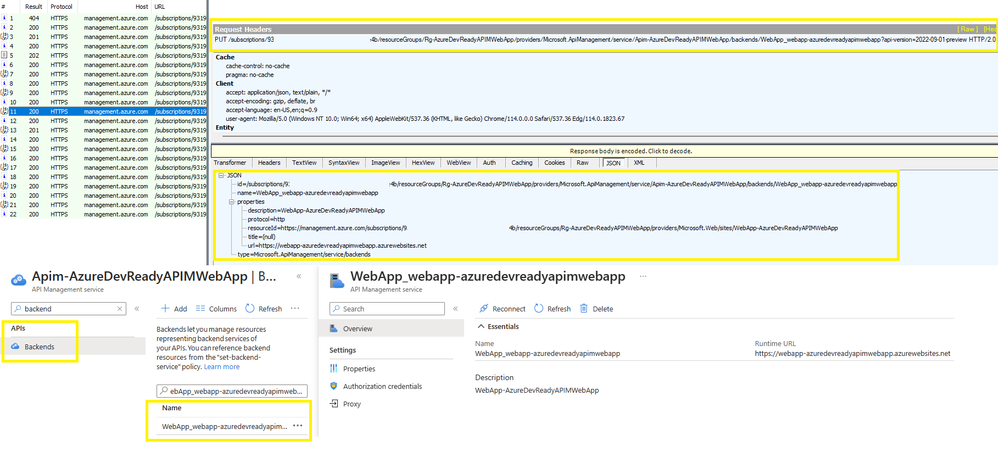
-
An Azure Resource Manager PUT call to resource provider "Microsoft.ApiManagement" to create a policy referencing that backend previously created <set-backend-service id="apim-generated-policy" backend-id="WebApp_webapp-azuredevreadyapimwebapp" />.
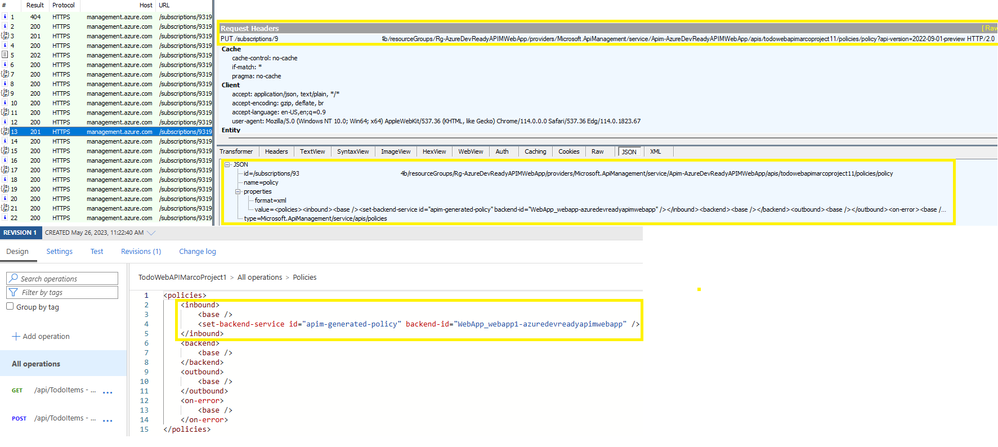
Finally, after successful creation you will get a new API imported to APIM from an Azure App Service resource. Please note that App service can be imported independently the Web App is on Virtual Network or attached to a Private Endpoint because behind the scenes the requests are Control Plane Data to Azure Resource Manager ARM. However, there are common scenarios where you can find that App Service is not Imported as expected.
Scenario#1: App services not on list to be added to API Management.
Symptom:
When going to Azure Portal > APIM > APIs > create new API from App Service and Browse, It is not listing all the webapps you are expecting to.
Cause:
As mentioned on step#1- "Once you clicked on the Azure Portal > APIM > APIs > App Service and Browse, there's a rest API call made to Azure Resource Manager by the Azure Portal to list the "Microsoft.Web" resources (this includes the App Service resources) present on your subscriptions."
Resolution:
Make sure that the user you signed into the Azure Portal has sufficient RBAC role permissions over the WebApps along the subscriptions those App Services belong to.
Scenario#2: API imported from Azure App service to APIM missing OpenAPI specification.
Symptom:
After importing the API to APIM from a WebApp you noticed that it did not import the Open API specification, and instead created a wildcard for each HTTP verb operation, example: GET, DELETE, PATCH, POST, PUT.
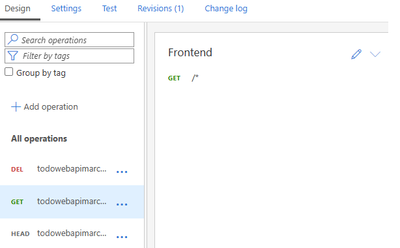
Cause:
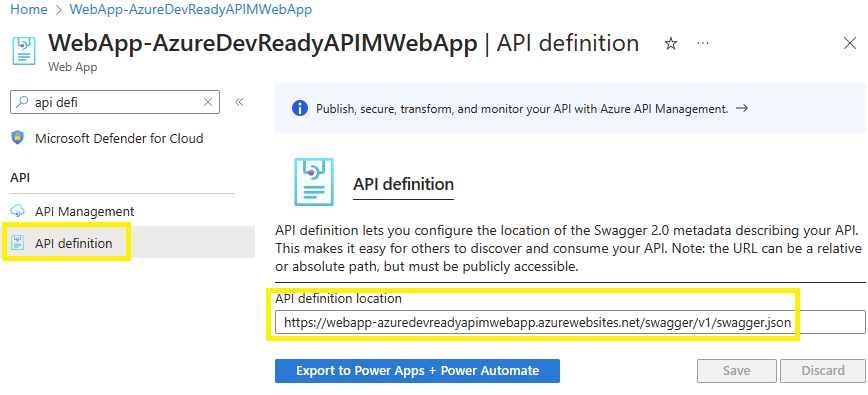
As mentioned on step # 2, there's a Get call to the web site selected in order to list the app service configuration. Note that there's a specific field on the response called apiDefinition with the complete URL of the API specification returned by app services (example: https://webapp-azuredevreadyapimwebapp.azurewebsites.net/swagger/v1/swagger.json ).
You can specify the above apiDefinition by going to the Azure Portal > App Service> API definition. As portal states "API definition lets you configure the location of the Swagger 2.0 metadata describing your API. This makes it easy for others to discover and consume your API. Note: the URL can be a relative or absolute path, but must be publicly accessible."
Resolution:
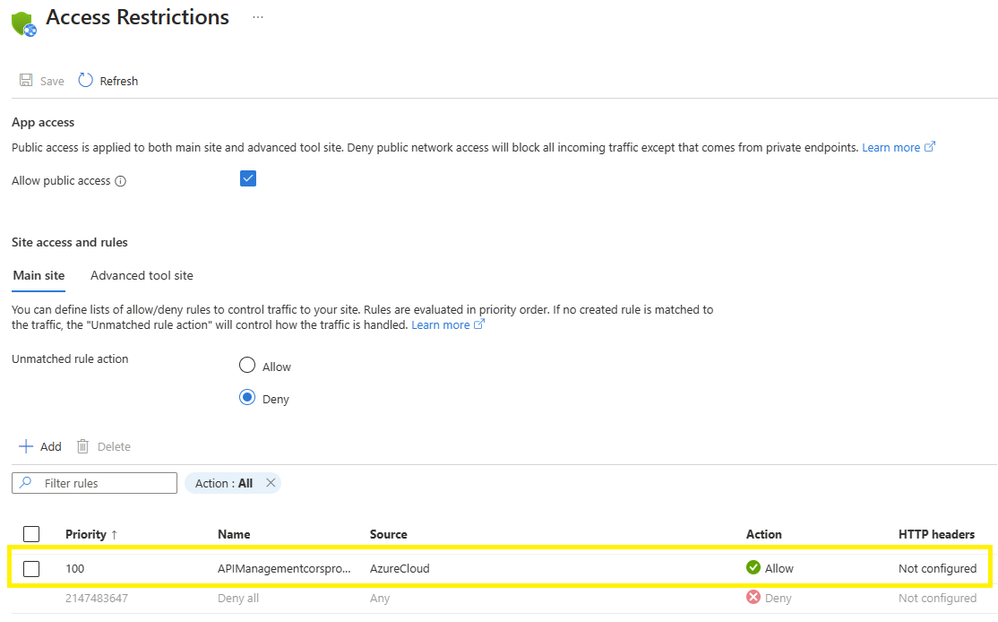
Make sure you add OpenAPI URL on the API definition of the App service, as it stated this URL should be publicly accessible. There's a common scenario where the URL is inside the same app service being imported for example: https://webapp-azuredevreadyapimwebapp.azurewebsites.net/swagger/v1/swagger.json , and web app is only accessible throughout a private endpoint, in this scenario there still would be a workaround, as you could also see on step # 2 point B "POST call to apiDefinition specified on below step to collect the OpenAPI specification. It's very important to mention that call is made from APIM cors proxy API Management "apimanagement-cors-proxy-prd.azure-api.net ". You can edit the access restrictions on the Web App side by going to the Azure Portal > App Service> Networking > Access Restriction and accept traffic from tag Azure Cloud.
Published on:
Learn moreRelated posts
Azure Storage - TLS 1.0 and 1.1 retirement
Overview TLS 1.0 and 1.1 retirement on Azure Storage was previously announced for Nov 1st, 2024, and it was postponed recently to 1 year later...
Efficient Management of Append and Page Blobs Using Azure Storage Actions
Overview In Azure Storage, Blob Lifecycle Management (BLM) allows you to automate the management of your data based on rules defined by...
[Azure AI Search] Internal Server Error when creating CMK encrypted objects
Scenario Customers follow the Microsoft doc to create CMK encrypted objects (data source, index etc.), but get the 500 Internal Serv...
Optimizing Azure Table Storage: Automated Data Cleanup using a PowerShell script with Azure Automate
Scenario This blog’s aim is to manage Table Storage data efficiently. Imagine you have a large Azure Table Storage that accumulates logs from ...
Optimizing Azure Table Storage: Automated Data Clean-up using a PowerShell script with Azure Automat
Scenario This blog’s aim is to manage Table Storage data efficiently. Imagine you have a large Azure Table Storage that accumulates logs from ...
Restoring Soft-Deleted Blobs with multithreading in Azure Storage Using C#
Blob soft delete is an essential feature that safeguards your data against accidental deletions or overwrites. By retaining deleted data for a...
Performing simple Azure Table Storage REST API operations using curl command.
The blog provides guidance to perform simple Table Storage REST API operations such as Create table, Delete Table, Insert entity, Delete entit...
Bulk delete all the old jobs from the batch account
Deleting a Job also deletes all Tasks that are part of that Job, and all Job statistics. This also overrides the retention period for Task dat...
Utilizing Azure Storage and Runbooks for scheduled automated backups of Azure SQL Databases
In this article, we are going to provide detailed steps to create a scheduled Azure SQL Database backup to storage account using automation. T...
[Azure Service Bus] JMS messages getting dead-lettered
The article discusses a problem where numerous messages end up in the dead letter queue (DLQ) when the JMS service bus consumer connects to th...