
Share a model-driven app in Power Apps
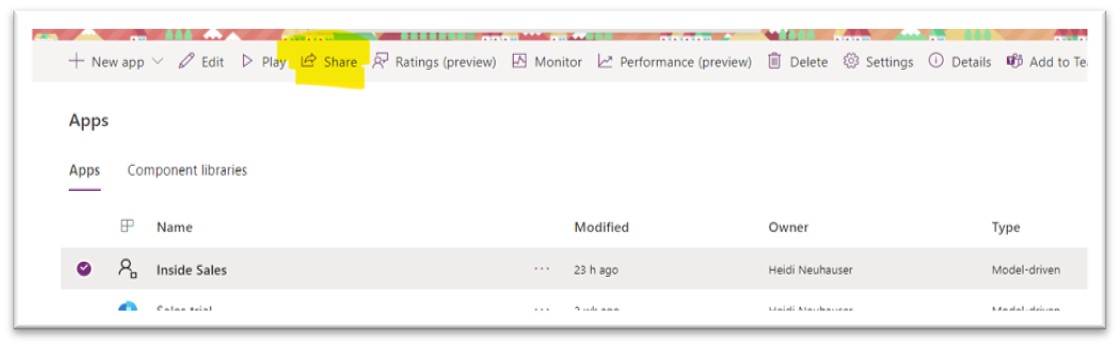
It’s easier than ever to share your model-driven app with users! Share directly from Power Apps, and you can choose between security roles and / or individual people in your organization. Sharing is caring! How to get started Well this one is “easy peasy lemon squeezy” as my kids say. Three simple steps: Model-driven App […]
The post Share a model-driven app in Power Apps appeared first on .
Published on:
Learn moreWe can help you with Share a model-driven app in Power Apps
If you want help implementing, troubleshooting, or improving this product, contact us and we’ll point you in the right direction.
Related posts
When a calculated column wins over a formula column
Formula columns have been available in Dataverse for a few years now, and Microsoft has made it clear that they are the preferred option going...
Business Process Flows in Dynamics 365 CE
Let’s look back at an oldie but a goodie in Dynamics 365 CE/CRM: Business Process Flows! These are designed to standardize how records m...
Handling Dataverse Customer Columns in Power Automate
In Dataverse, a Customer column is a special type of lookup. Unlike a standard lookup, it can reference either an Account or a Contact. That f...
Dynamics 365 CE: Known Issues Creating Word Templates
A classic feature worth revisiting, today’s focus is Word Templates in Dynamics 365 CE/CRM. This tool remains a powerful option available for ...
Types of Power Automate Flows
Welcome to Power Automate! This article focuses on differentiating the three types of Power Automate cloud flows: scheduled, instant and autom...
Condition vs. Switch in Power Automate: When to Use Each
A common question I hear from newer Power Automate users is when to use Condition vs Switch in the Control connector. Control is available in ...