
Azure Firewall: New Monitoring and Logging Updates

Contributors: Eliran Azulai and Yuval Pery
Monitoring, management, and innovation are core pillars of Azure Firewall. With this in mind, we are delighted to share the following new capabilities:
- Resource Health is now in public preview
- Embedded Firewall Workbooks is now in public preview
- Latency Probe Metric is now in general availability
When you monitor the firewall, it’s the end-to-end experience that we continuously strive to improve. Our aim is to empower you to make informed decisions quickly and maximize your organization's security demands. Understanding the importance of having visibility into your network, this release focuses on making it easier for you to monitor, manage, and troubleshoot your firewalls more efficiently.
Azure Firewall is a cloud-native firewall as a service offering that enables customers to centrally govern and log all their traffic flows using a DevOps approach. The service supports both application and network-level filtering rules and is integrated with the Microsoft Threat Intelligence feed to filter known malicious IP addresses and domains. Azure Firewall is highly available with built-in auto-scaling.
Resource Health is now in public preview
With the Azure Firewall Resource Health check, you can now view the health status of your Azure Firewall and address service problems that may affect your Azure Firewall resource. Resource Health allows IT teams to receive proactive notifications regarding potential health degradations and recommended mitigation actions for each health event type. For instance, you can determine if the firewall is running as expected with an "Available" status or if there was downtime due to platform events with an "Unavailable" status.
This preview is automatically enabled on all firewalls and no action is required to enable this functionality. For more information, see Azure Resource Health overview - Azure Service Health | Microsoft Learn
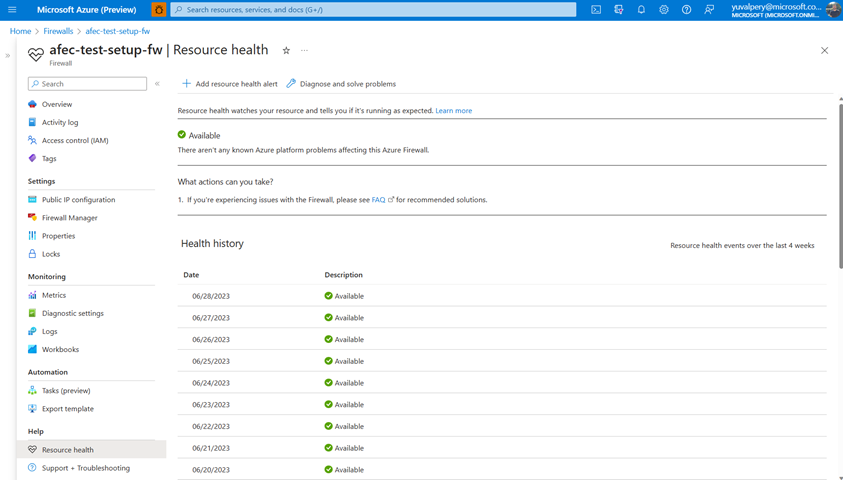
Easily view the resource health status and history of your firewall
Embedded Firewall Workbooks are now in public preview
The Azure Firewall Workbook presents a dynamic platform for analyzing Azure Firewall data. Within the Azure portal, you can utilize it to generate visually engaging reports. By accessing multiple Azure Firewalls deployed throughout your Azure infrastructure, you can integrate them to create cohesive and interactive experiences.
With the Azure Firewall Workbook, you can extract valuable insights from Azure Firewall events, delve into your application and network rules, and examine statistics regarding firewall activities across URLs, ports, and addresses. It enables you to filter your firewalls and resource groups, and effortlessly narrow down data sets based on specific categories when investigating issues in your logs. The filtered results are presented in a user-friendly format, making it easier to comprehend and analyze.
Now, Azure Firewall predefined workbooks are two clicks away and fully available from the Monitor section in the Azure Firewall Portal UI:
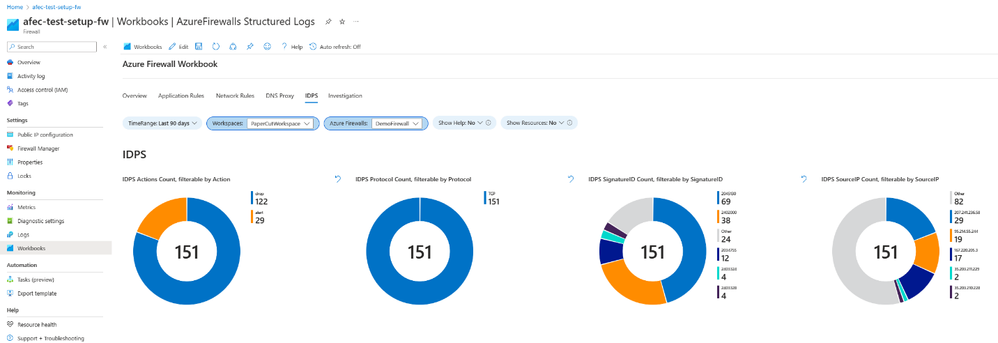
View valuable insights in a dashboard view using Azure Firewall Embedded Workbooks
Latency Probe metric is now generally available
The Latency Probe metric is designed to measure the overall latency of Azure Firewall and provide insight into the health of the service. IT administrators can use the metric for monitoring and alerting if there is observable latency and diagnosing if the Azure Firewall is the cause of latency in a network. This troubleshooting metric is helpful for proactively engaging in potential issues to traffic or services in your infrastructure.
Azure Firewall latency can be caused by various reasons, such as high CPU utilization, throughput, or networking issues. As an important note, this tool is powered by Ping Mesh technology, which means that it measures the average latency of the ping packets to the firewall itself. The metric does not measure end-to-end latency or the latency of individual packets.
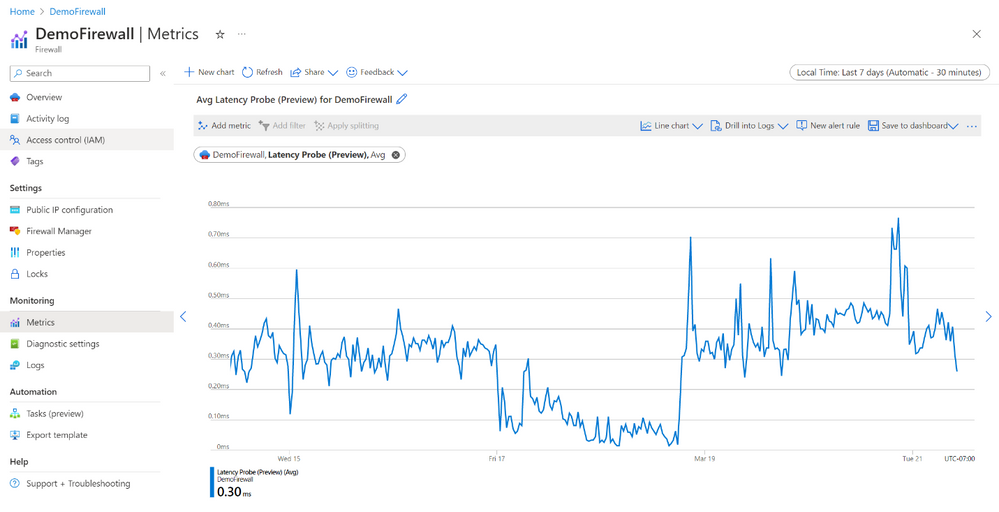
View the overall latency of the Azure Firewall using the Latency Probe metric
Learn more
When you’re ready to try these new capabilities, just navigate to Azure Firewall Monitoring in the Azure Portal, and select Logs, Metrics, or Workbooks to use these new features. If you do not have logs, navigate to Azure Firewall Diagnostic settings to get started. And continue to provide us with feedback! To give us feedback just tap the feedback icon 
Learn more in the following support articles:
Latency Probe metric – Microsoft Learn
Resource Health – Microsoft Learn
Azure Firewall Workbook – Microsoft Learn
Azure Firewall – Microsoft Learn
Azure Firewall Manager – Microsoft Learn
About the author
Suren Jamiyanaa is a Product Manager in Azure Network Security. She joined the team in 2019 where she focuses on innovating the Azure Firewall product for customers in a modern cloud network strategy.
Published on:
Learn moreRelated posts
IPv6 Adoption: Enhancing Azure WAF on Front Door
The transition to IPv6 is a significant step for enterprise corporations, reflecting the evolution of internet technology and the need for a l...
Azure WAF’s Bot Manager 1.1 and JavaScript Challenge (Preview): Navigating the Bot Threat Terrain
Introduction Bots are a common presence on the internet, serving a range of functions from automating customer service to indexing page...
Private IP DNAT Support (Preview) and Scenarios with Azure Firewall
Introduction Azure Firewall is a cloud native security service to protect your workloads running in Azure. It is a stateful firewall as a serv...
Getting Started with Azure DDoS Protection REST API: A Step-by-Step Guide
REST API is a cornerstone in the management of resources on Azure, providing a streamlined and efficient approach for executing create, read, ...
Monitoring Azure DDoS Protection Mitigation Triggers
Monitoring Azure DDoS Protection Mitigation Triggers In today’s digital landscape, Distributed Denial of Service (DDoS) attacks pose a signifi...
Azure WAF’s Bot Manager 1.1 and JavaScript Challenge: Navigating the Bot Threat Terrain
Introduction Bots are a common presence on the internet, serving a range of functions from automating customer service to indexing page...
Utilizing Azure DDoS Protection Workbook for DDoS attack traffic Analysis
In today's digital age, the security of applications, servers, and networks is paramount. One of the most significant threats to this security...
Independent Configuration of Size Enforcement and Inspection Limits in Application Gateway WAF
Introduction In the constantly changing world of cybersecurity, both flexibility and effective security are essential for safeguarding ...
Private IP DNAT Support and Scenarios with Azure Firewall
Introduction Azure Firewall is a cloud native security service to protect your workloads running in Azure. It is a stateful firewall as a serv...
Monitoring traffic flows in Azure Firewall using Virtual Network Flow Logs
Azure Firewall is a managed service designed to protect your Azure Virtual Network resources, providing advanced threat protection and advance...