

Microsoft Dynamics 365 & Power Platform Posts

Article
Substring vs Slice in Power Automate
Power Automate has quite a few string functions that can help you sort out textual issue. Two of these functions are Substring and Slice. Do y...
SharePains Home of Microsoft Tech
10 months ago
35
Article
AI-Powered Report Generation Using Copilot Studio’s Document Output (Preview)
Table of Contents 1. Introduction 2. Business Context: Vocational Assessment Reports 3. Solution Overview and Data Flow 4. High-Level Data Flo...
Inogic- Maplytics | Dynamics CRM Add-Ons | Development | Consulting
10 months ago
48
Article
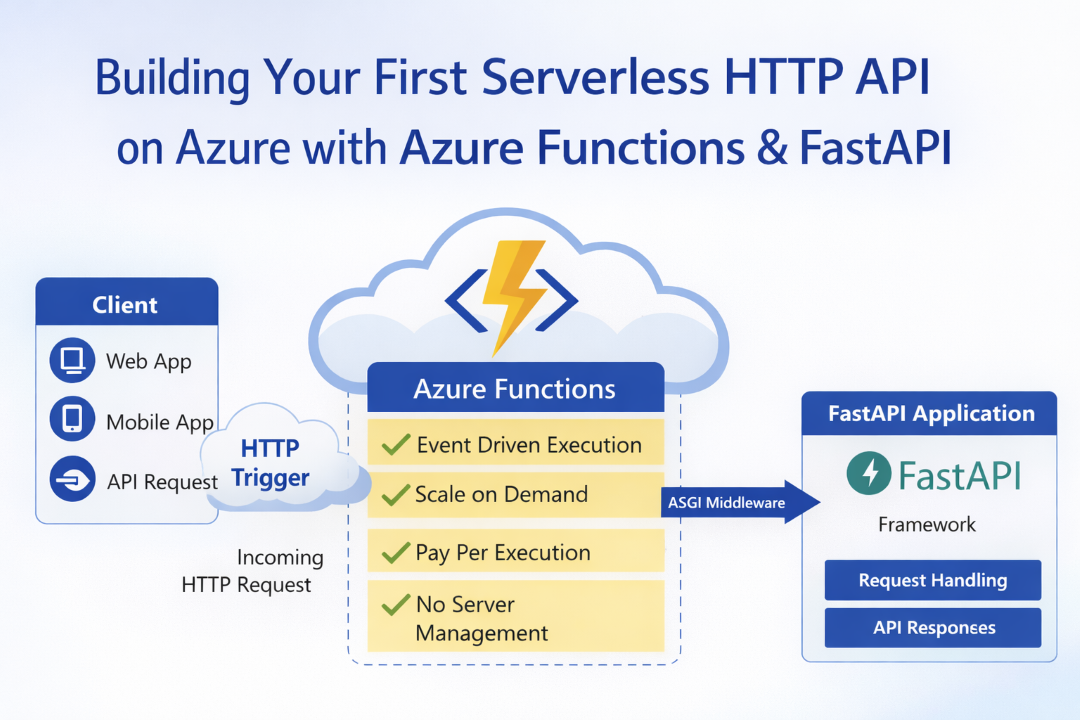
Part 1: Building Your First Serverless HTTP API on Azure with Azure Functions & FastAPI
Introduction This post is Part 1 of the series Serverless Application Development with Azure Functions and Azure Cosmos DB, where we explore ...
Azure Cosmos DB Blog
10 months ago
38

Article
What I learned about SSIS
Happy New Year, everyone! Today, I want to share a list of knowledge that I have gained since I started learning SSIS – KingswaySoft! Ce...
Temmy Wahyu Raharjo – Dreaming to be a clean coder and TDD minded programmer.
10 months ago
38

Article
Microsoft Copilot (Microsoft 365): People Skills – Expanded AI inferencing for E3/E5 users
People Skills is expanding AI powered skill inferencing to include Microsoft 365 E3 and E5 licensed users. Previously, AI powered skill infere...
M365 Admin
10 months ago
49

Article
Outlook: Open and Send Outlook File Templates
We’re introducing the ability to open and send OFT files (Outlook File Templates) on mobile. This feature allows users to view and open ...
M365 Admin
10 months ago
18

Article
Microsoft 365: Drawn electronic signatures with eSignature for Microsoft 365
Signers will be able to add their electronic signature to PDFs using a stylus, touch, or mouse, in addition to the existing typed signature op...
M365 Admin
10 months ago
21

Article
Microsoft Viva: Viva Glint – Navigation improvements in Reporting
Viva Glint Reporting users like managers and leaders will be able to retrace their navigation flow i.e. drill down and drill up in reports rat...
M365 Admin
10 months ago
9

Article
Microsoft Copilot (Microsoft 365): Agent Mode in PowerPoint
Agent Mode in PowerPoint lets you transform, polish, and edit presentations through natural conversation in chat—preserving your deck’s format...
M365 Admin
10 months ago
25
Sidebar
All Categories
 Azure
 Dynamics 365
 Dynamics 365 Business Central
 Dynamics 365 Commerce
 Dynamics 365 Contact Center
 Dynamics 365 Customer Service
 Dynamics 365 Customer Voice
 Dynamics 365 Field Service
 Dynamics 365 Finance
 Dynamics 365 Human Resources
 Dynamics 365 Marketing (Customer Insights)
 Dynamics 365 Order Management System
 Dynamics 365 Project Operations
 Dynamics 365 Sales
 Dynamics 365 Supply Chain Management
 Microsoft 365
 Microsoft 365 Copilot
 Microsoft 365 Graph
 Microsoft 365 Sharepoint
 Microsoft 365 Teams
 Microsoft Excel
 Microsoft OneNote
 Microsoft Outlook
 Microsoft PowerPoint
 Microsoft Word
 Power Platform
 AI Builder
 Copilot Studio
 Dataverse
 Power Apps
 Power Automate
 Power BI
 Power Fx
 Power Pages
Azure
Azure
Dynamics 365
Dynamics 365
Dynamics 365 Business Central
Dynamics 365 Commerce
Dynamics 365 Contact Center
Dynamics 365 Customer Service
Dynamics 365 Customer Voice
Dynamics 365 Field Service
Dynamics 365 Finance
Dynamics 365 Human Resources
Dynamics 365 Marketing (Customer Insights)
Dynamics 365 Order Management System
Dynamics 365 Project Operations
Dynamics 365 Sales
Dynamics 365 Supply Chain Management
Microsoft 365
Microsoft 365
Microsoft 365 Copilot
Microsoft 365 Graph
Microsoft 365 Sharepoint
Microsoft 365 Teams
Microsoft Excel
Microsoft OneNote
Microsoft Outlook
Microsoft PowerPoint
Microsoft Word
Power Platform
Power Platform
AI Builder
Copilot Studio
Dataverse
Power Apps
Power Automate
Power BI
Power Fx
Power Pages