
Announcing Azure Resource Manager metrics in Azure Monitor

Today, we're excited to announce that Azure Resource Manager metrics are available in Azure Monitor.
When you create and manage resources in Azure, requests are orchestrated through Azure's control plane, Azure Resource Manager. With the metrics we've announced today, you now have observability into the traffic and latency for control plane requests made throughout your subscriptions. For example, you can now figure out when your requests have been throttled or have failed by filtering for specific status codes. This data and the rich dimensions we expose, like Method, ResourceType, and StatusCode, will enable you to dig deep into how your requests perform in Azure!
The Azure Resource Manager metrics cover the past three months (93 days) of requests and currently track synchronous requests. For a scenario like a VM creation, the metrics that you retrieve do not represent the performance or reliability of the long running asynchronous operation, but rather the initial PUT request and the subsequent GET requests.
You can access control plane metrics via the Azure Monitor REST APIs, SDKs, and the Azure portal. For an overview on Azure Monitor, see Azure Monitor Metrics. For guidance on how to retrieve a bearer token and make requests to Azure, see Azure REST API reference.
The metric namespace for the Azure Resource Manager metrics is "microsoft.resources/subscriptions" as you'll see in the example REST API request below:
For using this in Azure portal, you will first need to navigate to the Azure Monitor blade within the portal:

After selecting Explore Metrics, select a single subscription and then select the Azure Resource Manager metric:
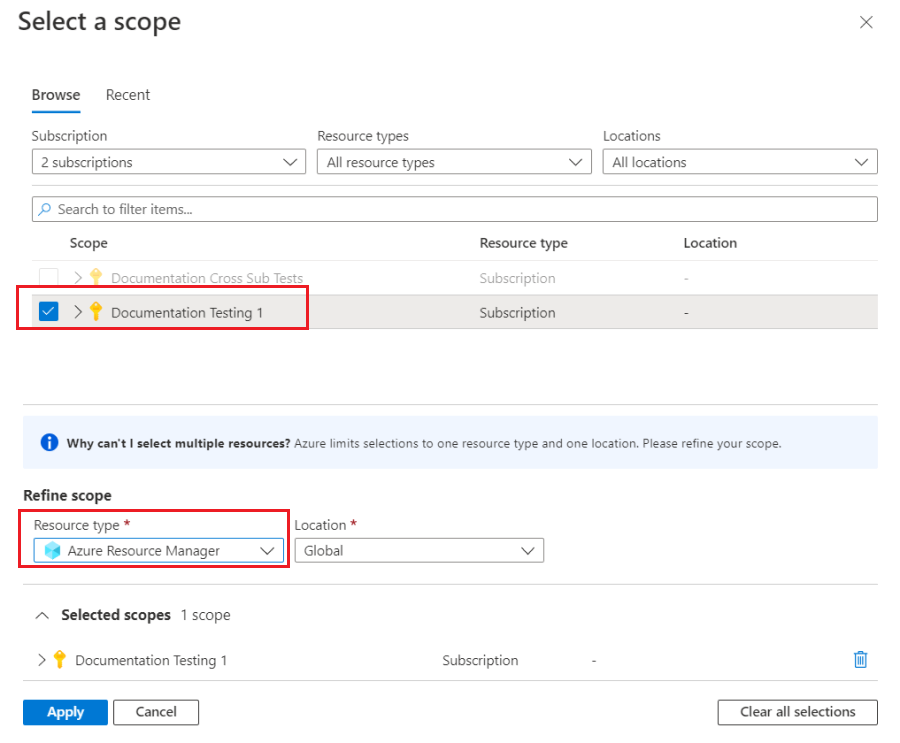
Then, after selecting Apply, you can visualize your Traffic or Latency control plane metrics with custom filtering and splitting:
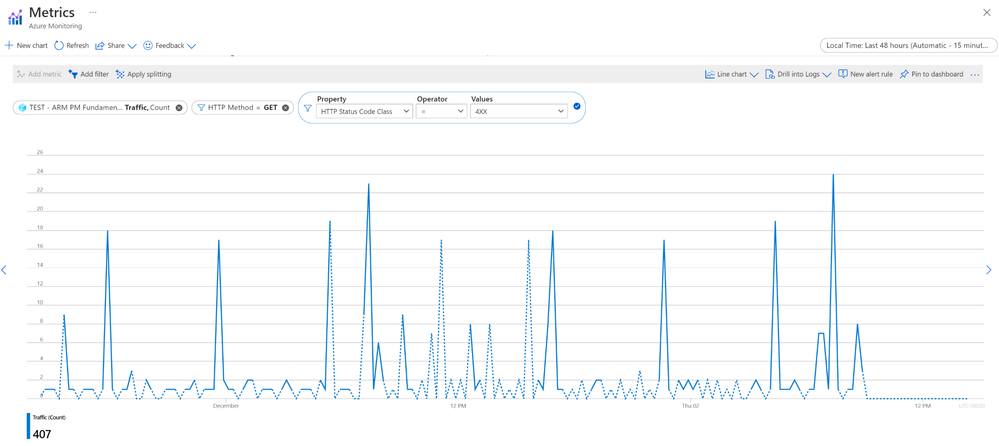
For more details on filtering and scoping dimensions and specific scenarios like examining your throttling requests, see Control plane metrics in Azure Monitor - Azure Resource Manager | Microsoft Docs.
We've built and enabled these metrics so you have more observability into your own request patterns and into Azure's commitment to operational excellence! We hope that you enjoy this capability and make full use of it for your scenarios ranging from viewing monthly traffic to pulling detailed hourly 4xx and 5xx status metrics.
Published on:
Learn moreRelated posts
Azure Landing Zones - Policy Refresh Q1 FY25
ALZ - Policy Refresh Q1 FY25 is here! As you may be aware, the ALZ team release cadence is now on quarterly basis to help customers and partne...
Custom Policy- Reusable Logs Templates
Reusable Templates for Sending Logs to Log Analytics Workspace Challenge: When it comes to developing custom policies for sendin...
Enhancements to Azure Monitor Baseline Alerts for Azure Landing Zones
Introduction Welcome to our latest blog post where we dive into a number of exciting new key updates, highlight the new portal accelera...
Introducing the Azure Policy Community Repo
Introducing the Azure Policy Community Repo What is the Azure Policy Community Repo? The Azure Policy Community Repo is a collaborativ...
General Availability: Vaulted backups for Azure Blob Storage
We are excited to announce the general availability of vaulted backups for Azure Blob Storage. Vaulted backups can help you achieve complete p...
Azure Update Manager to support CIS hardened images among other images
What’s coming in by end of July 2024: Azure Update Manager will add support for 35 CIS hardened images. This is the first time that Update Man...
Mastering your cloud journey: Essentials to Innovating, Migrating and Modernizing, on Azure
We are living during a time of rapid growth in AI technologies and seeing cloud complexity increase as a result of those advanced workloads, w...
Public Preview Announcement: Azure Policy Built-in Versioning
Welcome to a new era of policy management, where policy definitions are more agile, adaptable, and accessible than ever before! We are thrille...
Announcing Azure Monitoring Agent support in Azure Landing Zones
Introduction Hello and welcome to another blog post about Azure Landing Zones, the best practice framework for accelerating your cloud...
Announcing the General Availability of Change Actor
Change Analysis Identifying who made a change to your Azure resources and how the change was made just became easier! With Change Analys...