
Azure Storage enhancements for running stateful Kubernetes applications

As a follow up to our blog post at KubeCon NA last month, we are excited to announce key enhancements that make Azure the most compelling platform to run stateful container workloads. You can also check out our skilling videos on introduction to stateful workloads and protecting your stateful apps to see some of these capabilities in action.
Resiliency & Availability
Introducing replica mounts for Azure Disk volumes in preview
When running business-critical applications, or short-term jobs at scale on Kubernetes, you want to minimize pod downtime during unplanned scenarios like node failures as well as planned scenarios like node patching. Kubernetes plays a key role here, maximizing pod uptime and availability by constantly monitoring node health and capacity and moving pods to balance usage across the cluster. This, however, does not work well with stateful applications using persistent volumes, which need ongoing storage realignment or data movement.
To improve this experience for stateful workloads, we are introducing replica mounts for Azure Disk persistent volumes which automatically pre-creates replica attachments to ensure that your volume will be rapidly available when your pods failover between cluster nodes. Replica mounts are tightly integrated with Kubernetes, to optimize pod placement, and maximize uptime for stateful applications.
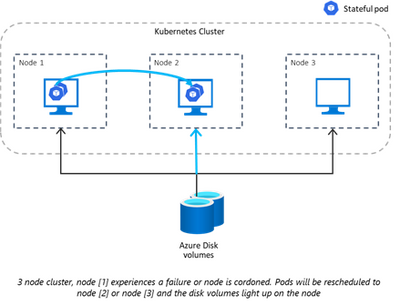
Replica mounts can be used with both Locally Redundant (LRS) and Zone Redundant (ZRS) disks. You can enable this capability and configure the number of attachments using the maxShares property in the StorageClass using Standard SSD, Premium SSD and Ultra Disk. With this preview, you can continue to leverage existing Azure Disk sizes, encryption, snapshots, clone, and other service management capabilities via the CSI driver. You can try out replica mounts with the Azure Disk CSI driver v2 in preview with your clusters running on AKS and Cluster API (CAPZ) in all Azure public regions. For price per mount, see our pricing page.
Zone redundant option for Azure Disk volumes on AKS in general availability
Multi-zone Kubernetes clusters enable you to improve application availability and protect your workload from zonal failures. This, however, is a challenge for stateful applications, which need consistent data access across zones. Zone redundant option for disks allows you to create volumes that can tolerate zonal failures. This means that stateful pods in a multi-zone cluster can be moved across zones and have uninterrupted access to volumes. ZRS disks can be used with Azure Disk CSI driver v1.5+ on a StorageClass using Standard SSDs and Premium SSDs. For list of regions that support ZRS disks, please see here.
Flexibility
NFS v4.1 shared file volumes with Azure Files in general availability
Azure Files offers a fully managed, simple, secure, and serverless enterprise-grade cloud file shares. With NFS v4.1, these volumes are now fully POSIX compliant to meet your production workload needs. With the Azure Files CSI driver, customers can leverage NFS shares to access Files volumes built into Azure Kubernetes Service (AKS). NFS v4.1 can be used with Azure Premium file shares and is available in all regions. You can choose between Locally Redundant Storage (LRS) or Zonal Redundant Storage (ZRS) redundancy options, with ZRS synchronously replicating your data to three different availability zones within an Azure region alongside your multi-zone AKS cluster. You can also leverage NFS shares with Azure Container Instances (ACI) to elastically scale your application with virtual nodes coming soon. Learn more about NFS v4.1 here. Check out our documentation to get started with NFS v4.1 volumes on AKS.
Increased IP limits for VNets with Azure NetApp Files volumes in preview
Azure NetApp Files (ANF) now supports Standard network features which provides an enhanced virtual networking experience. Importantly, this lifts the previous 1000 IP limit for VNETs using ANF eliminating the need for you to rearchitect you network topologies to use ANF volumes with Kubernetes. This preview is now available in North Central US. Learn more about Standard network features support here. Check out our documentation to get started with ANF volumes on AKS.
Performance & Scale
Granular control on tuning with performance profiles on Azure Disk block volumes in preview
Stateful applications like PostgreSQL, Cassandra or ElasticSearch have unique workload requirements including – IOPS, latency, or differences in default read/write IO sizes. Azure Disk CSI driver now allows you to tune the block device (PV) configuration to optimize performance for IO sensitive applications, based on workload best practices. This can be configured using the perfProfile property in a StorageClass. You can choose the basic profile for workloads with balanced IOPS and throughput requirements. For advanced scenarios, you can control device settings like queue depth, io request sizes or read ahead sizes to optimize workload performance. For example, database systems like PostgreSQL need to balance high priority journaling writes, needed for transactional performance, with high volume streaming reads required for analytical queries. To maximize both IOPS and throughput for a selected disk size, along with low latency, accommodating sequential IOs, you can configure the device to use lower queue depth and scale up IO request sizes. We observed ~12% performance improvement on average in the fio runs mirroring PostgreSQL IO patterns on a P20 disk in the example here. PerfProfile can be used with Azure Disk CSI driver v2 preview on a StorageClass using Premium SSDs and Standard SSDs. Get started with performance profiles in preview here.
Live resize of Azure Disk volumes in preview
As you scale up your application in production, you may want to add additional capacity or increase performance limits on your volumes without disruption. To enable you to seamlessly scale your workloads without interruption, we have enabled live resize of disks in preview. With live resize, you now have the flexibility to start with smaller sizes and scale up disk volumes as needed. This preview is now available in West Central US and will be available on the Azure Disk CSI driver with v1.9 preview coming soon. Learn more about live resize here.
Published on:
Learn moreRelated posts
Update on classic storage account retirement and upcoming changes for classic storage customers
We previously announced that support would end for retired Azure classic storage accounts on 31 August 2024. Now that we are past the retireme...
Azure Elastic SAN for Azure VMware Solution: now Generally Available
Have you been looking to expand your storage on Azure VMware Solution (AVS), but do not need the extra compute performance and the associated ...
Accelerate metadata heavy workloads with Metadata Caching preview for Azure Premium Files SMB & REST
Azure Files previously announced the limited preview of Metadata caching highlighting improvements on the metadata latency (up to 55...
Announcing UNLIMITED Public Preview of Metadata Caching for Azure Premium SMB/REST File Shares
Azure Files is excited to announce the Unlimited public preview of Metadata Caching for the premium SMB/REST file share tier. Unlimited ...
Azure Backup-SAP HANA DB Backup Delivers More Value at Lower TCO with Reduced Protected Instance Fee
Azure Backup for SAP HANA Database Delivers More Value at Lower TCO with Reduced Protected Instance Fees starting 1st Sept’2024 At Azur...
Switch to Azure Business Continuity Center for your at scale BCDR management needs
In response to the evolving customer requirements and environments since COVID-19, including the shift towards hybrid work models and the incr...
The Azure Storage product group is heading to the SNIA Developer Conference 2024
The Azure Storage product group is heading to the SNIA Developer Conference (SDC) 2024 in Santa Clara, California, USA from September 16th thr...
Latest advancements in Premium SSD v2 and Ultra Azure Managed Disks
We are excited to share the latest advancements in Premium SSD v2 (Pv2) and Ultra disks, the next generation of Azure disk stor...
Unlocking the Potential of Unstructured Data with Microsoft Copilot and Azure Native Qumulo
It has been a true pleasure to see our friends at Qumulo constantly innovating and delivering a service that adds more value with every releas...
Public Preview: Customer Managed Planned Failover for Azure Storage
We are excited to announce customer managed Planned Failover for Azure Storage is now available in public preview. Over the past few ye...