
Power BI Publish to Web – Questions Answered
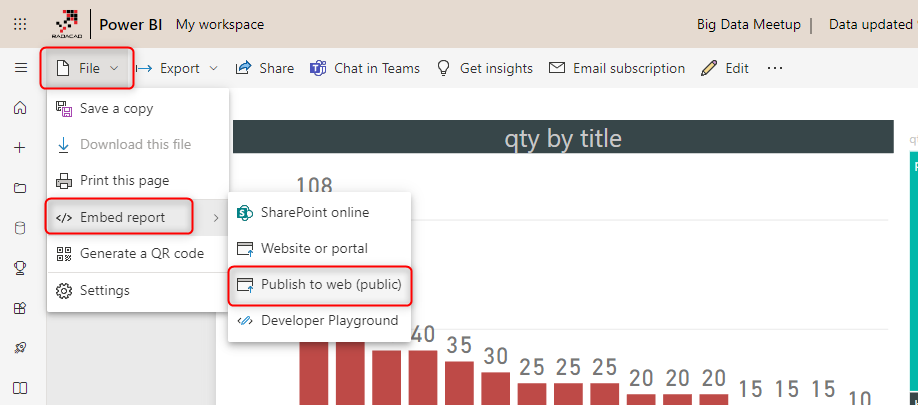
All of the methods of sharing Power BI files in the Power BI Service (such as dashboard sharing, workspaces, Apps, etc.) need paying power bi subscriptions for consuming reports. Users need to be either Power BI Pro or free accounts under Power BI premium capacity. The “Publish to web” is the only way of sharing Read more about Power BI Publish to Web – Questions Answered[…]
The post Power BI Publish to Web – Questions Answered appeared first on RADACAD.
Published on:
Learn moreWe can help you with Power BI Publish to Web – Questions Answered
If you want help implementing, troubleshooting, or improving this product, contact us and we’ll point you in the right direction.
Related posts
The Next Evolution of Power BI — A Conversation with Mohammad Ali | Fabric Insider Ep. 10
What is the next evolution of Power BI? Will Power BI Desktop ever become a prompt-first UI? And how do you actually decide whether you need a...
Rayfin Data App — The Future of Power BI Reporting
You can build an application whose frontend is TypeScript and ReactJS, and whose backend is a Power BI semantic model — meaning you get a full...
Data Integration, Migration & the Future of ETL in Microsoft Fabric — A Conversation with Wee Hyong Tok | Fabric Insider Ep. 9
Is ETL as we know it coming to an end? What is the real migration path from ADF, Synapse, or SSIS to Microsoft Fabric? And what does AI mean f...
Fabric MCP Servers, CLI & AI Agents — A Conversation with Hasan Abo-Shally | Fabric Insider Ep. 8
Everyone is talking about MCP Servers. But most people still cannot clearly explain what one actually is, why it matters for Fabric, or how it...
What Is Fabric App or Rayfin and Why You Should Care
Imagine an application built entirely inside the Microsoft Fabric environment. Not an application that connects to Fabric. Not an application ...
Everything About the Microsoft MVP Program — A Conversation with Rie Merritt | Fabric Insider Ep. 7
This episode of Fabric Insider is a little different from the others. We are not talking about a product feature or a technical update. We are...
No Code Dataflow Gen 2 in Microsoft Fabric Using GitHub Copilot and Fabric Skills
What if you could create a complete Dataflow Gen 2 in Microsoft Fabric — with data connections, merge transformations, and a fully built date ...
Fabric Real-Time Intelligence & Fabric IQ — A Conversation with Yitzhak Kesselman | Fabric Insider Ep. 6
We had Fabric. Then Real-Time Intelligence. Now Fabric IQ. What comes next? That is the question I most wanted answered when I sat down with Y...
No Code, No Tools: Documentation for Power BI and Fabric Using Fabric Skills and GitHub Copilot
Documentation is one of those things that every data team knows they should do — and almost nobody does well. You build a Power BI semantic mo...
What’s Hot and New for Power BI Semantic Models in 2026 — A Conversation with Christian Wade | Fabric Insider Ep. 5
Christian Wade has been in the enterprise BI space longer than most. He was working with semantic models — Analysis Services, VertiPaq — long ...