
Submit your Microsoft Lists ideas to the Microsoft Feedback portal

Over the years, we have enjoyed getting your *lists feedback* through SharePoint UserVoice. We’ve been hard at work on the replacement solution, one that carries forward past submissions and evolves with feedback going forward.
Today, we’re pleased to announce expansion of the Microsoft Feedback portal… now ready for your Microsoft Lists feature ideas and feedback. Feedback gives power to your voice to shape the Microsoft Lists roadmap going forward.
Community feedback is public and allows you to browse or vote. Your username will be displayed when you Send feedback. You can Search for, upvote (simply click on the Vote count number/item), Comment on, and Share feedback that matches yours. I added a new idea today; it’s fast, easy, and checked regularly by the Lists product team to comment and add status.
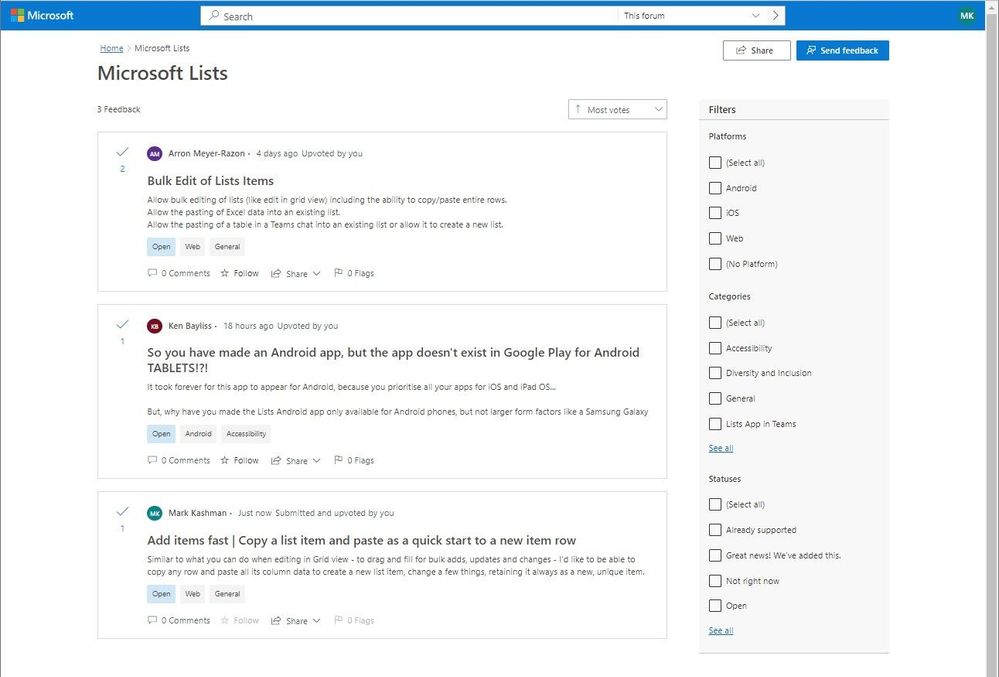
Note: The following aka.ms URL link takes you directly to the Microsoft Lists Feedback forum | aka.ms/Feedback/Lists – share it with anyone who says, “You know what they should bring to Microsoft Lists…” #LetUsKnow 
Microsoft Feedback portal has 49 forums and is growing
The Feedback portal is built on Dynamics 365 Customer Service and is a central location for numerous Microsoft products. You can give feedback for Teams, SharePoint, OneDrive, Yammer, Microsoft Stream, Microsoft Viva, and more.
The Feedback portal allows people to submit their own feedback, browse other ideas, track official Microsoft responses, view top voted customer ideas, upvote the feedback they agree with, and comment on ideas throughout. In Feedback, users will also be able to easily track their favorite ideas through the ‘star’ icon and receive notifications when those ideas are responded to by Microsoft.
Your feedback is gold and an ongoing, two-way dialog
Our primary goal is to advance the development of our products and services, guided by your input.
Microsoft values your feedback, and every day we look at feedback from users across our diverse products and services on all platforms. By providing clear feedback, you can make the greatest impact on the products and features you'd like to see or improve. Learn more about Feedback at Microsoft.
We want to highlight two related Feedback forums for OneDrive and SharePoint:
- OneDrive: aka.ms/feedback/OneDrive
- SharePoint: aka.ms/feedback/SharePoint
We appreciate all the suggestions, ideas, feedback, and details you share – the glue that binds and drives the best community in technology: open dialog and two-way engagement.
Thank you and let us know what you’re thinking,
Mark Kashman (Microsoft Lists product marketing manager)
Published on:
Learn moreRelated posts
Announcing the General Availability of the Microsoft 365 Document Collaboration Partner Program
Empowering Seamless Collaboration for Modern Workforces We are thrilled to announce the general availability of the Microsoft 365 Docume...
Favorite Copilot Prompts
(Amber Plumb interviewing Michael Morales and Allison Sweet) The power of M365 Copilot is transforming the way our support team operates...
Favorite Microsoft 365 Copilot Prompts
(Amber Plumb interviewing Michael Morales and Allison Sweet) The power of M365 Copilot is transforming the way our support team operates...
Boost digital event engagement with Voting and Archiving in Teams Q&A
Managing and delivering effective town halls is key to enabling two-way dialogue with leaders in today’s hybrid world. Microsoft Teams Q&A...
Prepare now for key end of support moments in 2025
One year from today, on October 14, 2025, support will end for all Office 2016 and 2019 suites, standalone apps, and servers. This includes:&n...
Everything you should know about Visio 2016 and Visio 2019 end of support
On October 14, 2025, Visio 2016 and Visio 2019 will reach end of support. After this date, Visio 2016 and Visio 2019 will no longer receive se...
Limit frontline worker access to Teams when off shift
We’re excited to announce that the frontline working time feature is now generally available! This feature allows admins to block or warn acce...
We are removing Feed on Microsoft 365 (Office)
As part of our ongoing efforts to streamline and enhance user experiences, we will be retiring the Feed feature (shown in figure 1 below) on t...
Leveraging Partner Apps to Deliver on the Promise of AI-Led Productivity
The advent of generative AI is driving a rethink of what outcomes we deserve from our productivity software – from gains in efficiency to more...
What’s new in FLW shared devices
Discover the Latest Enhancements in Shared Device Mode (SDM) We are excited to announce a series of new features in Shared Device Mode ...