
Microsoft 365 Admin Monthly Digest – July 2023

Welcome to the Microsoft 365 IT admin blog, your monthly source of tips, insights, and best practices for managing and optimizing your Microsoft 365 environment. In this edition, get ready for the next AMA on Microsoft 365 Copilot, learn about Bing Chat Enterprise, and the latest enhancements to the Microsoft 365 admin center. Read on to catch up about all things Microsoft 365 administration.
Join the next AMA on Microsoft 365 Copilot
We’ll be hosting the next AMA (Ask Me Anything) focused on Microsoft 365 Copilot and Bing Chat Enterprise on August 10 in the Microsoft 365 Copilot Tech Community. The event was a great opportunity to hear from members like you and have the team of experts answer questions. You can start sending in your questions to the event page now, and a team of experts will join us to help answer them during the event. The first AMA was held on July 13, and focused on preparing for Microsoft 365 Copilot. If you missed it, you can review the full list of questions and answers here.
Bing Chat Enterprise now in preview
At Microsoft Inspire, Microsoft announced Bing Chat Enterprise, giving organizations AI-powered chat for work with commercial data protection. Chat data is not saved, Microsoft has no eyes-on access, and your data is not used to train foundation models. This gives users access to better answers, greater efficiency, and new ways to be creative while staying secure. Users can access Bing Chat Enterprise using their work account wherever Bing Chat is supported – Bing.com/chat and Microsoft Edge sidebar.
To enable the preview, eligible customers can turn on Bing Chat Enterprise by going to https://aka.ms/TurnOnBCE to opt in. You will also need to ensure Microsoft Search in Bing setting in the Microsoft 365 admin center is turned on. Learn more about managing Bing Chat Enterprise here.
Have questions about Bing Chat Enterprise? Check out the FAQ here.
Highlights across Microsoft 365 administration
Let’s check out some of the latest features we launched in the Microsoft 365 admin center and how they can help you get things done.
Learn about Microsoft 365 Backup and Archive
Microsoft also announced many new AI capabilities across Microsoft 365 at Inspire. Particularly for Microsoft 365 admins, Microsoft 365 Backup was introduced to help you back up and quickly restore your organization’s data to a prior point-in-time after a catastrophic event or unforeseen data loss. Microsoft 365 Archive offers long-term storage of inactive or aging files that you might still want to maintain for compliance or retention requirements. You can also catch up on details on Microsoft 365 Copilot licensing and availability announced during the opening keynote.
Simplify controls with the Microsoft Edge manager service
Following our announcement in May, The Microsoft Edge management service is now generally available (Roadmap ID 123856). You can access the service through the Microsoft 365 admin center, Org settings > Microsoft Edge to configure Microsoft Edge browser settings for your organization and apply these settings by group assignment or group policy. Through the portal, you can also manage browser extensions and policies or view user requests for browser extensions. To learn more, read about the Microsoft Edge management service.

Improve employee experience with Viva Pulse
Last week, Microsoft announced the general availability of Microsoft Viva Pulse, a new employee feedback experience that is now available for use with your Viva Suite subscription. It empowers managers and project team leaders to request and receive feedback from their teams at any time. Managers and project leads can choose from research-based templates to quickly create a survey and send it to select individuals or groups. They can also track feedback to understand team sentiment over time and show teams they’re being heard by working together to take clear steps to address needs.
As an admin, you must execute a script in PowerShell for these notifications to appear. After the script is executed successfully, users will receive email notifications when a feedback author requests a Pulse, when feedback providers are reminded to respond, when a feedback author is notified their Pulse request has closed, and when a feedback author shares a Pulse report. Find the script to enable notifications for your organization here.
Better plan for change with Feature release status in the message center
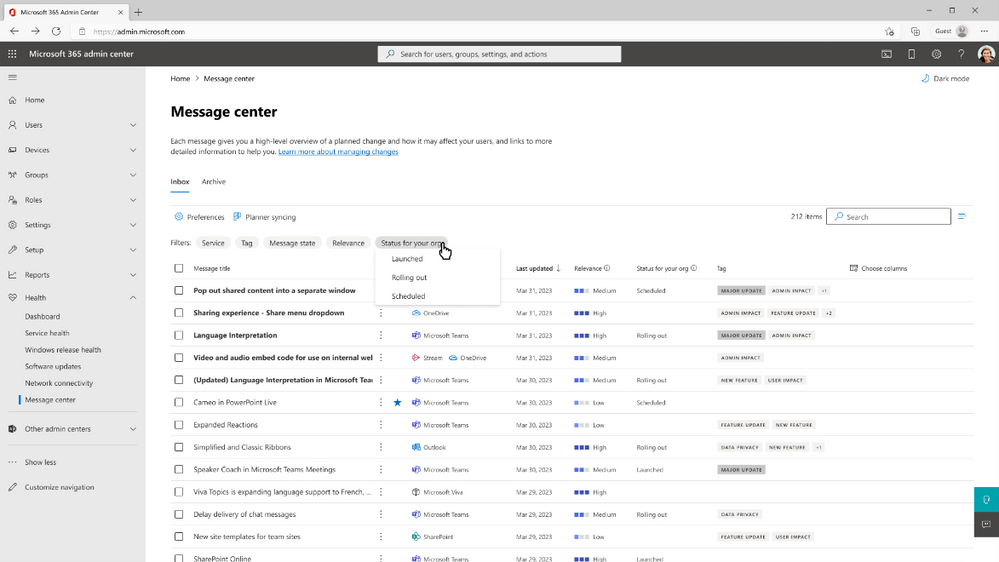
In continued efforts to make it easier for IT departments to manage change with greater predictability, Microsoft recently made feature release status in the message center for Teams, and Outlook on the web, and Microsoft 365 admin center available worldwide to customers. Now, you can have visibility to feature rollout status in the message center, Planner sync for the message center, and Service Communications API, along with the ability to view release status in Targeted and Standard release rings. Additionally, on the message center, you can apply filters based on the status of the releases and the timeframe of their status changes. To learn more, you can read the documentation here.
Stay updated
As always, stay current with the latest updates Microsoft 365 admin center from the Microsoft 365 roadmap and the message center. In addition, we also highlight new feature releases and enhancements released each month in our What's new in the Microsoft 365 admin center article.
Comment below if there are IT admin or change management topics you would like us to explore in the future!
Published on:
Learn moreRelated posts
Announcing the General Availability of the Microsoft 365 Document Collaboration Partner Program
Empowering Seamless Collaboration for Modern Workforces We are thrilled to announce the general availability of the Microsoft 365 Docume...
Favorite Copilot Prompts
(Amber Plumb interviewing Michael Morales and Allison Sweet) The power of M365 Copilot is transforming the way our support team operates...
Favorite Microsoft 365 Copilot Prompts
(Amber Plumb interviewing Michael Morales and Allison Sweet) The power of M365 Copilot is transforming the way our support team operates...
Boost digital event engagement with Voting and Archiving in Teams Q&A
Managing and delivering effective town halls is key to enabling two-way dialogue with leaders in today’s hybrid world. Microsoft Teams Q&A...
Prepare now for key end of support moments in 2025
One year from today, on October 14, 2025, support will end for all Office 2016 and 2019 suites, standalone apps, and servers. This includes:&n...
Everything you should know about Visio 2016 and Visio 2019 end of support
On October 14, 2025, Visio 2016 and Visio 2019 will reach end of support. After this date, Visio 2016 and Visio 2019 will no longer receive se...
Limit frontline worker access to Teams when off shift
We’re excited to announce that the frontline working time feature is now generally available! This feature allows admins to block or warn acce...
We are removing Feed on Microsoft 365 (Office)
As part of our ongoing efforts to streamline and enhance user experiences, we will be retiring the Feed feature (shown in figure 1 below) on t...
Leveraging Partner Apps to Deliver on the Promise of AI-Led Productivity
The advent of generative AI is driving a rethink of what outcomes we deserve from our productivity software – from gains in efficiency to more...
What’s new in FLW shared devices
Discover the Latest Enhancements in Shared Device Mode (SDM) We are excited to announce a series of new features in Shared Device Mode ...