
Integrating Third-Party User Management Systems into cyclecloud
Overview:
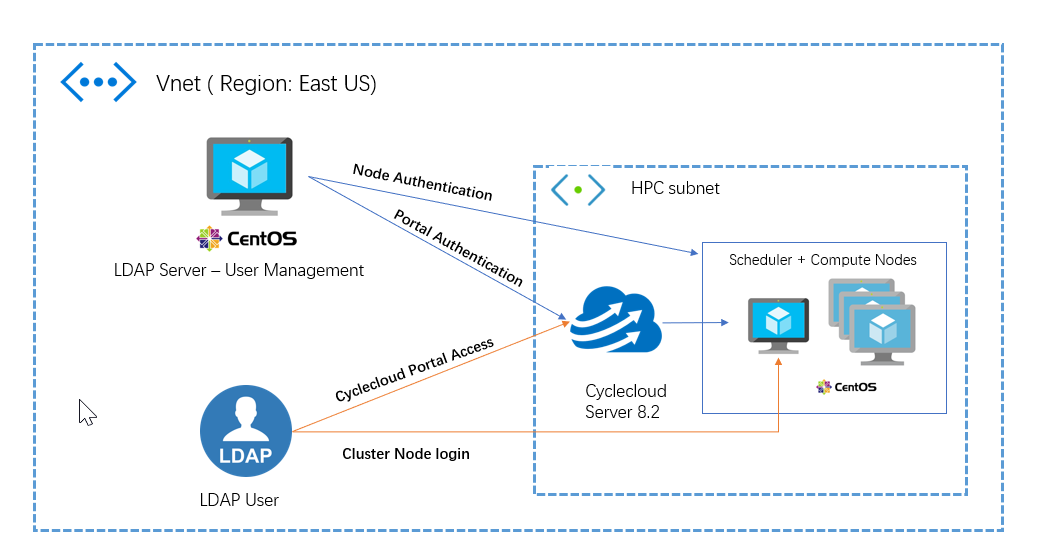
Azure CycleCloud is an enterprise-friendly tool for orchestrating and managing High-Performance Computing (HPC) environments on Azure. With CycleCloud, users can provision infrastructure for HPC systems, deploy familiar HPC schedulers, and automatically scale the infrastructure to run jobs efficiently at any scale. There are two primary mechanisms for enabling login access to cluster nodes, through CycleCloud's built-in authentication, or by integrating nodes with a directory service such as Active Directory or LDAP. For enterprise production clusters, it is recommended that user access be managed through a directory service such as LDAP, Active Directory, or NIS.
In this blog, we are discussing how to integrate LDAP into the cyclecloud cluster (Node Authentication) for User management using cloud-init and this will give you an idea of how to integrate third-party user management systems like NIS and LDAP in cyclecloud clusters for Node authentication.

Requirements :
- CycleCloud server ( I am using CycleCloud Version: 8.2.2-1902)
- Functional LDAP server (I have an OpenLDAP-servers configured for User Management)
- Compute OS - CentOS 7
Solution:
The first requirement is to have a functional LDAP server. I have an OpenLDAP-Server running and we are going to demonstrate how to enable login access to cluster nodes using an LDAP user named "vinil".
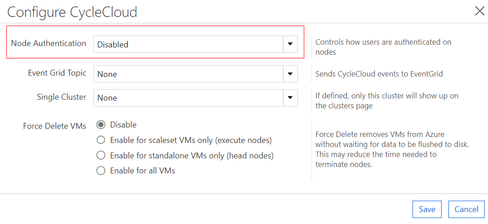
The built-in user management system is enabled by default on every CycleCloud installation and is an installation-wide setting -- all clusters managed by the CycleCloud server will have this enabled. To disable it, navigate to the CycleCloud section of the Settings page. The pop-up box contains an option for Node Authentication and selecting Disabled from the drop-down will ensure that no local user accounts aside from the VM agent user will be created.
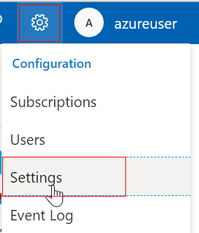
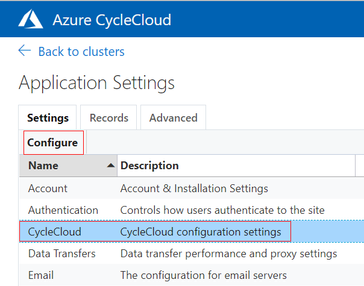
Node authentication select "Disabled"
Create the cluster as usual with the preferred scheduler, VM SKUs etc. And in the cloud-init section add the script to integrate the Nodes with LDAP (LDAP server and cluster as in the same subnet).
Here I am using a shell script to configure the LDAP client on the Master and compute nodes.
LDAP user's home directory is set to /share/home location to make sure that we have the home directories shared across all the cluster nodes. All the same cloud-init script for all the node arrays (HPC, HTC, Login , schedulers etc)

Let's test the authentication using an LDAP user. We could see the built-in user management is disabled in the cyclecloud portal for the cluster.
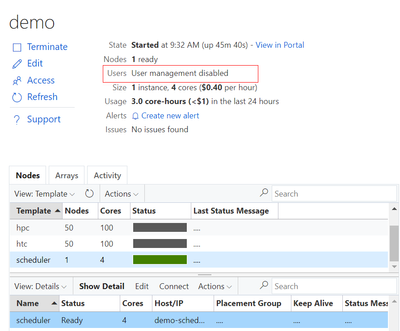
Login to the scheduler using the LDAP user "vinil" and see if you are able to login. We are successfully able to login to the cluster as an LDAP user.
NOTE: By default, password authentication is disabled. if you are using password-based authentication make sure that "PasswordAuthentication yes" is set in /etc/ssh/sshd_config file. Additionally set the proper home directory, permissions and ssh-keys are present.
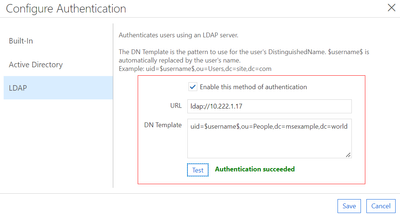
Similarly, for cycle cloud portal access, we could integrate LDAP or AD in Settings --> Authentication --> configure --> LDAP. This will enable the LDAP user to login into the cyclecloud portal using LDAP credentials.
Conclusion:
Third-party user management systems can be easily integrated into CycleCloud for portal access and Node authentication. This guide gives you an idea about how LDAP can be integrated for node authentication and portal access.
Reference:
Learn more about CycleCloud
More info on Azure High-Performance computing
Read more on Cyclecloud User Management
Published on:
Learn moreRelated posts
Upcoming Changes to Instance Size Flexibility Ratios for Reserved VM Instances for M-series: What Yo
Overview In the ever-evolving landscape of cloud computing, it is crucial to stay informed about changes that may affect your usage and busine...
Exploring SUSE Enterprise Linux on Azure
Exploring SUSE Enterprise Linux on Azure In today's cloud-centric world, leveraging robust and reliable operating systems is crucial for busin...
Announcing Public Preview of new attach/detach disks API for VMs/VMSS
We are excited to announce the public preview of a new API that will make attaching and detaching disks to a VM faster and easier. The new API...
Fine-tuning a Hugging Face Diffusion Model on CycleCloud Workspace for Slurm
Introduction Azure CycleCloud Workspace for Slurm (CCWS) is a new Infrastructure as a Service (IaaS) solution which allows the users to purpos...
Public Preview Announcement-On Demand Capacity Reservation in Azure in China
Today, we're announcing the public preview of on demand capacity reservations for Azure Virtual Machines in Azure in China Cloud . Y...
Breaking change for Window Server 2022 Image Users with .NET 6
Azure Marketplace media images for Windows Server 2022 currently include .NET 6, but going forward will not include a .NET version with the im...
Announcing the public preview of the new Azure FXv2-series Virtual Machines
Today, Microsoft is announcing the public preview of the new Azure FXv2-series Virtual Machines (VMs), based on the 5th Generation Intel® Xeon...
Effortlessly Migrate Azure VMs between zones
For various reasons you might come across a situation when you need to migrate your Azure VMs from one zone to another. Migrating Azure VMs be...
Announcing Public Preview of Instance Mix on Virtual Machine Scale Sets
Today, we’re excited to announce that the ability to specify multiple different VM sizes in your Virtual Machine Scale Sets (VMSS) with Flexib...
Announcing General Availability of Attach & Detach of Virtual Machines on Virtual Machine Scale Sets
Today, we’re thrilled to announce that the ability to attach or detach Virtual Machines (VMs) to and from a Virtual Machine Scale Set (VMSS) w...