
How to ensure the best RDP experience for lab users
To help you ensure the best experience for users that are connecting to lab VMs, we have put together a list of resources that show how to:
- Estimate bandwidth requirements for Remote Desktop Protocol (RDP).
- Connect to Windows and Linux lab VMs for an optimal experience.
- Measure and troubleshoot latency when connecting to a lab VM.
Estimate RDP bandwidth requirements
The Azure Virtual Desktop (AVD) product team has put together helpful documentation that describes the requirements for RDP to ensure a high-quality user experience. This documentation is also applicable to Azure Lab Services because RDP is often used to connect to both Windows and Linux lab VMs. For details on RDP requirements, read the following article:
The previous article also includes a section that helps you estimate bandwidth requirements for common scenarios. These scenarios range from using Office apps such as Word\Excel\PowerPoint to GPU visualization involving video playback. Here is the section that provides more information on how to estimate bandwidth based on the type of user scenario:
Connect to Windows and Linux lab VMs for an optimal experience
Windows Remote Desktop Connection
We recommend users connect to Windows lab VMs using Microsoft’s Remote Desktop Connection (RDC or sometimes called RDP) client app. The RDC\RDP client app includes various settings that can be adjusted to optimize the user’s connection experience. Typically, these settings don’t need to be changed. By default, the settings are already configured to choose the right experience based on the user’s network connection. For more information on these settings, read the article about the RDC\RDP client's experience settings.
Linux Remote Desktop Connection
To connect to Linux VMs with a graphical desktop environment, we recommend using:
- Microsoft’s RDC\RDP client app which uses Xrdp, an open-source Linux version of RDP. See the previous section for more information about how to configure the RDC\RDP client app’s settings.
- Or use X2Go. In some cases, such as with Ubuntu LTS 18.04, X2Go provides better performance.
If you use RDP and notice latency when interacting with the graphical desktop environment, consider trying X2Go instead because it may improve performance.
For more information on how to enable RDP or X2Go on Linux lab VMs, read the following article:
For more information about how users connect to their lab VMs, read the following articles:
- Access labs
- Connect to a VM from Mac using RDP
- Connect to a VM from Chromebook using RDP
- Connect to Linux VMs
Measure and troubleshoot latency when connecting to a lab VM
To measure the latency that a user experiences when connecting to their lab VM, you can use a utility called PsPing to measure response times. For example, you can use PsPing to compare and troubleshoot response times when a user connects from a home network versus from an on-premise network within a school or company.
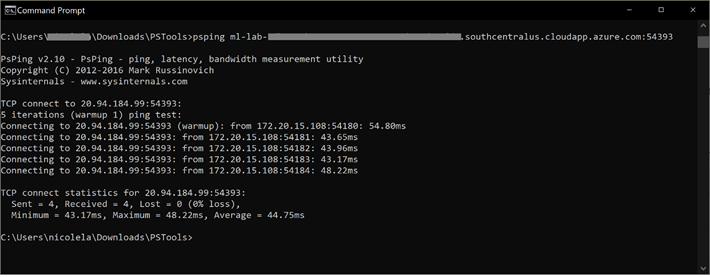
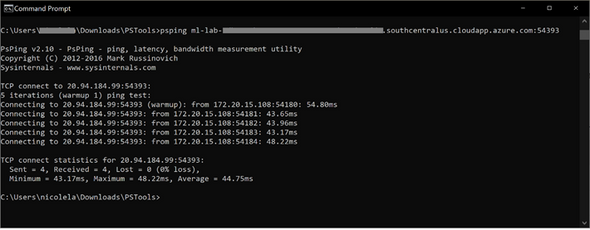
Since PsPing is a Windows utility, you must run PsPing on a Windows machine from within the network that you want to measure latency from. You can use PsPing to measure latency to both Windows and Linux lab VMs. PsPing is used instead of the ping utility because ping uses the ICMP protocol which is disabled at the networking level for labs. PsPing uses the TCP protocol which enables you to test connectivity using the lab’s connection string. As shown in the following screenshot, use the command prompt to execute psping to get the VM’s response time:
- psping <your lab VM connection string>
There are a few ways to get the connection strings for lab VMs:
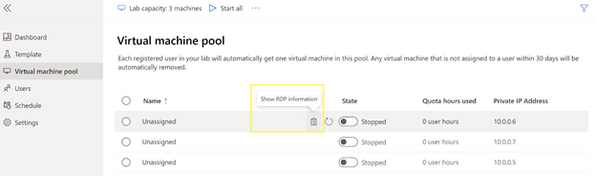
- Use the lab’s Virtual machine pool screen. Next to each VM, you will see an option to Show RDP information which allows you to copy the connection string.
- Use Azure Lab Service’s PowerShell module and run the following command:
- Get-AzLabAccount -LabAccountName ‘your_labaccount_name’ | Get-AzLab -LabName 'your_lab_name' | Get-AzLabVM | ForEach-Object {Write-Host $_.properties.networkInterface}
Thanks for reading!
Azure Lab Services Team
Published on:
Learn moreRelated posts
ISSUE RESOLVED: Azure Lab Services - lab plan outage - September 12, 2024
Hello, Azure Lab Services is currently experiencing an outage affecting customers using Lab Plans for their service. Customers using Lab Accou...
Azure Lab Services - Upcoming maintenance update on October 12, 2024
Hello all, On October 12th, 2024, we will be updating our system between 7:00 AM and 6:00 PM CST. This maintenance will only affect the...
Azure Lab Services - lab plan outage - September 12, 2024
Hello, Azure Lab Services is currently experiencing an outage affecting customers using Lab Plans for their service. Customers using Lab Accou...
Azure Lab Services - Upcoming maintenance update on 08/24
Hi, We will be doing an update to the service on Saturday, August 24 starting at 12:30 pm PDT and ending at 11:59 pm PDT. The service is not g...
[Mitigated] Azure Lab Services - Maintenance update outage
Hi, We are experiencing a service outage due to ongoing maintenance since around July 21st, 4 pm PDT. The service is currently not available i...
Azure Lab Services - Maintenance update outage
Hi, We are experiencing a service outage due to ongoing maintenance since around July 21st, 4 pm PDT. The service is currently not available i...
[Mitigated] Azure Lab Services - Lab Plan Outage
Azure Lab Service is experiencing an outage that is affecting Lab Plans, but not Lab Accounts. This outage intermittently impacts all operatio...
Azure Lab Services Tutorial Video
This is a complete tutorial about Azure Lab Services' features. It walks through the steps of setting up a Lab Account, creating a Lab, and ac...
What's new in the Azure Lab Services
This is a presentation highlighting the new features introduced in the latest preview for Azure Lab Services.
Updates for Azure Lab Services
The product team has been busy working on fundamental improvements for the service to boost performance, reliability, and scalability. It has ...