
How Tenant Restrictions v2 Can be Used to Prevent Data Exfiltration

In a previous blog, we introduced Continuous Access Evaluation (CAE) - a product that brings Zero Trust principles to session management. Today we would like to discuss securing cross-tenant access with a focus on preventing data exfiltration.
It’s impossible to imagine a successful modern organization that doesn’t collaborate with partners across organizational boundaries. While cross-company collaboration empowers employees and enables partnerships, it also lowers barriers for both accidental and malicious data exfiltration. Microsoft Cross-Tenant Access Settings is designed to address security of cross-company exchange.
Outbound and Inbound Cross-Tenant Access Settings offer fine grain security controls for cross-company collaboration using user’s home identity, while Tenant Restriction v2 (TRv2) can be used to prevent data exfiltration using foreign identity.
Some of the hardest-to-prevent data leaks happen when users inside your organization use foreign identities to connect to external tenants. Let’s consider one such attack. A malicious insider creates a Microsoft Entra tenant. Then they authenticate to their malicious tenant from your organization’s device. Now the attacker can leak your files via email using the Exchange Online account of the malicious tenant. These types of attacks can be described as creating a “USB dongle in a cloud.” Regular security methods do not work against such attacks. Your tenant’s policies do not apply to external identities that attackers use. Blocking Microsoft Entra ID or Exchange Online URIs in the firewall would block your legitimate users along with the attacker. These types of attack need special defenses that TRv2 provides.
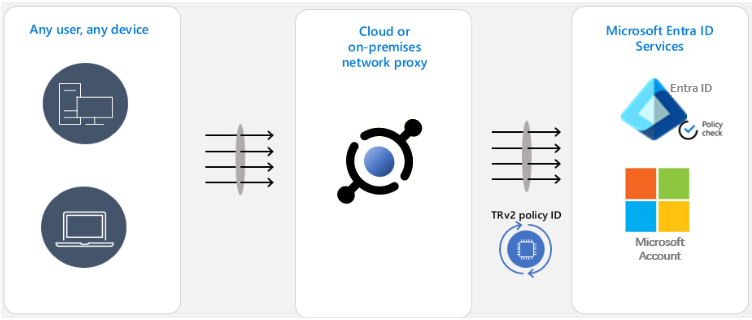
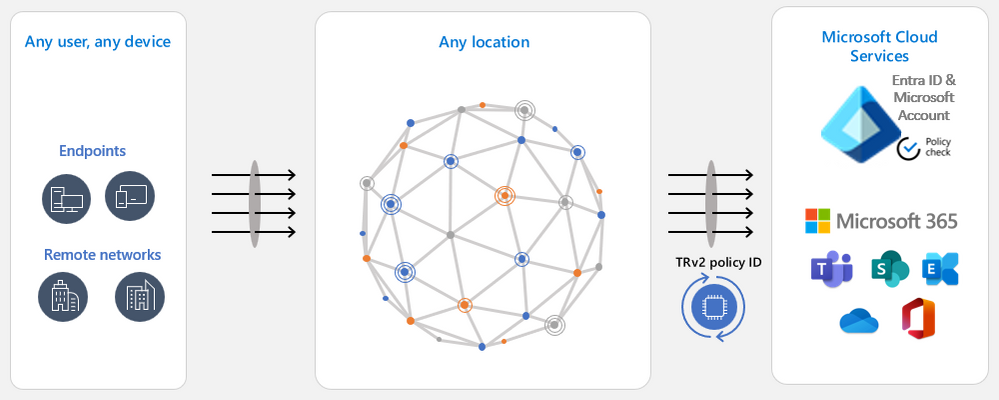
TRv2 works by sending special signals to Entra ID, Microsoft Account and other Microsoft resources. These signals point to Cross-Tenant Access Settings’ TRv2 policy that you created. Microsoft resources evaluate the policy and block unsanctioned access. We have two major flavors of TRv2.
Auth Plane TRv2 can block logins with external identities based on policy. To configure it you need to deploy a network proxy in your organization and configure that proxy to set TRv2 signals on all traffic to Entra ID and Microsoft Account. In the above example of a malicious insider leaking data over external email, the attacker will not be able to login to their malicious tenant and therefore will not be able to send email. Auth Plane TRv2 is now generally available.
Universal TRv2 as part of Microsoft Entra Global Secure Access goes one step further to protect against more sophisticated attacks where an attacker bypasses authentication by allowing anonymous access to the malicious tenant’s apps, such as anonymous meeting join in Teams. Or the attacker can import to your organizational device an access token lifted from a device in the malicious tenant. All these attack vectors bypass login to Entra ID. Since Universal TRv2 sends TRv2 signals on authentication plane (Entra ID and Microsoft Account) and data plane (Microsoft cloud applications), these attacks will be prevented. Universal TRv2 is currently in public preview.
We have another flavor of TRv2 in public preview – TRv2 on Windows. It’s a partial solution that protects the authentication and data planes but only for some scenarios. It only works on managed Windows devices and does not protect .NET stack, Chrome, or Firefox. We have heard from customers that it is difficult to deploy and does not provide adequate security. The Windows solution was meant to provide temporary protection until Universal TRv2 is released and we’re planning to retire it after Universal TRv2 is generally available.
Anna Barhudarian
Principal Product Manager, Identity Division
Learn more about Microsoft Entra:
- Related Articles: Apply Zero Trust Principles to Authentication Session Management with Continuous Access Evaluation - Microsoft Community Hub
- See recent Microsoft Entra blogs
- Dive into Microsoft Entra technical documentation
- Join the conversation on the Microsoft Entra discussion space and Twitter
- Learn more about Microsoft Security
Published on:
Learn moreWe can help you with How Tenant Restrictions v2 Can be Used to Prevent Data Exfiltration
If you want help implementing, troubleshooting, or improving this product, contact us and we’ll point you in the right direction.
Related posts
Sync identities from Rippling to Microsoft Entra ID
Today, we’re thrilled to announce that customers using Rippling HCM can now automatically provision users to on-premises Active Directory and ...
Microsoft Entra ID Governance for government
I’m pleased to announce that as of November 1, 2024, Microsoft Entra ID Governance is available for federal agencies, state and local governme...
Update to security defaults
As part of the Secure Future Initiative, we’ve evolved our security approach to align with three security principles: secure by design, secure...
Meet Microsoft Entra at Ignite 2024: November 18-22
Microsoft Ignite is just around the corner, taking place from Monday, November 18, 2024 through Friday, November 22, 2024, in Chicago, Illinoi...
Manage Microsoft Entra ID role assignments with Microsoft Entra ID Governance
I’m excited to announce that we now support Microsoft Entra role assignments in Microsoft Entra ID Governance's Entitlement Management feature...
The latest enhancements in Microsoft Authenticator
Hi folks, I'm thrilled to announce three major Microsoft Entra ID advancements that will help you protect your users with phishing-resi...
Microsoft Security announcements and demos at Authenticate 2024
The Microsoft Security team is excited to connect with you next week at Authenticate 2024 Conference, taking place October 14 to 16 in Carlsba...
What's new in Microsoft Entra - September 2024
We’re excited to announce the general availability of Microsoft Entra Suite—one of the industry’s most comprehensive secure access solutions f...
Explore the key benefits of Microsoft Entra Private Access
The traditional network security models are becoming increasingly ineffective in a world where remote work and cloud services are the norm. Co...
Join us at the Microsoft Entra Suite Showcase!
This fall, we are bringing the Microsoft Entra Suite Showcase to cities worldwide. Join us to explore how our latest advancements in secure id...